Getting started
RQT7125
12
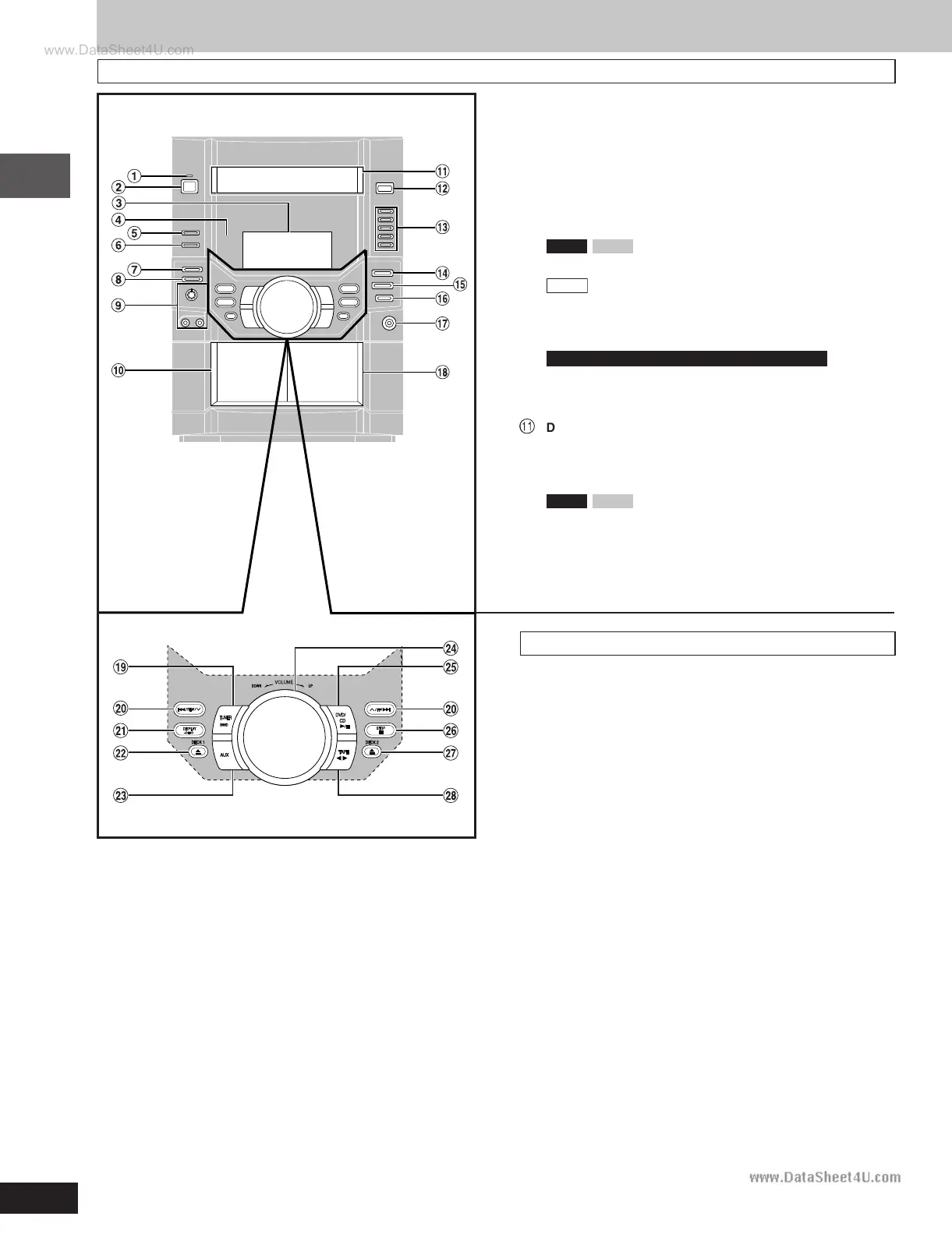
1 AC supply indicator [AC IN]
This indicator lights when the unit is connected to the AC mains
supply.
2 Standby/on switch [
ff
ff
f/I]
Press to switch the unit from on to standby mode or vice versa. In
standby mode, the unit is still consuming a small amount of power.
3 Display
4 Remote control signal sensor
5 Double re-master button [DOUBLE RE-MASTER] ............. 30
6
VK90D
VK80D
Super surround button
[SUPER SURROUND] ...........................................................29
VK70D
Advanced surround button
[ADVANCED SURROUND] ................................................... 29
7 Deck 1/2 selection button [DECK 1/2] .................................27
8 Record button [a REC] ....................................................... 31
9 For the Middle East, South Africa and Southeast Asia
Microphone volume control [MIC VOL MIN, MAX] .............32
Microphone jacks [MIC 1, 2] ................................................ 32
! Deck 1 cassette holder ......................................................... 27
Å
Disc tray
# Disc tray open/close button [c OPEN/CLOSE] ................. 14
$ Disc direct play buttons [1]–[5] ............................................14
% Super sound EQ button [SUPER SOUND EQ] ................... 30
&
VK90D
VK80D
Subwoofer button [SUBWOOFER] ........... 30
( Sound EQ button [SOUND EQ] ............................................ 30
) Headphones jack [PHONES] ................................................35
~ Deck 2 cassette holder .........................................................27
Main unit
Center console
+
Tuner/band select button [TUNER BAND] .......................... 26
, Disc skip/search/slow-motion play, tape fast-forward/
rewind, tune/preset channel select, time adjust buttons
[g/REW/
44
44
4,
33
33
3/FF/f] ........................................... 15, 26, 27
- Display, demonstration button [DISPLAY, –DEMO] ..... 11, 35
. Deck 1 open button [c DECK 1] ........................................ 27
/ AUX button [AUX] ................................................................ 39
: Volume control [VOLUME DOWN, UP] ............................... 14
; DVD/CD play/pause button [:/ J DVD/CD] ........................ 14
< Stop button [L STOP]...........................................................14
= Deck 2 open button [c DECK 2] ........................................ 27
> Tape play/direction button [; : TAPE] ............................. 27
Control reference guide
RQT7125(12-13)-5 5/22/03, 9:32 AM12








 To Next Page