Disc operations
RQT7125
24
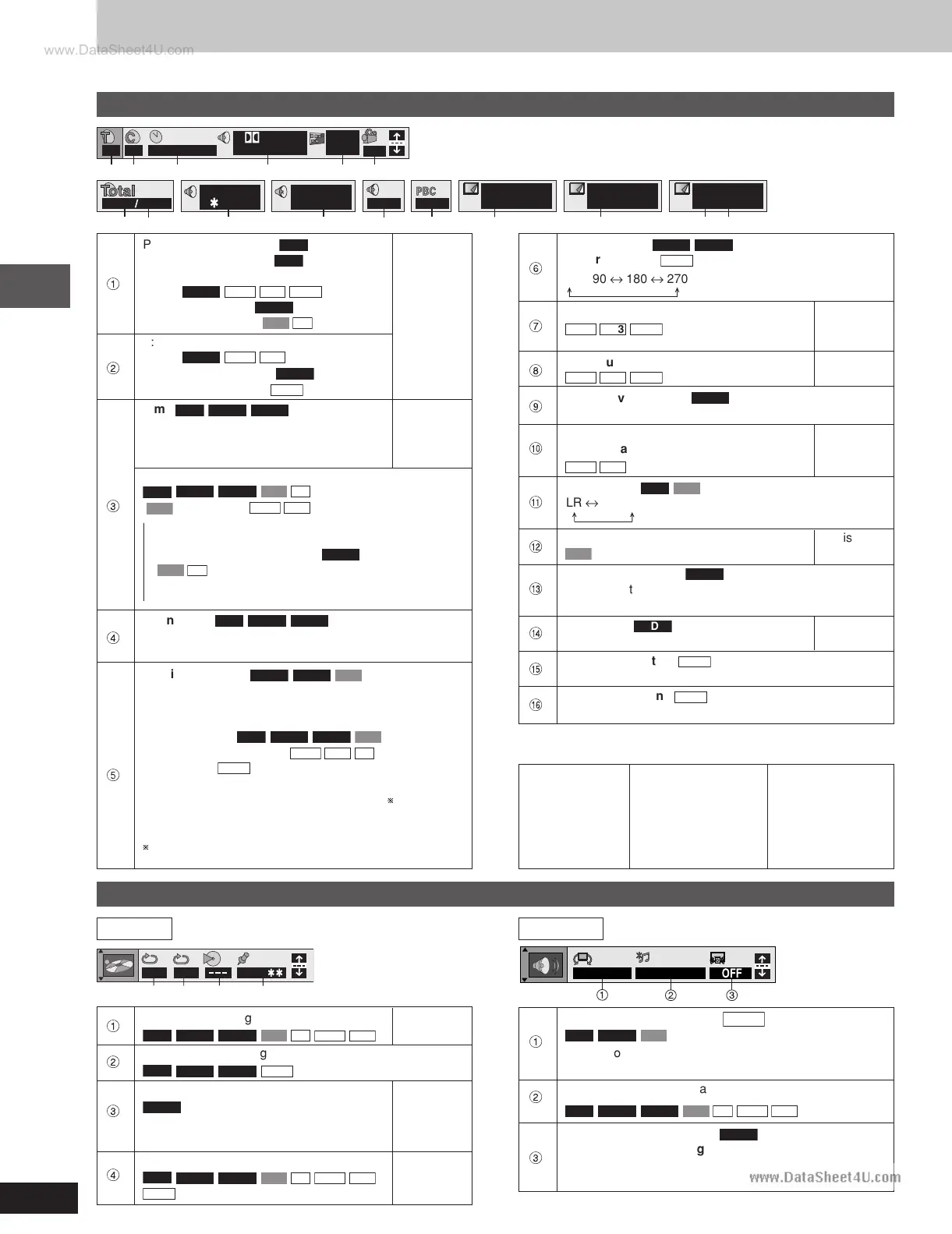
Using GUI (Graphical User Interface) screens
Unless otherwise indicated, select items with [/, -] and change with [8, 9].
Disc information
2 2 1 : 46 : 50
Digital
1 ENG 3/2.1 ch
ON
1 ENG
1
1
2
3456
128kbps
44.1kHz
12 18
Vocal
1
OFF
Page
1
Return
Slideshow
1
ON
L R
7 8 9 : ; < = >
Slideshow
ON 0 sec
? @
Unit information
OFF
1 2 3
A B
12 3 4
SP OFF
OFF/48kHz
1
PG: Program number
RAM
PL: Play list number
RAM
G: Group number
DVD-A
WMA
MP3
JPEG
[8, 9]
T: Title number
DVD-V
↓
Track number
VCD
CD
[ENTER]
2
T: Track number in group
DVD-A
WMA
MP3
C: Chapter number
DVD-V
P: Picture number
JPEG
3
Time
RAM
DVD-A
DVD-V
Numbered
Select a position to start play by specifying buttons
a time. ↓
[ENTER]
Changing the time display
RAM
DVD-A
DVD-V
VCD
CD
[
VCD
(SVCD only)
WMA
MP3
Display only]
→Elapsed play time for the program, play list, title or track
↓↑
Remaining time for the group (
DVD-A
) or disc
(
VCD
CD
)
↓↑
→Remaining time for the program, play list, title or track
4
Soundtrack
RAM
DVD-A
DVD-V
(A page 18)
Refer to “Audio/Subtitle language” (A right) for language
abbreviations.
5
Subtitle language
DVD-A
DVD-V
VCD
(SVCD only)
(A page 18)
Refer to “Audio/Subtitle language” (A right) for language
abbreviations.
Subtitles on/off
RAM
DVD-A
DVD-V
VCD
(SVCD only)
Track information on/off
WMA
MP3
CD
(CD text only)
Picture data
JPEG
Full: Group title, picture title, picture size, file size, date
of shooting, and camera model used.
Date: Date of shooting only.
OFF: No display
Displays differ depending on the type of camera and
condition of the data.
Angle number
DVD-A
DVD-V
6
Picture rotation
JPEG
Track/picture number in disc [8, 9]
7
WMA
MP3
JPEG
↓
[ENTER]
8
Total number of tracks/pictures on disc Display
WMA
MP3
JPEG
only
9
Karaoke vocal on/off
DVD-V
(Karaoke DVD only)
If a DVD title is a duet, select V1 or V2 to duet with the unit.
Current bitrate (kbps)
Ä
Current sampling frequency (kHz)
Display
WMA
MP3
only
Audio mode
RAM
VCD
Å
Ç
Menu play Display
VCD
(with playback control only) only
Still picture number
DVD-A
É
• To return to page 1
[
//
//
/,
--
--
-] → Select “Return” → [ENTER]
Ñ
Slide show
DVD-A
Display
Picture number only
Ö
Slide show setting
JPEG
ON
↔
OFF
Ü
Slide show timing
JPEG
0 sec–30 sec
Audio/Subtitle language
ENG: English SVE: Swedish CHI: Chinese
FRA: French NOR: Norwegian KOR: Korean
DEU: German DAN: Danish MAL: Malay
ITA: Italian POR: Portuguese VIE: Vietnamese
ESP: Spanish RUS: Russian THA: Thai
NLD: Dutch JPN: Japanese Z: Others
1
A-B repeat (A page 19)
RAM
DVD-A
DVD-V
VCD
CD
WMA
MP3
[ENTER]
2
Repeat mode (A page 18)
RAM
DVD-A
DVD-V
JPEG
Play mode (A page 16)
DVD-A
Display
3
---: Normal play PGM: Program play only
ALL: All group play
Marker
4
RAM
DVD-A
DVD-V
VCD
CD
WMA
MP3
A Page
JPEG
19
Advanced surround (VSS)
VK70D
(A page 29)
1
RAM
DVD-V
VCD
• VSS mode SP
↔↔
↔↔
↔ HP
• SP/HP level 1
↔↔
↔↔
↔ 2
↔↔
↔↔
↔ OFF
2
Double re-master (A page 30)
RAM
DVD-A
DVD-V
VCD
CD
WMA
MP3
Dialogue Enhancer on/off
DVD-V
3
(Discs where the dialogue is recorded in the center
channel)
This makes the dialogue in movies easier to hear.
0 ↔ 90 ↔ 180 ↔ 270
LR ↔ L ↔ R
Play menu Audio menu
RQT7125(23-25) 6/13/03, 1:52 PM24








 To Next Page