16
RQT0A83
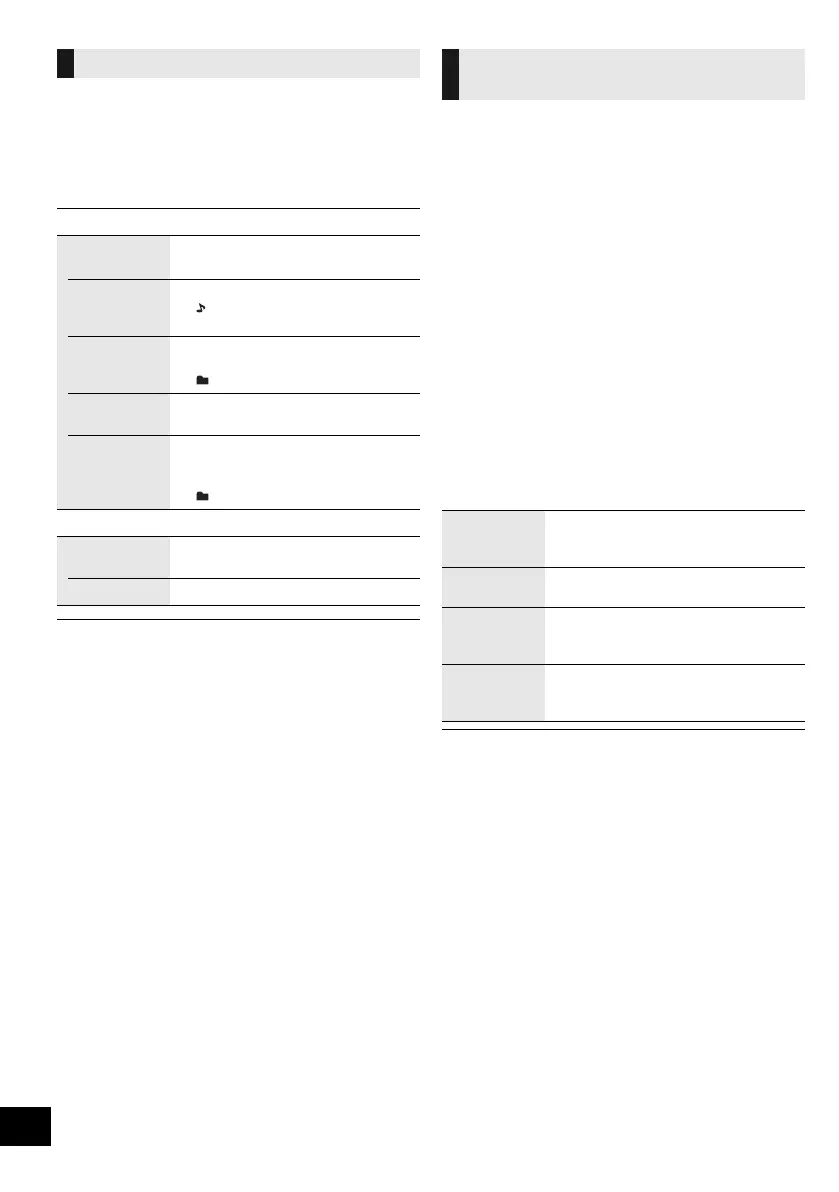
Select the playback mode.
1 Press [PLAY MENU] repeatedly to select
“Playmode” or “Repeat”.
2 Press [2, 1] to select the setting and then press
[OK].
≥ During random playback, you cannot skip to tracks which
have been played or press the numeric buttons.
≥ Playmode function does not work with “Programme play”.
≥ The mode is cancelled when you open the disc tray, remove
the USB device, or start recording.
≥ [MEMORY]: When using the one-touch mix play function,
[PLAY MENU] does not work.
This function allows you to programme up to 24 tracks.
[CD] (CD-DA)
1 Press [PGM, sDEL] in the stop mode.
≥ “Program” is shown for a few seconds.
2 Press the numeric buttons to select the desired
track.
≥ Do this step again to programme other tracks.
3 Press [1/;] to start playback.
[CD] (MP3), [USB], [MEMORY]
1 Press [PGM, sDEL] in the stop mode.
≥ “Program” is shown for a few seconds.
2 Press [3, 4] to select the desired album.
3 Press [9] and then press the numeric buttons to
select the desired track.
4 Press [OK].
≥ Do steps 2 through 4 again to programme other tracks.
5 Press [1/;] to start playback.
• The programme memory is cleared when you open the disc
tray, remove the USB device, or start recording.
Playback modes ([CD], [MEMORY], [USB])
Playmode
Off
Playmode
Cancels the play mode setting.
1-Track Only plays the selected track.
≥ “ ” indicator lights up.
(Skip to the desired track.)
1-Album Only plays the selected album.
≥ Press [3] or [4] to select the album.
≥ “ ” indicator lights up.
Random Plays the contents randomly.
≥ “RND” indicator lights up.
1-Album
Random
Plays the tracks in the selected
album randomly.
≥ Press [3] or [4] to select the album.
≥ “ ” and “RND” indicators light up.
Repeat
On Repeat Turns on repeat mode.
≥ “`” indicator lights up.
Off Repeat Turns off repeat mode.
Programme play
(
[CD], [MEMORY], [USB])
Check
programme
contents
Press [:] or [9] in the stop
mode.
Clear the last
track
Press and hold [PGM, sDEL] in the
stop mode.
Cancel
programme
mode
Press [PGM, sDEL] in the stop mode.
≥ “PGM Off” is shown for a few seconds.
Clear all
programmed
tracks
Press [∫] in the stop mode. “Clear All”
is shown. Within 5 seconds, press [∫]
again.
SC-ALL7CD_EGEBGN_RQT0A83-B.book 16 ページ 2016年3月1日 火曜日 午後4時19分









 To Next Page