Listening to Compact
Discs
(continued)
1
€*'
irViiP
S_£6P
CO
I*E=
3*\C
CD
CD
CD CD CD CD
7
g 9
i<M>
un
n n
n
P&CJJX
WWKftm CANCt.
Bt<^*T ftAWDOU
O
O CD CD
CD
a 6 ft ggg
u
a a
c
n cj
2006
VOLUME
»
3
5
From the
remote control
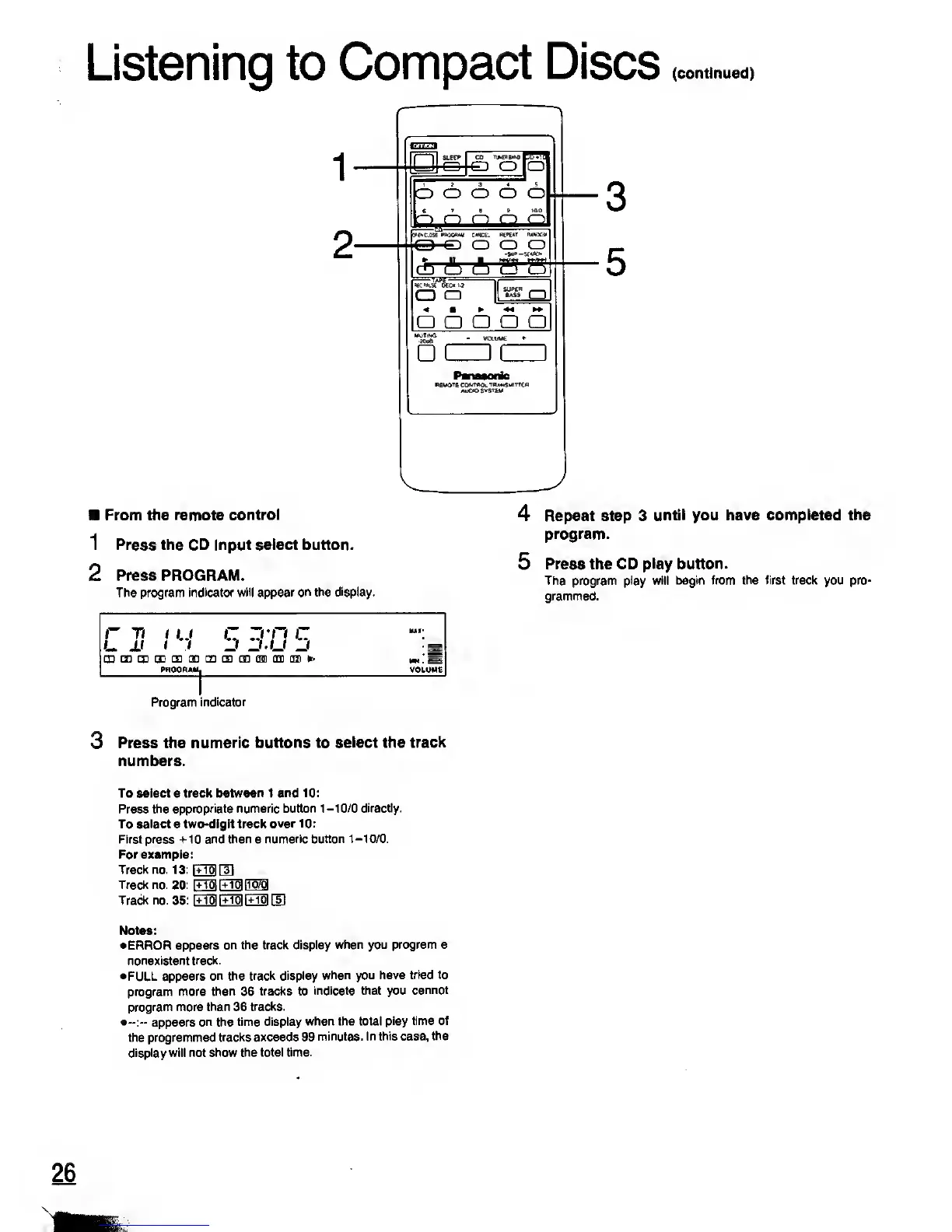
1 Press the CD input select button.
2 Press PROGRAM.
The program indicator
will appear on the display.
n
ti i
u
r
zvn c
U JJ
i t
-3 U'U ZJ
m ryi ryi m m m m m m mn im im
>>
awAM|
4 Repeat step 3
until you have completed
the
program.
5
Press the CD play
button.
The program play will begin from the
first track
you
pro-
grammed.
Program
indicator
3 Press the
numeric buttons to select the
track
numbers.
To select a track
between
1
and 10:
Press the
appropriate numeric button
1-10/0 directly.
To select a two-digit track
over 10:
First press +10 and then a
numeric button
1-10/0.
For example:
Track no. 13: PTToHTl
Track no. 20: FfflFTo|[To7g
Track no.
35:
\±M \IM
EM GD
Notes:
•ERROR
appears on the track display
when you program a
nonexistent
track.
•FULL appears
on
the
track display
when you have tried
to
program more
than
36
tracks to
indicate that you
cannot
program more than 36
tracks.
•--:--
appears on the
time display
when the total
play time of
the programmed
tracks exceeds 99
minutes. In
this
case,
the
display
will not show
the total time.
26










 To Next Page