EasyManua.ls Logo

Panasonic SC-CH11 - Making a Recording (Deck 2 only)

Panasonic SC-CH11
51 pages
Print Icon
To Next Page IconTo Next Page
To Previous Page IconTo Previous Page
Loading...
Making
a Recording
|
To
record from
the radio
or
external
source
Although
you
can record
a compact
disc using the
following proce-
dures, we recommend
that
you use the compact disc
edit-recording
procedure to record
a compact
disc.
(See "Edit-Recording
from
Compact
Discs"
on pages
38-43.)
To make
a tape-to-tape
recording,
see
"Tape-to-Tape
Recording"
on page 37.
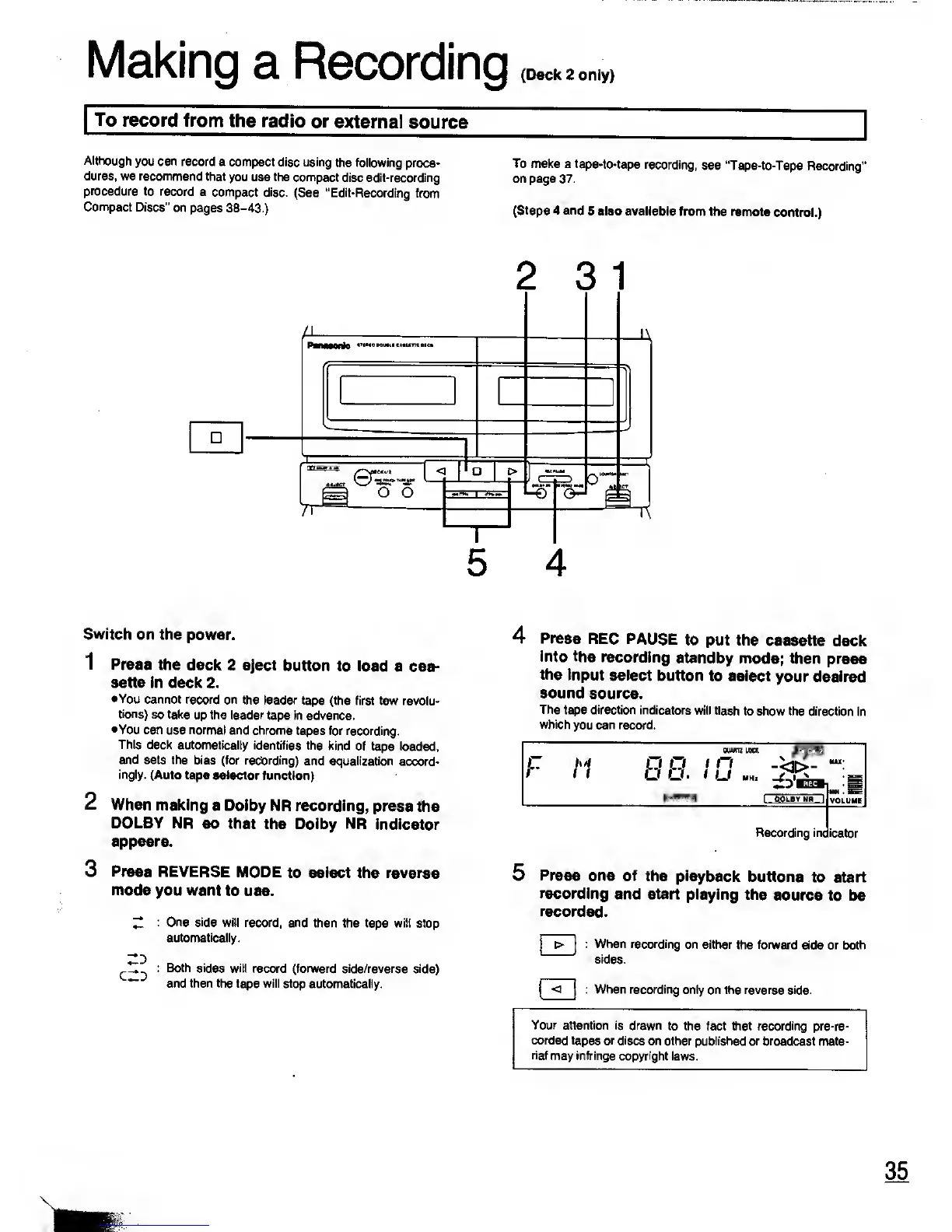
(Steps
4
and
5 also available
from the remote
control.)
Switch
on the
power.
1 Press the
deck 2 eject
button to load
a cas-
sette in deck 2.
•You
cannot record on
the leader
tape (the first few
revolu-
tions)
so take
up the leader
tape in advance.
•You can
use
normal
and chrome
tapes for recording.
This
deck automatically
identifies the
kind of tape
loaded,
and sets the bias
(for recording)
and equalization
accord-
ingly.
(Auto tape selector
function)
2 When making
a Dolby
NR recording,
press the
DOLBY
NR so that
the Dolby NR
indicator
appears.
3
Press REVERSE
MODE
to select the reverse
mode
you want
to use.
Z
One side
will record, and
then the tape will
stop
automatically.
^tZ^
: Both sides will
record (forward side/reverse side)
~~
and then the tape will stop
automatically.
4
Press
REC
PAUSE
to put the
cassette
deck
into
the recording
standby mode;
then press
the
input select
button
to select
your desired
sound source.
The
tape direction indicators
will flash
to show the direction
in
which
you
can
record.
F M
ouwrc
lock
JESS
HiiiliJ
I
O.OLBVNR
|
MAX-
VOLUME
Recording ino
icator
5
Press
one of
the playback
buttons
to start
recording
and start playing
the
source to
be
recorded.
|
>
|
:
When recording
on either the
forward side or both
sides.
< : When recording
only on the reverse side.
Your
attention is drawn
to the fact that recording pre-re-
corded tapes or discs
on other published or broadcast
mate-
rial
may infringe copyright
laws.

Related product manuals