Front Panel Controls
and
Functions
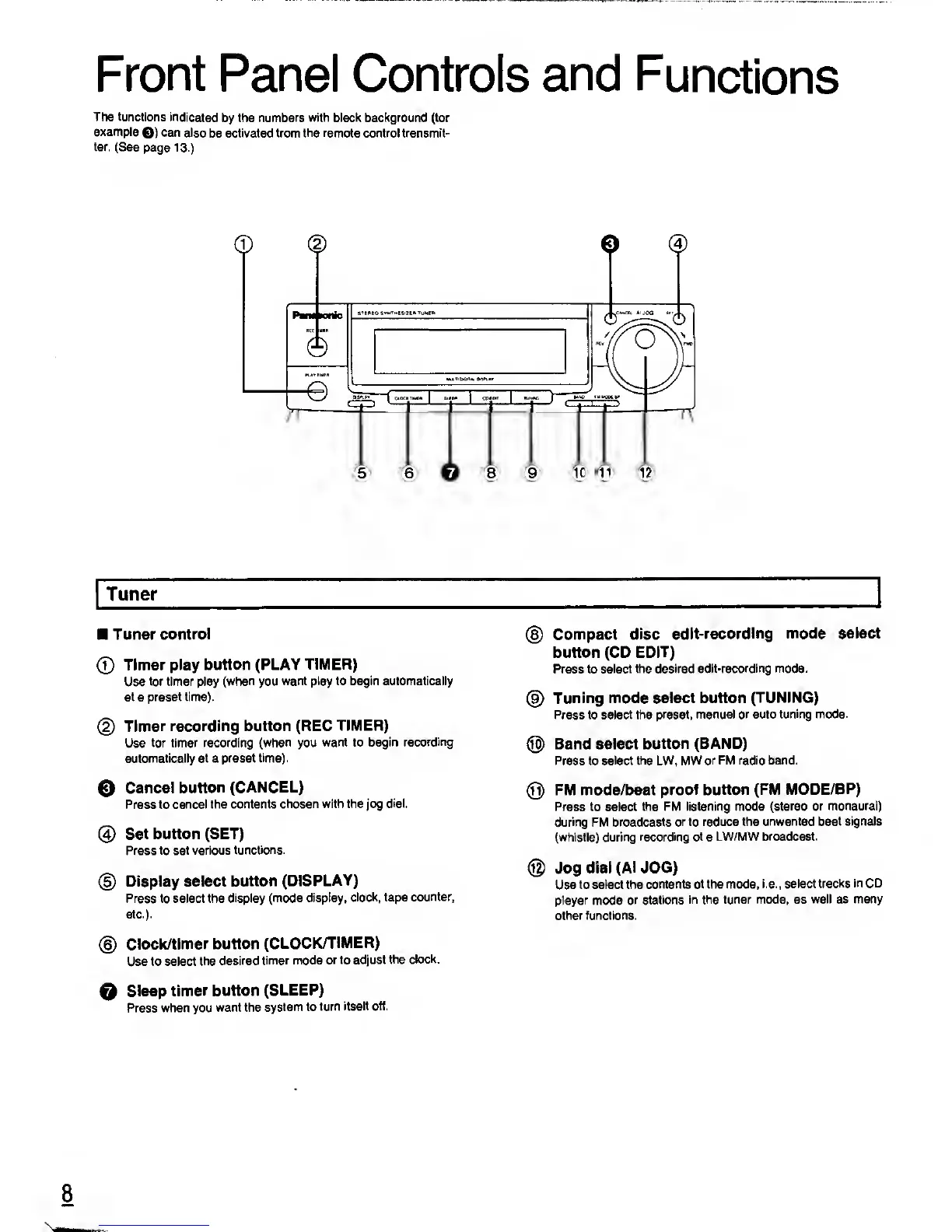
The functions
indicated
by
the numbers with black background (for
example
Q)
can
also
be
activated from the remote control transmit-
ter. (See
page
13.)
o
®
Tuner
Tuner
control
©
Timer
play button (PLAY
TIMER)
Use
for timer play
(when
you
want play to begin automatically
at
a
preset time).
(2)
Timer recording button (REC
TIMER)
Use
for timer recording
(when
you
want to begin
recording
automatically at a preset
time).
0
Cancel
button (CANCEL)
Press to
cancel the contents
chosen with the
jog
dial.
@
Set button (SET)
Press
to set various
functions.
©
Display select
button
(DISPLAY)
Press to select the
display (mode display,
clock, tape
counter,
etc.).
©
Clock/timer button
(CLOCK/TIMER)
Use to select
the desired
timer mode
or to adjust
the clock.
O
Sleep
timer button
(SLEEP)
Press when you
want the
system to
turn
itself off.
©
Compact disc
edit-recording
mode select
button (CD
EDIT)
Press to select
the desired
edit-recording mode.
©
Tuning mode select button
(TUNING)
Press to select the
preset, manual or auto
tuning
mode.
®
Band select
button (BAND)
Press to select
the
LW, MW
or FM radio band.
®
FM mode/beat
proof button (FM
MODE/BP)
Press to select
the FM listening mode
(stereo or monaural)
during FM broadcasts
or to reduce the
unwanted beat signals
(whistle) during
recording of
a
LW/MW broadcast.
©
Jog
dial
(AIJOG)
Use to select the
contents of the mode,
i.e., select
tracks in CD
player
mode
or stations
in the tuner mode, as
well as many
other functions.
8










 To Next Page