EasyManua.ls Logo

Panasonic SC-CH64M - Disc Grouping Play; Naming and Organizing CD Groups

Panasonic SC-CH64M
44 pages
Print Icon
To Next Page IconTo Next Page
To Previous Page IconTo Previous Page
Loading...
Disc
grouping
play
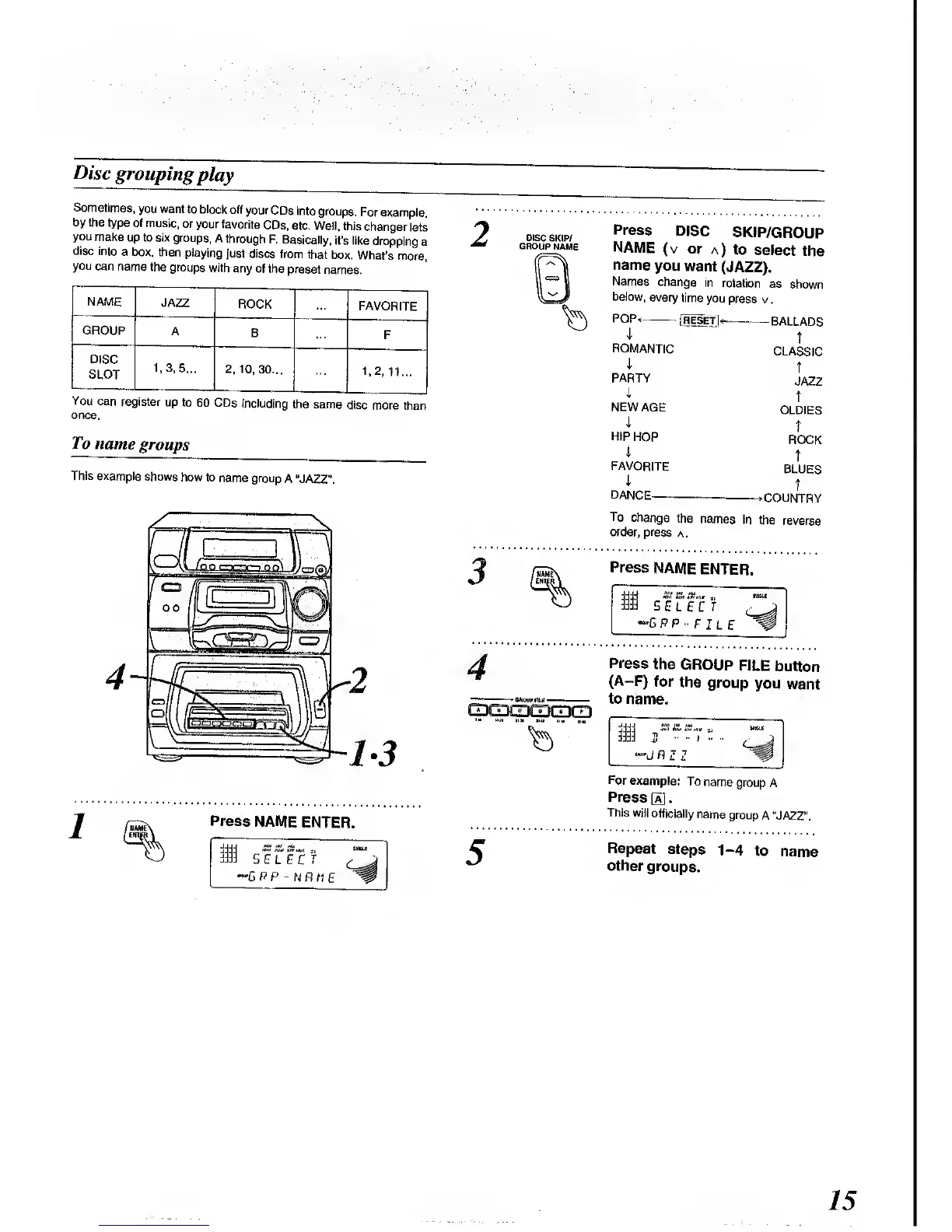
Sometimes,
you want
to block
off
your CDs
into
groups.
For
example,
by the
type
of music,
or
your favorite
CDs,
etc. Well,
this
changer
lets
you
make
up to six
groups,
A
through
F. Basically,
it's like
dropping
a
disc
into
a
box, then
playing
just
discs
from that
box.
What's
more,
you
can name
the
groups
with
any of
the
preset
names.
NAME
JAZZ
ROCK
FAVORITE
GROUP
A
B
F
DISC
SLOT
1.3, 5...
2,
10,30...
1,2,11...
You can
register
up to
60 CDs
including
the same
disc
more
than
once.
To name
groups
This example
shows
how to
name
group
A "JAZZ".
Press
NAME
ENTER.
m
SELECT
'GPP
-NAME
2
Press
DISC
SKIP/GROUP
NAME
(v
or
a)
to
select
the
name
you
want
(JAZZ).
Names
change
in
rotation
as
shown
below,
every
time
you
press v
.
POP<
[RESET]*
BALLADS
3
4
I
ROMANTIC
I
PARTY
i
NEW
AGE
4
HIP
HOP
1
FAVORITE
1
DANCE
t
CLASSIC
T
JAZZ
T
OLDIES
t
ROCK
t
BLUES
t
>COUNTRY
To
change
the
names
in
the
reverse
order,
press
a
.
Press
NAME
ENTER.
m
SELECT
*G P P
F
I L
E
Press
the
GROUP
FILE
button
(A-F)
for
the
group
you want
to
name.
<~dPZZ
For
example:
To
name
group
A
Press
[a] .
This will
officially
name
group
A "JAZZ".
Repeat
steps 1-4
to
name
other
groups.
15

Related product manuals