EasyManua.ls Logo

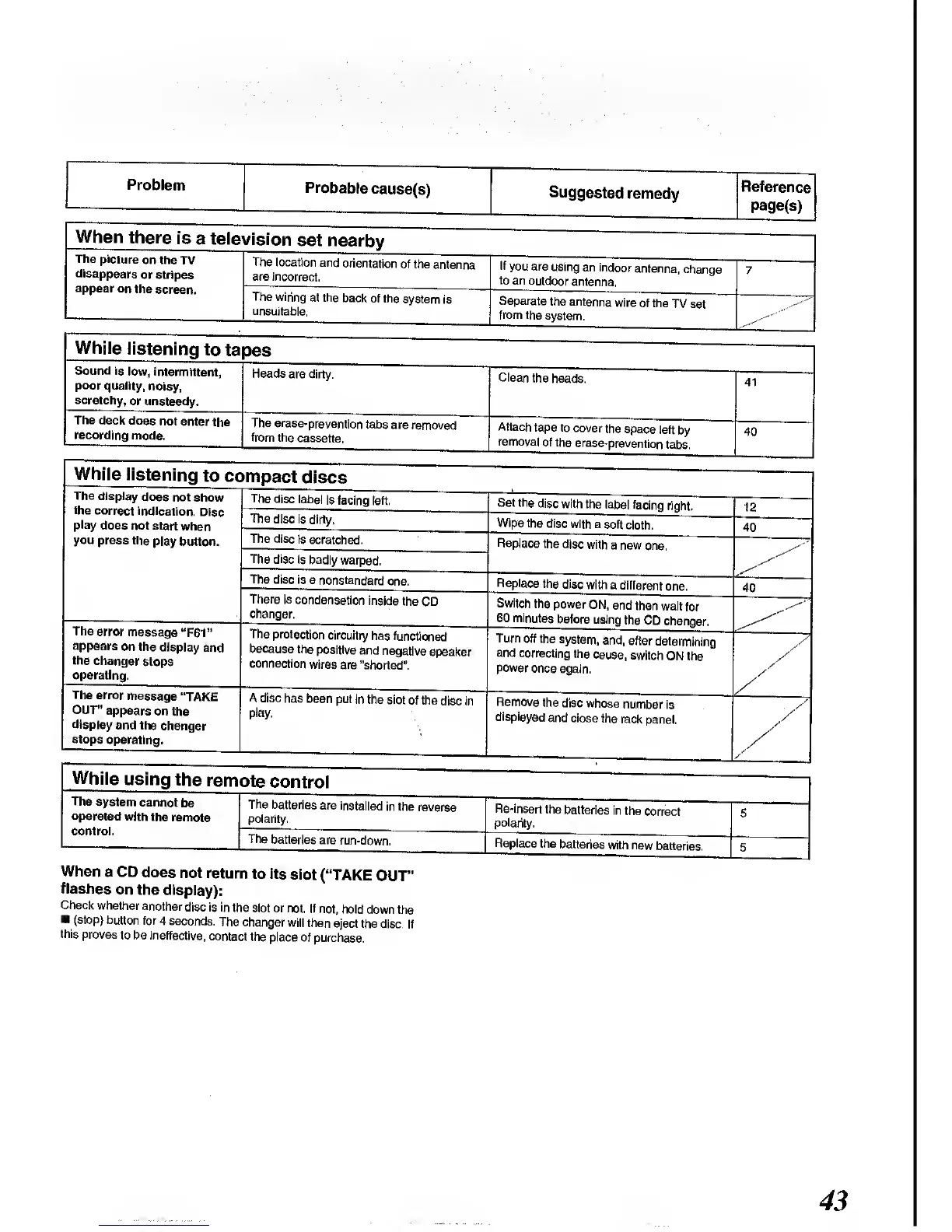
Panasonic SC-CH64M - Troubleshooting Guide - Specific Issues; Tape, CD, and Remote Control Issues

Panasonic SC-CH64M
44 pages
Print Icon
To Next Page IconTo Next Page
To Previous Page IconTo Previous Page
Loading...
Problem
Probable
cause(s)
Suggested
remedy
Reference
page(s)
When
there
is
a tele
vision
set
nearby
The picture
on the
TV
disappears
or stripes
appear
on
the
screen.
The
location
and
orientation
of the
antenna
are incorrect.
If
you are
using
an indoor
antenna,
change
to
an
outdoor
antenna.
7
The
wiring
at the
back
of the
system
is
unsuitable.
Separate
the antenna
wire
of the
TV set
from the
system.
While
listening
to
ta
pes
Sound is
low,
intermittent,
poor
quality,
noisy,
scratchy,
or unsteady.
Heads
are dirty.
Clean
the
heads.
41
The
deck does
not
enter
the
recording
mode.
The
erase-prevention
tabs
are
removed
from the
cassette.
Attach
tape to
cover
the
space
left
by
removal
of the
erase-prevention
tabs.
40
While
listening
to cc>mpact
discs
The
display
does
not
show
the
correct
indication.
Disc
play
does
not start
when
you
press
the
play
button.
The
disc
label
is facing
left.
Set the
disc
with
the label
facing
right.
12
The
disc is
dirty.
Wipe
the disc
with
a
soft cloth.
40
The
disc is
scratched.
Replace
the
disc
with
a new
one.
The
disc
is badly
warped.
The
disc is
a
nonstandard
one.
Replace
the
disc
with
a different
one.
40
There
is
condensation
inside
the
CD
changer.
Switch
the
power
ON,
and
then
wait
for
60
minutes
before
using
the
CD
changer.
The
error
message
"F61"
appears
on the
display
and
the
changer
stops
operating.
The
protection
circuitry
has
functioned
because
the
positive
and
negative
speaker
connection
wires
are "shorted".
Turn
off the
system,
and,
after
determining
and
correcting
the
cause,
switch
ON the
power
once again.
/
/
_The
error
message
"TAKE
OUT"
appears
on
the
display
and the
changer
stops
operating.
A disc
has been
put in the
slot
of the
disc in
play-
Remove
the
disc whose
number
is
displayed
and
close the
rack
panel.
>'
./
S
/
/
While
using
the
rem<
ate
control
The
system
cannot
be
operated
with
the
remote
control.
The
batteries
are
installed
in the
reverse
polarity.
Re-insert
the
batteries
in
the
correct
polarity.
5
The
batteries
are
run-down.
Replace
the
batteries
with new
batteries.
5
When
a CD
does
not
return
to its
slot
("TAKE
OUT"
flashes
on
the
display):
Check
whether
another
disc is in
the
slot or
not. If not,
hold
down the
(stop)
button for
4
seconds.
The changer
will
then
eject the
disc. If
this
proves
to be
ineffective,
contact
the
place of
purchase.
43

Related product manuals