EasyManua.ls Logo

Panasonic SC-CH64M - Registering CDs in Named Groups; Checking and Cancelling Grouped CDs

Panasonic SC-CH64M
44 pages
Print Icon
To Next Page IconTo Next Page
To Previous Page IconTo Previous Page
Loading...
Listening
to compact
discs
Disc
grouping
play
Registering
CDs
under
named
groups
•Any
single
group can
hold up to
60 CDs.
You can enter
the
same CD
into any
single
group as
many times
as
you want.
•You
cannot
register the
disc
in slot No,
0,
in
your groups.
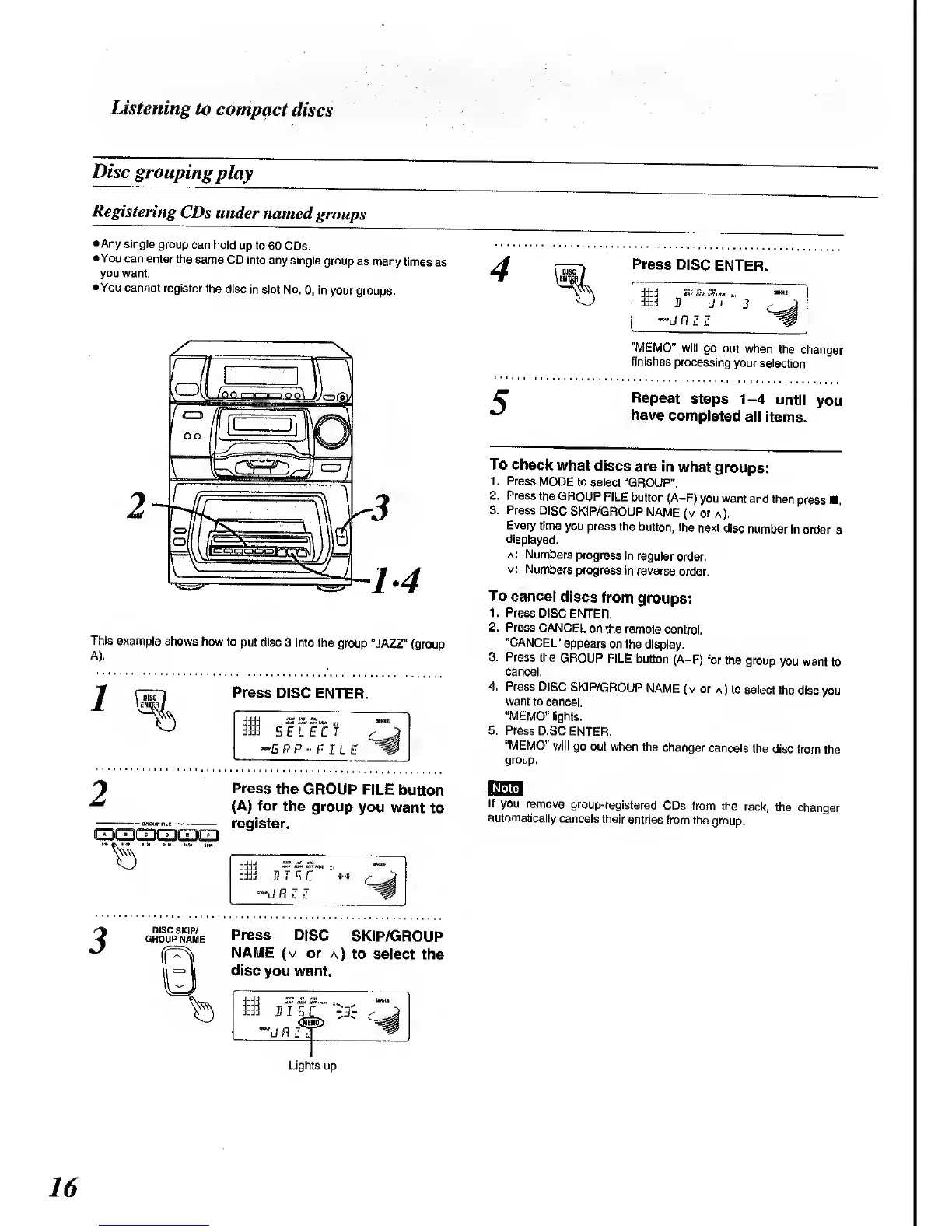
This
example
shows
how to
put disc 3
into the
group "JAZZ"
(group
A).
Press
DISC ENTER.
-GPP
r-
he
Press
the
GROUP FILE
button
(A) for
the group
you
want
to
register.
T5>
Jjjj
SS Si. St Kit
Mil
M
HISC
*
3
grou
C
p
S
name
Press
DISC
SKIP/GROUP
NAME
(v or
a) to
select the
disc
you want.
Press
DISC
ENTER.
3
>
"MEMO"
will
go out
when
the
changer
finishes
processing
your
selection.
Repeat
steps 1-4
until
you
have
completed
all
items.
To
check
what
discs
are in
what
groups:
1
.
Press
MODE
to
select
"GROUP".
2. Press the
GROUP
FILE
button
(A-F)
you want
and
then
press
3.
Press
DISC
SKIP/GROUP
NAME
(v or
a).
Every
time
you
press the
button,
the
next disc
number
in
order
is
displayed.
a
: Numbers
progress
in regular
order,
v:
Numbers
progress
in
reverse
order.
To
cancel
discs
from
groups:
1. Press
DISC
ENTER.
2. Press
CANCEL
on the
remote control.
"CANCEL"
appears
on the
display,
3.
Press
the
GROUP
FILE button
(A-F)
for
the group
you want
to
cancel.
4.
Press
DISC
SKIP/GROUP
NAME (
v
or
a
)
to
select
the
disc you
want to
cancel.
"MEMO"
lights.
5. Press
DISC ENTER.
"MEMO"
will
go out when
the
changer
cancels
the
disc from
the
group.
If
you
remove
group-registered
CDs from
the
rack,
the changer
automatically
cancels
their
entries
from
the group.
Lights up
16

Related product manuals