EasyManua.ls Logo

Panasonic SC-CH64M - Group Playback Control; Starting and Clearing Group Playback

Panasonic SC-CH64M
44 pages
Print Icon
To Next Page IconTo Next Page
To Previous Page IconTo Previous Page
Loading...
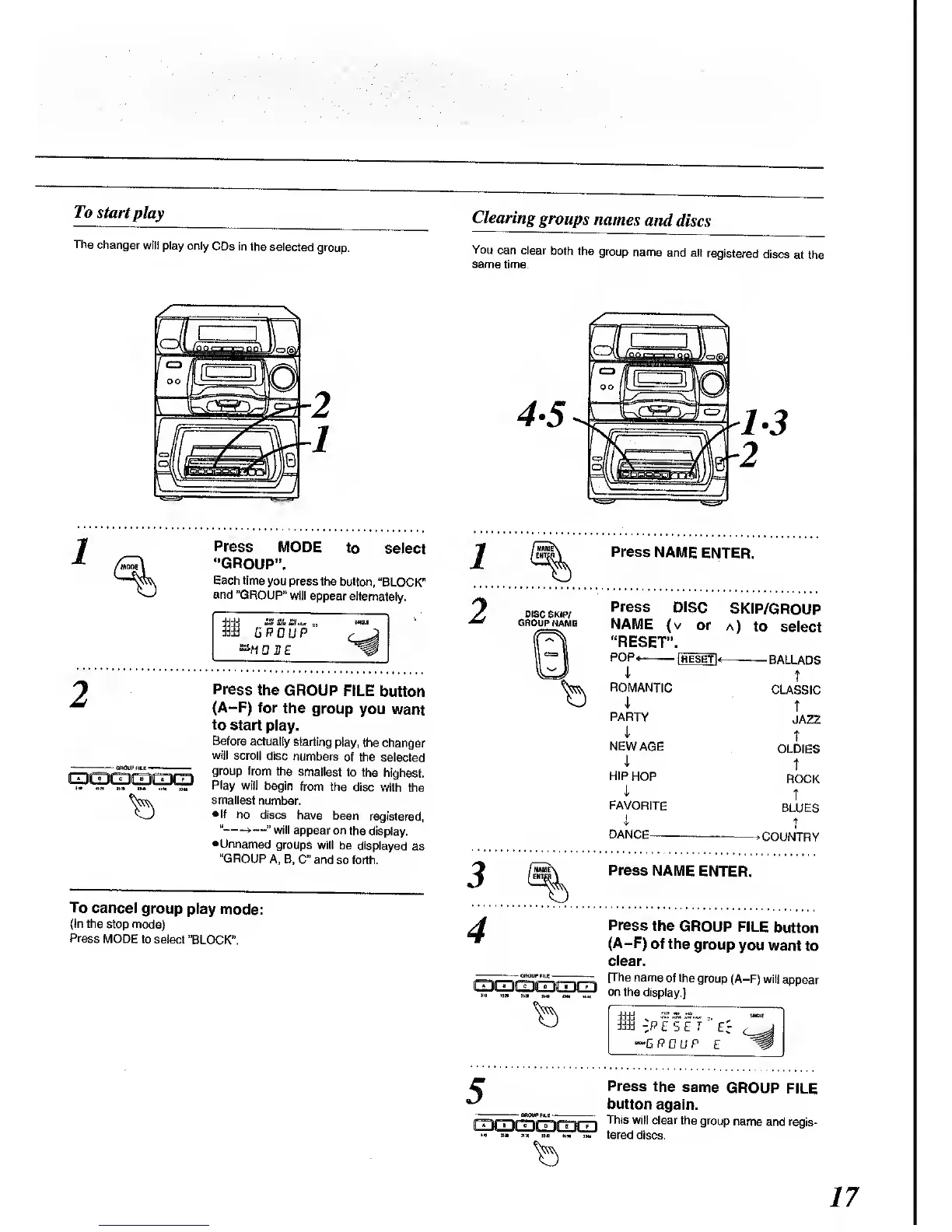
To
start
play
The
changer
will
play only
CDs in
the selected
group.
Clearing
groups
names
and
discs
You
can clear
both
the
group
name
and all
registered
discs
at the
same
time.
Press
MODE
to
select
"GROUP".
Each time
you
press the
button,
"BLOCK"
and
"GROUP"
will
appear alternately.
1
GROUP
"M
0
H E
«•»
\vm
]M» u*
«Hf ) )M
Press
the
GROUP
FILE
button
(A-F) for
the
group
you
want
to
start
play.
Before
actually
starting
play,
the changer
will
scroll
disc
numbers
of the
selected
group from
the
smallest
to the
highest.
Play
will
begin
from the
disc
with the
smallest
number.
If
no discs
have
been
registered,
14
>
"
will appear
on
the display.
•Unnamed
groups
will be
displayed
as
"GROUP
A, B,
C" and
so forth.
To cancel
group
play
mode:
(In the
stop mode)
Press
MODE
to select
"BLOCK".
1
2
Press
NAME
ENTER.
Press
DISC
SKIP/GROUP
NAME
(v
or
a)
to
select
"RESET".
5
POP*-
i
ROMANTIC
4
PARTY
i
NEW AGE
i
HIP
HOP
i
FAVORITE
I
DANCE
[reset]
-BALLADS
t
CLASSIC
T
JAZZ
T
OLDIES
t
ROCK
T
BLUES
t
•COUNTRY
Press
NAME
ENTER.
Press
the
GROUP
FILE
button
(A-F)
of the
group
you
want to
clear.
(The name
of the
group
(A-F) will
appear
on
the display.]
3d -P
E S
£ T
"**G PGUP
Er
Press
the
same
GROUP
FILE
button
again.
This
will clear
the group
name
and regis-
tered discs.
17

Related product manuals