EasyManua.ls Logo

Panasonic SC-CH64M - Program Playback; Creating and Managing CD Programs

Panasonic SC-CH64M
44 pages
Print Icon
To Next Page IconTo Next Page
To Previous Page IconTo Previous Page
Loading...
Listening
to
compactdiscs
Program
play
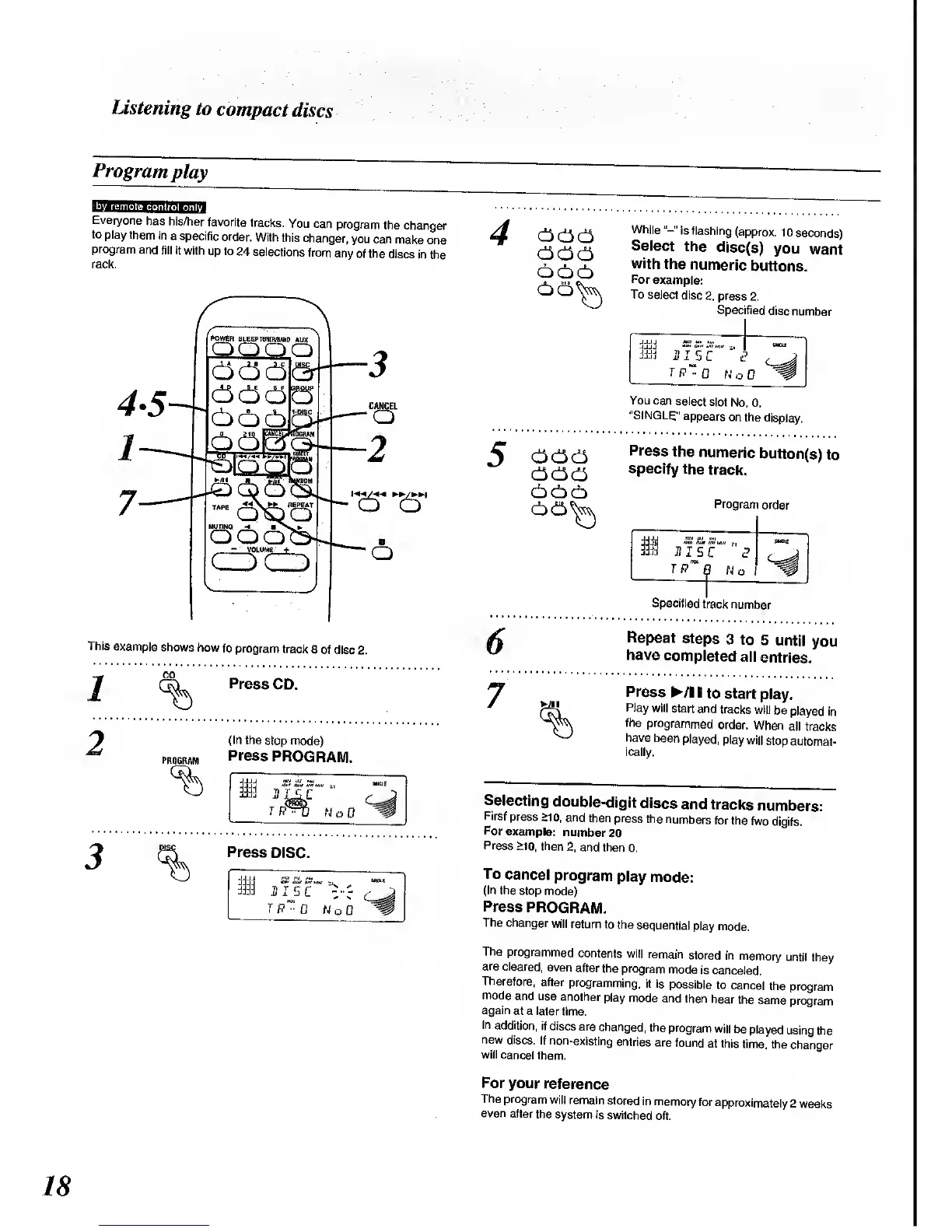
Everyone
has
his/her
favorite
tracks.
You can
program
the changer
to
play them
in
a
specific
order.
With
this
changer,
you
can make
one
program
and
fill it
with
up to
24
selections
from
any
of the
discs
in the
rack.
Power
bl
eep hiher/bmp
aux
QQOH
CANCEL
Q
OO
-
V
OUIME
+
OO
This
example
shows
how
to program
track
8 of disc
2.
1
2
CD
Press
CD.
(In
the
stop mode)
Press
PROGRAM.
Press
DISC.
1
IS Si.
-,
H IS
C
vf
T"
f?"
0 W
o 0
4
666
666
666
66^
While
"-"
is flashing
(approx.
10
seconds)
Select
the
disc(s)
you
want
with
the
numeric
buttons.
For
example:
To
select
disc
2,
press
2.
Specified
disc
number
jjjj
TP »0
No
0
You
can
select
slot
No.
0.
"SINGLE"
appears
on
the
display.
666
666
666
66^
Press
the
numeric
button(s)
to
specify
the
track.
Prograrr
order
fflj
JI5C™"(?
Specified
track
number
7
Repeat
steps
3 to
5
until
you
have
completed
all
entries.
Press
/lltostart
play.
Play
will
start
and
tracks
will
be
played
in
the
programmed
order.
When
all tracks
have been
played,
play
will
stop
automat-
ically.
Selecting
double-digit
discs
and
tracks
numbers:
First
press
>10,
and then
press
the
numbers
for the
two
digits.
For
example:
number
20
Press
>10,
then
2, and then
0.
To
cancel
program
play
mode:
(In the
stop
mode)
Press
PROGRAM.
The
changer
will
return
to the
sequential
play
mode.
The
programmed
contents
wilt
remain
stored
in
memory
until
they
are
cleared,
even
after
the program
mode
is
canceled.
Therefore,
after
programming,
it
is possible
to
cancel
the
program
mode
and use
another
play
mode
and
then hear
the
same
program
again
at a
later time.
In
addition,
if discs
are
changed,
the
program
will
be
played
using
the
new
discs.
If
non-existing
entries
are
found
at this
time,
the
changer
will
cancel them.
For
your
reference
The program
will
remain
stored
in
memory
for
approximately
2
weeks
even
after
the system
is
switched
off.
18

Related product manuals