EasyManua.ls Logo

Panasonic SC-CH64M - Listening to Tapes; Tape Playback Operations

Panasonic SC-CH64M
44 pages
Print Icon
To Next Page IconTo Next Page
To Previous Page IconTo Previous Page
Loading...
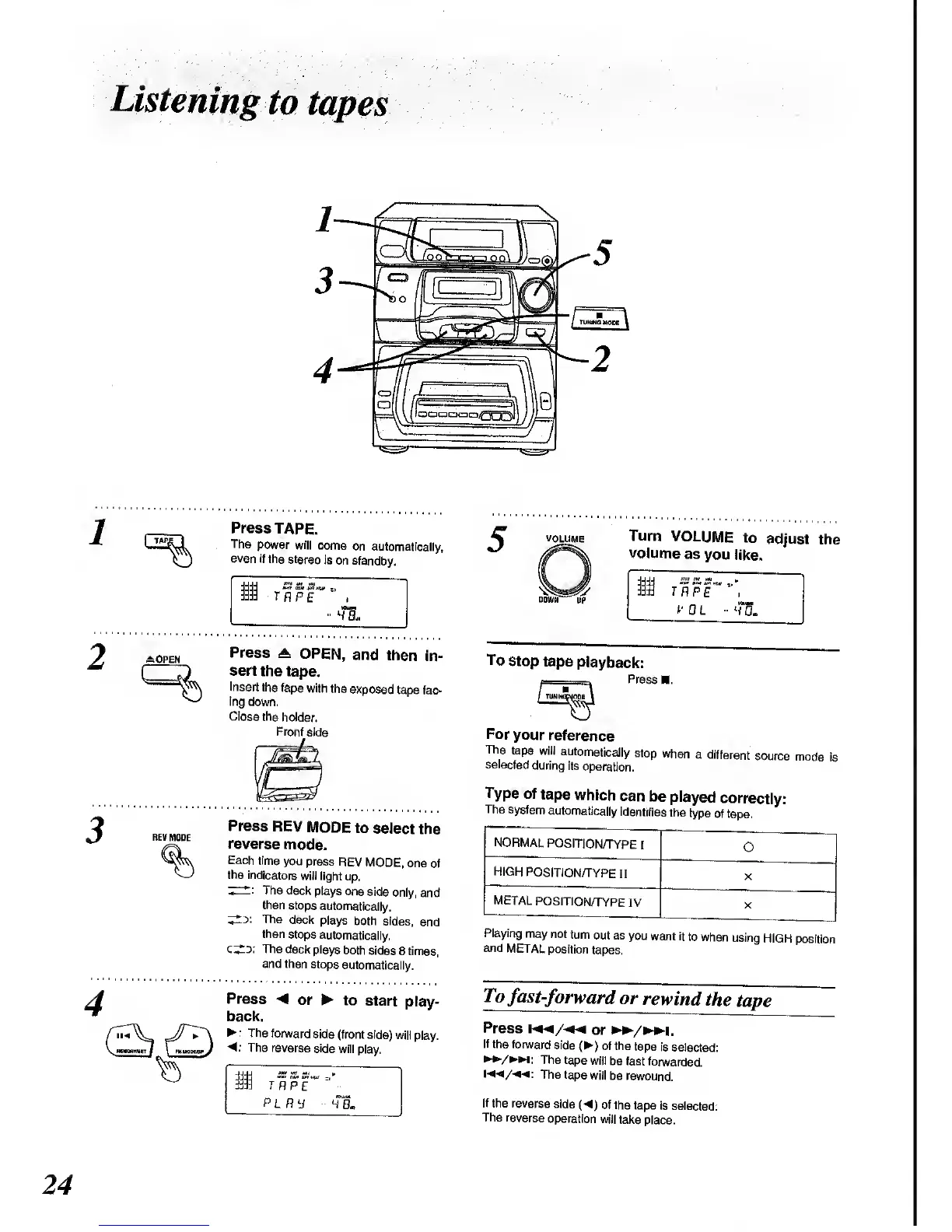
Listening
to
tapes
:OPEN
REV
MODE
Press
TAPE.
The
power
will come
on
automatically,
even
if tho
stereo
is
on standby.
I
w
a.
Press
A.
OPEN,
and
then
In-
sert
the tape.
Insert
the
tape
with
the
exposed
tape
fac-
ing
down.
Close
the
holder.
Front
side
Press
REV
MODE
to
select
the
reverse
mode.
Each
time
you
press
REV MODE,
one
of
the
indicators
will light
up.
The deck
plays one
side
only,
and
then
stops
automatically.
The
deck
plays
both sides,
and
then
stops
automatically.
The deck
plays
both
sides
8 times,
and then
stops
automatically.
Press
< or
to
start
play-
back.
:
The
forward
side (front side)
will
play.
4:
The
reverse side
will
play.
Si
rRpr
=i
-
p
l
r
y
4aL
VOLUME
Turn
VOLUME
to
adjust
the
volume
as
you
like.
i
TRPE
To
stop
tape
playback:
Press
For
your
reference
The
tape
will
automatically
stop
when
a
different
source
mode
is
selected
during
its
operation.
Type
of
tape
which
can
be
played
correctly:
The
system
automatically
identifies
the
type
of tape.
NORMAL
POSITION^YPE
I
O
HIGH
POSITION/TYPE
II
X
METAL
POSITIONm'PE
IV
X
Playing
may
not
turn
out as
you
want it
to when
using
HIGH
position
and
METAL
position
tapes.
To
fast-forward
or
rewin
d the
tape
Press
m<*/«*«
or
**v»i.
If the
forward
side
()
of the
tape
is selected:
w/*w:
The tape
will
be fast
forwarded.
The tape
will
be
rewound.
If the reverse
side
{4)
of the
tape
is selected:
The reverse
operation
will
take
place.
24

Related product manuals