EasyManua.ls Logo

Panasonic SC-PM29 - CD Playback Methods; Track search function; Direct access track playback; Viewing CD playback information

Panasonic SC-PM29
28 pages
Print Icon
To Next Page IconTo Next Page
To Previous Page IconTo Previous Page
Loading...
13
RQT7372
Other ways of playing CD's
Preparation: Press [CD/q/ h] and then [g CLEAR].
A
Track search
Remote control
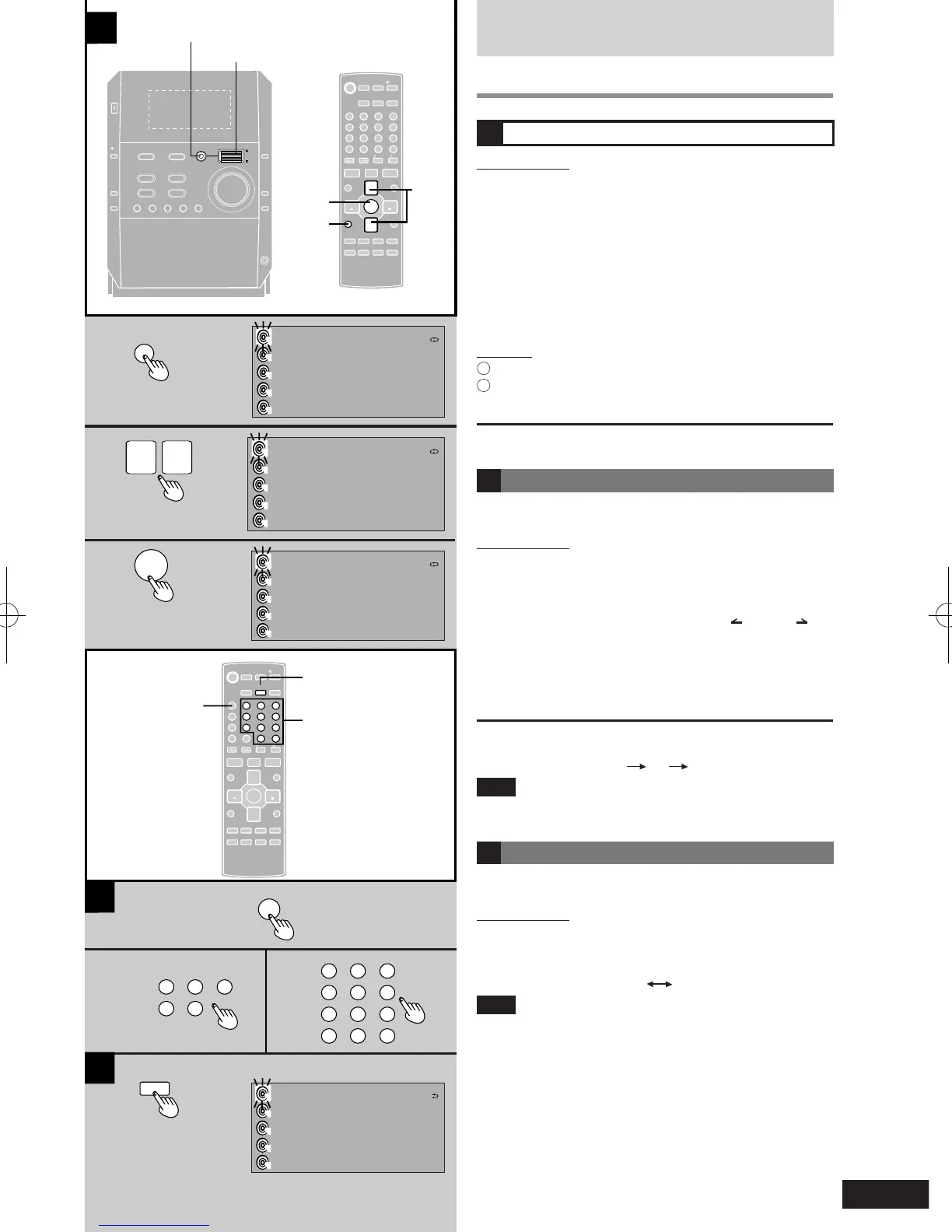
1 Press [PLAY LIST].
2 Press [e] or [r] to select the title.
First select the disc or album title.
With HighMAT, press [e] or [r] to select the method
of play (è refer step 3, on page 11).
3 Press [ENTER].
Repeat 2 and 3 as often as necessary to select the
desired track.
Play will start with the track you select.
Main unit
1
Press [PLAY LIST].
2
Turn the jog control to select and press it to conrm to
do steps 2 and 3 above.
To return to the previous display
Press [RETURN].
B Direct access play
Direct access allows you to start normal play from a
specic track to the last track of the CD.
Remote control
1 Press [DISC].
2 Within 10 seconds:
Press [1] - [5] to select the disc you want.
l
For MP3/WMA, after this press [ ALBUM ] to
select the album.
3 Press the numeric button(s) to select the
desired track number.
Play will start with the track you select.
To select a two-digit track
Press [ 10] and then the two numbers you want.
For example, 20: [ 10]
[2]
[0]
Note
You cannot use direct access play with 1-Disc Random
and All-Disc Random mode.
C CD display
You can see various types of information during play or
recording.
Remote control
Press [DISPLAY].
The display changes each time you press the button.
Elapsed Playtime Remaining Playtime
Note
When track number 25 or greater is playing, remaining play
time display shows “--:-- ”.

1
3
2
2
3
1
A
B
C
ENTER
^
DEL
DISPLAY DIMMER
AUX
CLEAR
INTRO
MARKER
TITLE
SEARCH
RE-MASTER
RETURN
ALBUM
TITLE IN
1
2 3
7
0
8 9
10
4
5 6
>
=
SOUND
SORROUND
MUTING
S.SOUND EQ
u
i
g
DISC ABC DEF
PROGRAM GHI JKL MNO
PLAY MODE PQRS TUV WXYZ
REPEAT SPACE l"
#
SLEEP
- AUTO OFF
CLOCK/
TIMER
PLAY/
REC
TUNER/
BAND
q
q
TAPE
w
q
CD
q
/
h
VOL
VOL
/REW
/FF
ENTER
^
DEL
DISPLAY DIMMER
AUX
CLEAR
PLAY LIST
INTRO
MARKER
TITLE
SEARCH
RE-MASTER
RETURN
ALBUM
TITLE IN
1
2 3
7
0
8 9
10
4
5 6
>
=
SOUND
SORROUND
MUTING
S.SOUND EQ
u
i
g
DISC
ABC DEF
PROGRAM GHI JKL MNO
PLAY MODE PQRS TUV WXYZ
REPEAT SPACE l"#
SLEEP
- AUTO OFF
CLOCK/
TIMER
PLAY/
REC
TUNER/
BAND
q
q
TAPE
w
q
CD
q
/
h
VOL
VOL
/REW
/FF
- DEMO
CD 1 CD 2 CD 3 CD 4 CD 5
STOP
g
TUNER /BAND
CD
q
/
h
TAPE
7
DOWN
VOLUM E
UP
PUSH
ENTER
PHONE S
PLAY LIST
S.SOU ND EQ RE-MASTER
AUX
CD
CHECK
RETRUN
AC IN
POWER
/
h
REC
8
CD
CHANGE
;
OPEN/
CLOSE
;
PLAY LIST
PLAY LIST
Jog control
PLAY LIST
q
q
ENTER
2 3
1
DISC
DEL
1
2 3
7
0
8 9
10
4 5 6
>
=
ABC DEF
GHI JKL MNO
PQRS TUV WXYZ
SPACE l"#
1
2 3
4 5
ABC DEF
GHI JK
L
DISPLAY
1
2, 3
DISPLAY
ALL DISC
2 NO DISC
5
4
3
2
1
1>PLAYLIST
3 NO DISC
4 NO DISC
5 NO DISC
ALL DISC
1 >TRACK 1
5
4
3
2
1
TRACK 7
2 TRACK 2
3 TRACK 3
4 TRACK 4
TRACK 1
-3:48
1DISC
5
4
3
2
1
CD
TRACK 1
0:18
5
4
3
2
1
CD PLAY
DISC 7
ALL DISC