Other ways of playing CD's
By remote control only
Preparation: Press [CD/q/ h] and then [g CLEAR].
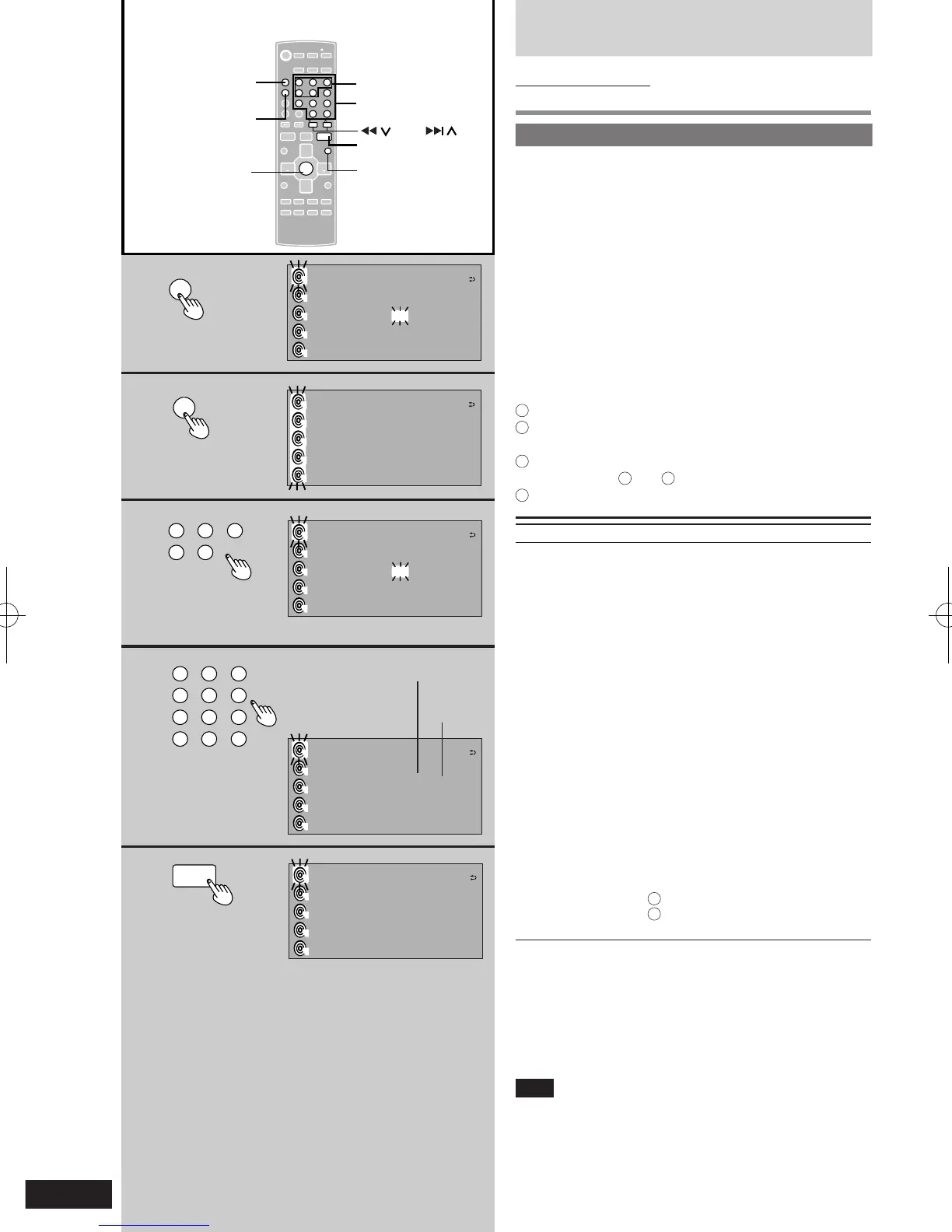
Program play
This function allows you to program up to 24 tracks.
1 Press [PROGRAM].
2 Press [DISC].
3 Within 10 seconds:
Press [1] - [5] to select the disc you want.
4 Press the numeric button(s) to select the
track you want.
Repeat steps 2 through 4 until you have programmed
all the tracks you want.
5 Press [CD q/ h].
Play will start in the programmed sequence.
MP3/WMA (within a single disc)
1
Press [PROGRAM].
2
Press [u 2/REW] or [i 1/FF] to select the track
you want.
3
Press [ENTER] twice.
Repeat steps
2
and
3
to create your program.
4
Press [CD/q/ h].
To Action
cancel program Press [PROGRAM] in the stop mode.
select a two-digit track
check program
contents.
add to the program.
clear the last track
clear all
programmed tracks
Press [ ≧ 10] and then the two numbers
you want.
Press [u 2/REW] or [i 1/FF].
Repeat steps 2 through 4.
Press [DEL].
Press [g CLEAR].
“CLEAR ALL?” is displayed.
Within 5 seconds, press the button
again to clear all tracks.
cancel program play
mode
Press [PROG RA M] i n th e stop
mode.
Programmed contents will be saved
in memory.
l
You r pro g r am i s ret a i ned i n
memory for about 1 week while
the system is unplugged.
replay your program
1
Press [PROGRAM].
2
Press [CD/q/ h].
When “FULL” appears
No further tracks can be programmed.
If you program a track not on your CDs
The track is initially programmed, but during program play,
the player will skip that track and will continue playing from
the next programmed item.
Note
l
During program play, you can search forward or
backward only within the current track.
l
During pr og ram play, s ki pping i s al wa ys in t he
programmed order, whether forward or backward.
l
Even if you create a program that contains both CD-DA
and MP3/WMA, only the CD-DA tracks are played.











 To Next Page