EasyManua.ls Logo

Panasonic SC-PM37MD - Page 30

Panasonic SC-PM37MD
52 pages
Print Icon
To Next Page IconTo Next Page
To Previous Page IconTo Previous Page
Loading...
Using the MD group feature
MD editing
30
RQT5975
MD editing operations
A
1
EDIT MODE
2
ENTER
3
/ FF
/
4
ENTER
5
REW
/ / FF
/
/
6
ENTER
8
ENTER
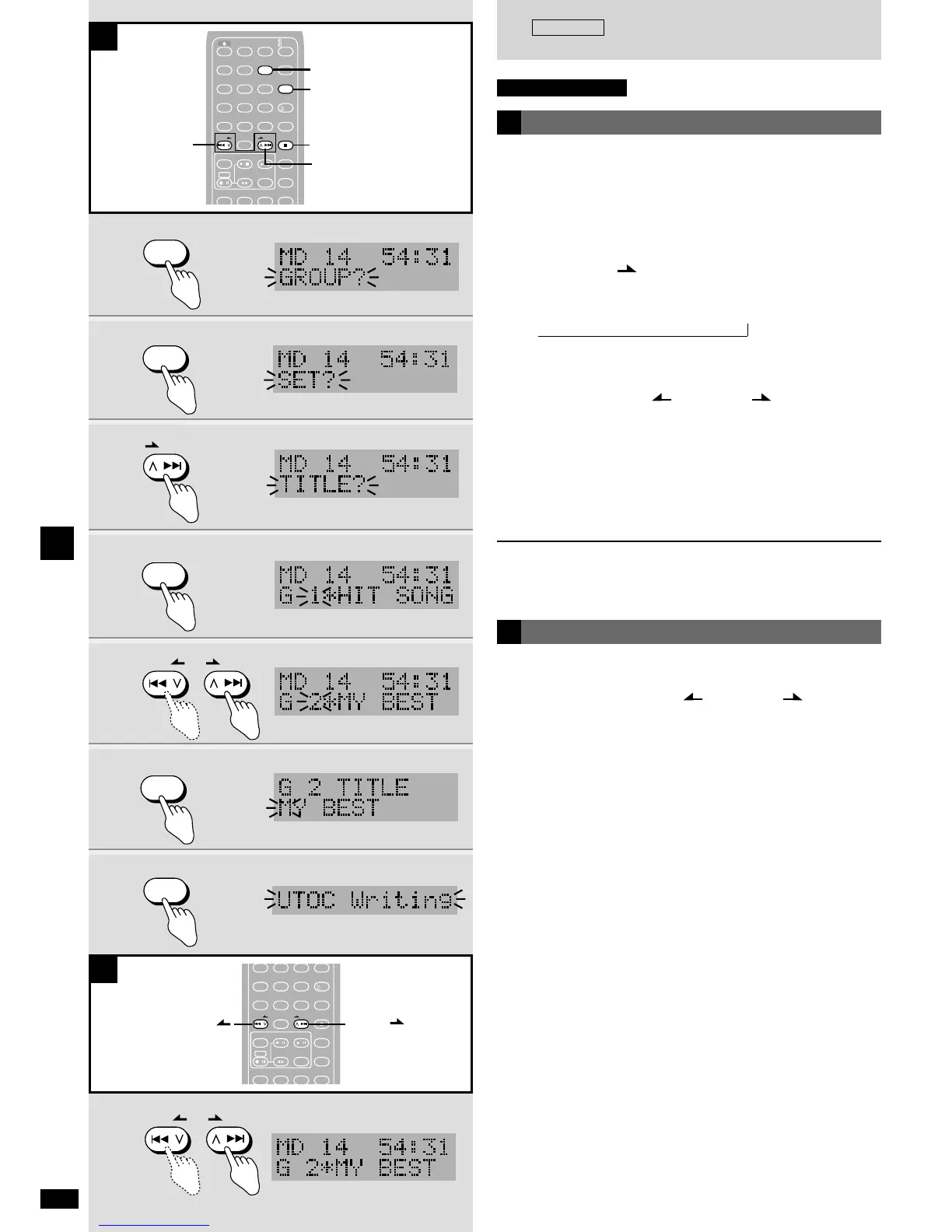
Changing group titles
Do the following to give groups titles or change existing ones.
1 Press [EDIT MODE] to select “GROUP?”.
2 Press [ENTER].
“SET?” appears.
3 Press [1/i /FF] to select “TITLE?”.
If there are no groups at all, only “SET?” can be selected.
Each time you press the button:
SET?
/ TITLE? / RELEASE? / ALL RELEASE?
4 Press [ENTER].
5 Press [u/2 REW/ ] or [1/i /FF] to select
the group.
6 Press [ENTER].
7 Give the group a title (
a
page 37).
8 Press [ENTER].
Editing is complete when “UTOC Writing” stops flashing.
To cancel part way through
Press [g STOP/CANCEL].
,
A
Group skip
First create groups (
a
page 29).
While stopped,
Press and hold [u/2 REW/ ] or [1/i /FF] to
select the group you want to play.
B

5
123
4610
789
0
SLEEP
– AUTO OFF
CLOCK/
TIMER
PLAY/
REC
TITLE CHARA ENTER
DISPLAY
ABC DEF
EDIT MODE
GHI JKL MNO
SPACE
!"#
PQRS
TUV
WXYZ
DELETE
REW
/ / FF
STOP/
CANCEL
EXT-IN MD CD
PLAYMODE
REC
TAPE TUNER
PROGRAM
MD REC MODE
SOUND
THEATER S. MUTING
BAND
/
/
/
/
/
g STOP/CANCEL
2, 4, 6, 8
1
5
3
B
REW
/ / FF
/
/
5
123
4610
789
0
GHI JKL MNO
SPACE
!"#
PQRS
TUV
WXYZ
DELETE
REW
/ / FF
STOP/
CANCEL
EXT-IN MD CD
PLAYMODE
REC
TAPE TUNER
PROGRAM
MD REC MODE
SOUND
THEATER S. MUTING
BAND
/
/
/
/
/
u/2 REW/
1/i /FF
Remote control only