20
VQT4L45
Press the SLEEP/TIMER button repeatedly, the
sleep timer will change sequentially as below:
- The sleep timer has been set. In this case,
press the SLEEP/TIMER button to confi rm the
remain time before turning off the unit.
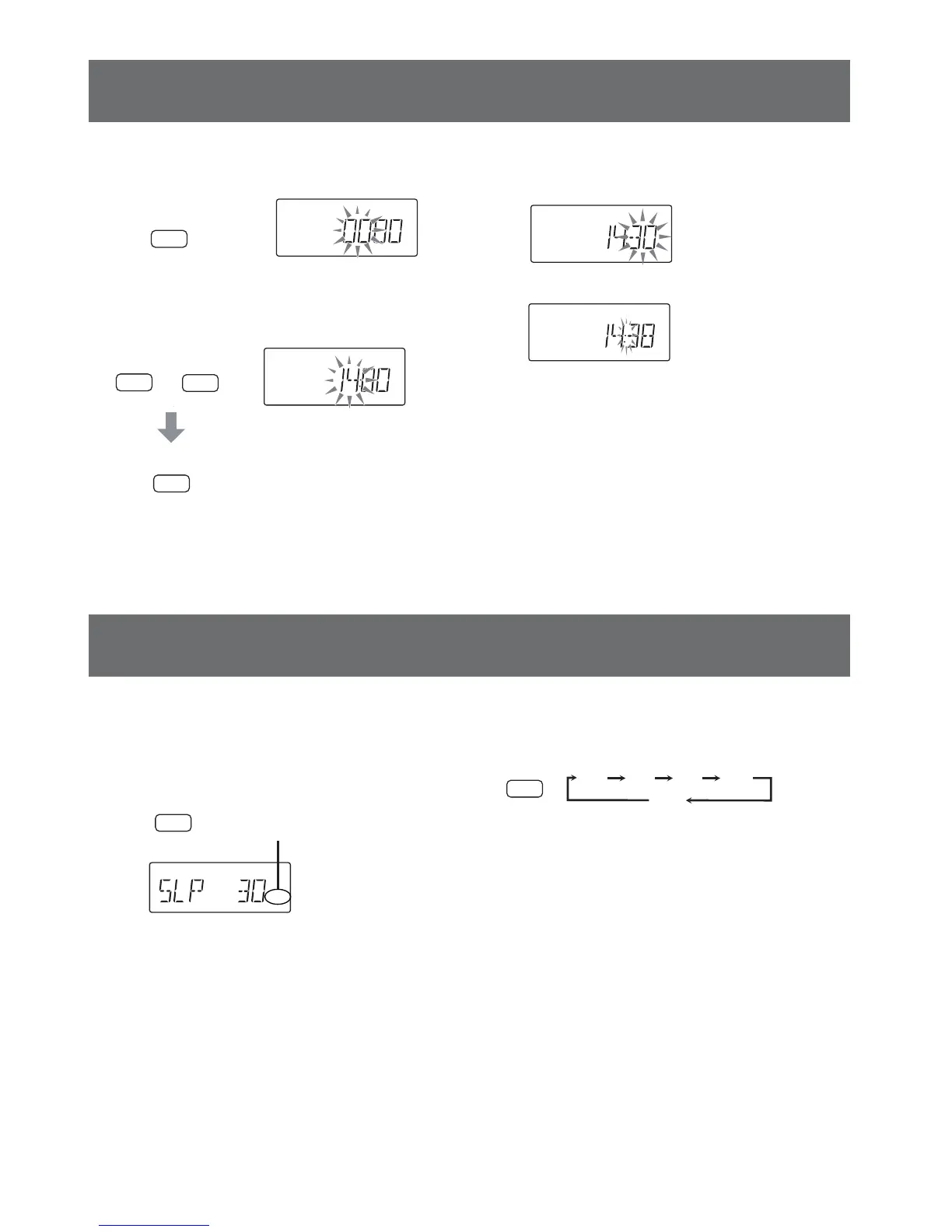
Clock setting
1. In the standby mode
2. Select hours.
DISPLAY/
CLOCK
Remote control
Press and hold
for 2 seconds.
f
e
Remote control
- The sleep timer automatically turns off the
power after a preset time has elapsed.
In power on mode...
SLEEP/
TIMER
0
Remote control
SLEEP/
TIMER
0
30 60 90 120
OFF
DISPLAY/
CLOCK
SLEEP
"SLEEP" appears.
3. Select minutes in same method
described above.
4. The clock starts.
- Confi rmation current time
- In standby mode press the DISPLAY/
CLOCK button. After 5 minutes current
time disappears.
- In power on mode, press and hold the
DISPLAY/CLOCK button for 2 seconds.
After 3 seconds current time disappears.
- If a power failure occurs or the mains lead is
disconnected. Please reset the clock again.
Sleep timer setting











 To Next Page