VQT4L45
15
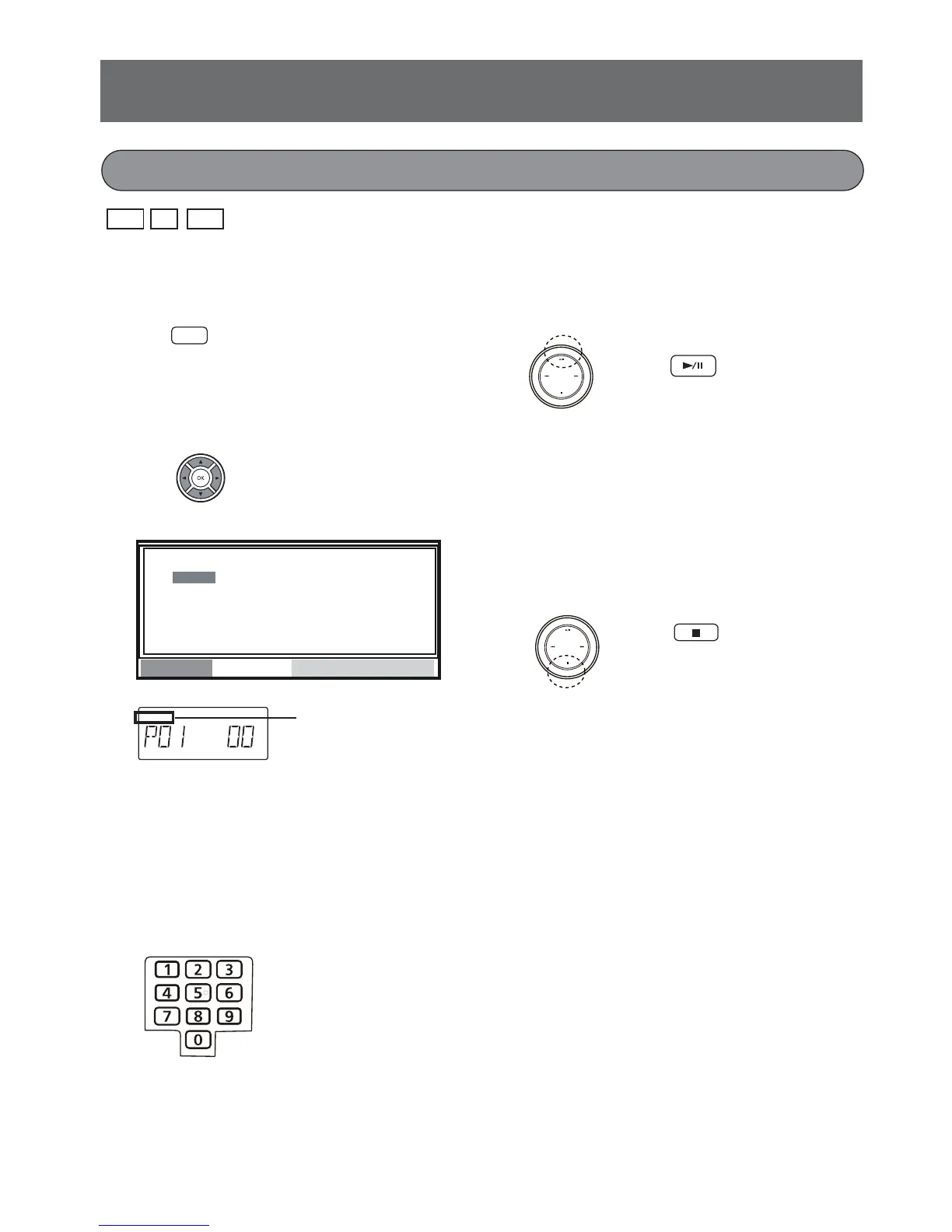
1. To show program setting picture
In stop mode press the PROG./ANGLE button.
2. Select program number.
Press the
o
,
p
,
a
or
b
button to select desired
program number.
When pressing the b or a button on the remote
control, the program number on the main unit’s
display may be skipped (Example:1 5) in accor-
dance with the number sequence of TV display.
3. Enter a track number.
PROG.
During program play-
back setting “PROG.”
appears.
Program playback (maximum 16 items)
4. Repeat steps 2-3 to program your
desired track.
5. Press the
i
button.
Program playback starts following the programmed
track number order.
If some program track numbers have not been
set, the playback will skip them.
6. Stop playback.
Press the
n
button once.
- To cancel program playback, press the n
button in stop mode.
- The same track can be programmed more
than once.
- The numeric button cannot be used to select
the track during program playback.
- During program playback you can press the
PLAY MODE button to select single track or all
programmed tracks and play repeatedly. (Refer
to page16).
PROGRAM
2
3
4
1
_ _ _ _
_ _ _ _
_ _ _ _
5
6
7
8
_ _ _ _
_ _ _ _
_ _ _ _
_ _ _ _
9
10
11
12
14
15
16
13
_ _ _ _
_ _ _ _
_ _ _ _
_ _ _ _
_ _ _ _
_ _ _ _
_ _ _ _
_ _ _ _
_ _
_ _
PLAY
CLEAR
Remote control
ANGLE
PROG./
To main unit
To T V
Remote control
Remote control
Main unit
Remote control
Remote control
Main unit
v
CD
MP3
VCD










 To Next Page