22
VQT4L45
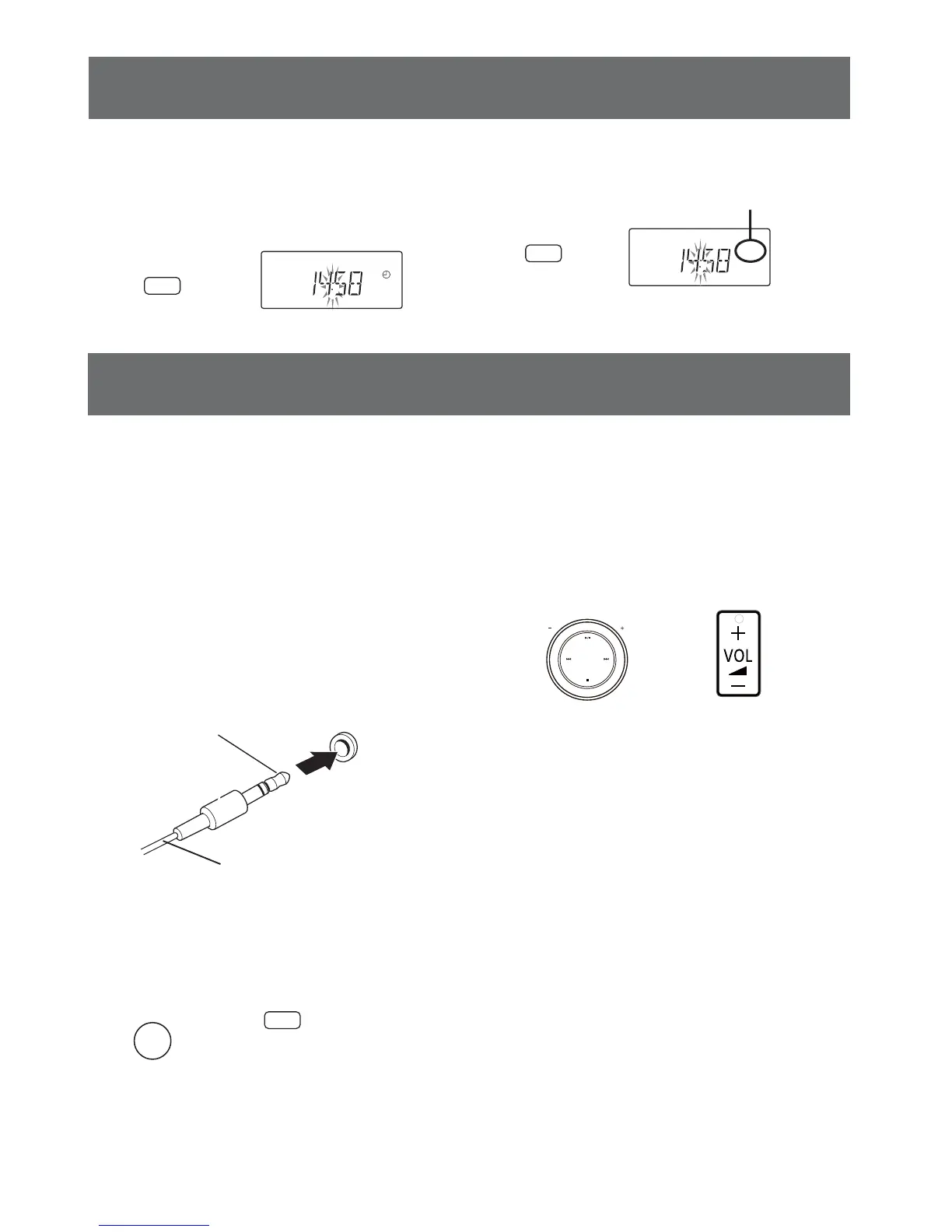
To turn off the Timer Setting
1. In the standby mode
Press the DISPLAY/CLOCK button.
2. Press the SLEEP/TIMER button.
DISPLAY/
CLOCK
Remote control
1. Connect an external equipment to
the MUSIC P. jack of the unit (Front
panel).
2. Select MUSIC P..
˄ 3.5 mm˅

MUSIC P.
Stereo mini-plug
MUSIC
PORT
Remote control
3. Play the equipment.
Play the equipment after connecting.
- Please refer to the operation instruction
supplied with the connected equipment.
4. Adjust the volume.
If volume of the equipment is too low please turn
up it.
Note:
- When MUSIC P. is selected but an audio cable
is not connected, after 10 minutes the power
will turn off automatically.
- (For Australia, New Zealand)
When an external equipment has been
connected, but no signal from the external
equipment is received, after 10 minutes the
power will turn off automatically.
Remote control
Main unit
External equipment operation
VOLUME
SLEEP/
TIMER
0
Remote control
"
0
" indicator disappears.
Timer setting (continued)
Main unit
SELECTOR
Audio cable (not included)
You can play music from an external equipment.
Preparation
Switch off the equalizer (if any) of the external
equipment to prevent sound distortion.
Decrease the volume of this unit and the external
equipment before you connect or disconnect the
external equipment.










 To Next Page