14
VQT4L45
For MP3 file during playback press the or but-
ton to skip folder.
Insert a disc or connect a USB device recorded
MP3, JPEG or DivX files to the unit. The file or disc
which the unit can playback, refer to page 4 -5.
Select playback source. Refer to page12.
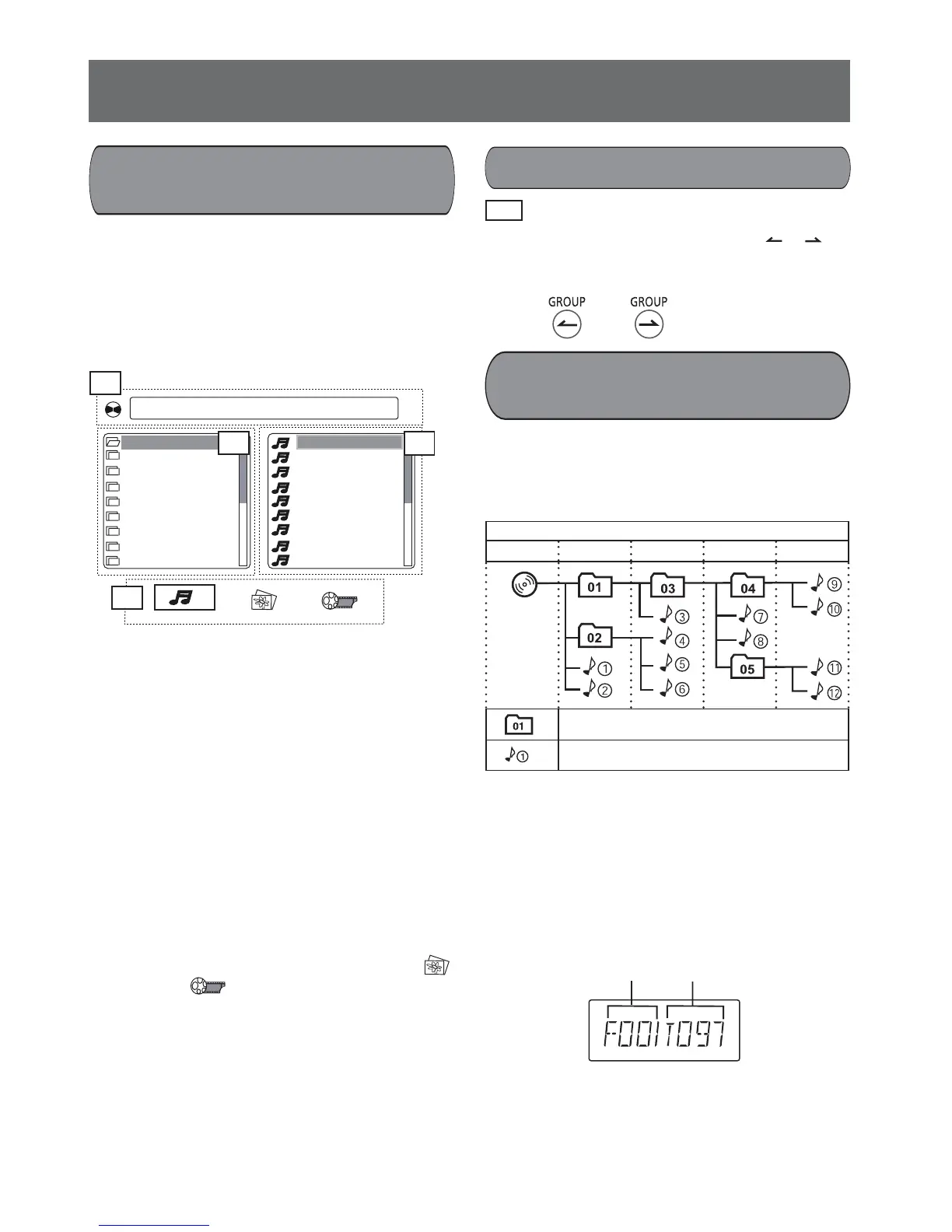
To MP3 file, below picture appears on TV.
Example:
A: Shows current fi le name B: Shows folder list
C: Shows fi le list
The names of the files or folders named by se-
lected language in the OSD LANGUAGE (refer to
page11.) can be displayed on the TV.
How to select fi le:
Press the o or p button to select desired file, then
press the OK button, playback starts.
To select the folder, press the b button to move
the cursor to folder list, then press the o or p button
to select desired folder.
How to select JPEG or DivX fi le:
1. In above picture press the b or a button to
move the cursor to D.
2. Press the b or a button to select JPEG ( )
or DivX ( ), then press the OK button to
confi rm. If there is no playable fi le the cursor
cannot move.
3. Press the o button to move the cursor to fi le list.
4. Press the o or p button to select fi le, then press
the OK button to confi rm. Playback starts.
To JPEG fi le, slide show starts.
MP3, JPEG, DivX fi les
playback
[MP3_01]101.MP3
01. MP3_01
02. MP3_02
03. MP3_03
04. MP3_04
05. MP3_05
06. MP3_06
07. MP3_07
08. MP3_08
09. MP3_09
001. 101
002. 102
003. 103
004. 104
005. 105
006. 106
007. 107
008. 108
009. 109
Skip group
Remote control
Discs/USB operation (continued)
MP3, JPEG, DivX folders/fi les
structure
This unit can play MP3, JPEG, DivX fi les in below
order.
It may be different to MP3, JPEG, DivX files in
large capacity USB device.
- Up to 8th layer can be accessed. 9th layer and
over may not be accessed.
- This unit can recognize up to 130 folders or 999
fi
les per disc or USB device. The disc or USB
device with 131 folders or 1000 fi les and over
may not be played back in some conditions.
- After reading the MP3 fi le the unit display as
below.
- All half-width lowercase alphabets used for the
fi le name and folder name will be displayed by
changing to half-width capital alphabets following
specifi cation of the unit.
Layer
Ist Layer
2nd Layer
3rd Layer
4th
Layer
5th Layer
Folder and its playback order
MP3, JPEG, DivX fi le and its playback order
MP3
Total folder number
Total track number










 To Next Page