VQT4L45
7
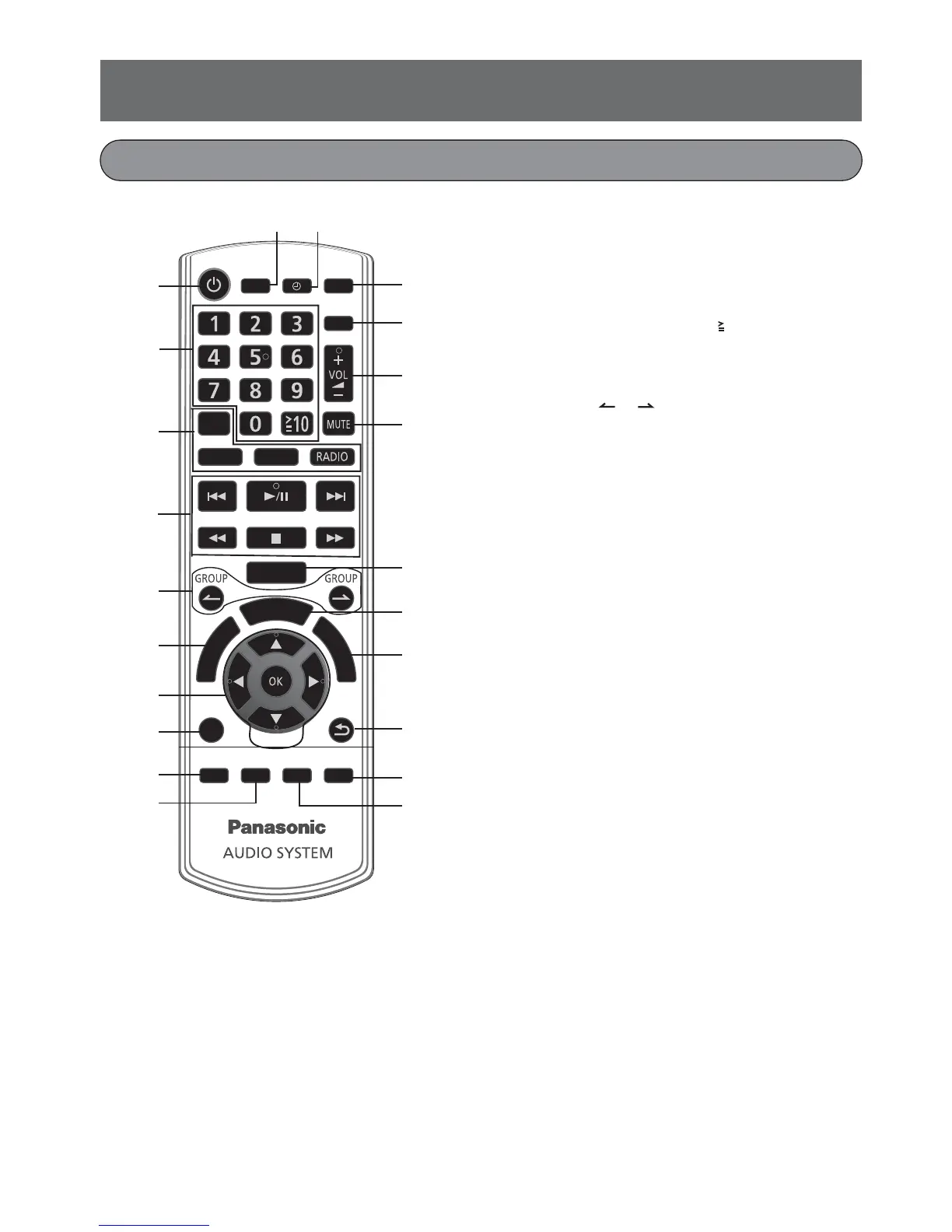
1. Standby/on switch [z]
Press to switch the unit from on to standby
mode or vice versa. In standby mode, the unit
is still consuming a small amount of power.
2. Numeric buttons [1 to 9, 0, 10]
3. Source select buttons
4. Basic playback buttons
5. Skip group or folder buttons
(GROUP , )
6. View system setting menu button
(SYSTEM MENU)
7. Cursor move buttons [o,p,b,a]
Confi rm the selection button [OK]
Slow playback button [SLOW p]
8. Select audio (AUDIO)
9. Select bass boost effect (D. BASS)
10. Select the playback mode (PLAY MODE)
11. Display disc information/Clock button
(DISPLAY/CLOCK)
12. Sleep/Timer operation button (SLEEP/TIMER)
13. On-screen information search button
(SEARCH MODE)
14. Set program function/Select camera angle
(PROG./ANGLE)
15. Adjust the volume (VOL +/-)
16. Mute the sound from the speakers (MUTE)
Press the button again to cancel.
“MUTE” is also cancelled when you adjust the
volume or when you switch off the system.
17. Select the sound mode (PRESET EQ)
18. Disc top menu button (DISC MENU)
19. Select subtitle language (SUBTITLE)
20. During system setting return to previous screen
(RETURN)
21. Select picture zoom (ZOOM)
22. Select A-B repeat playback
(A-B REPEAT)
Control buttons of remote control
リワヱヶヵ
ヱンユヴユヵチユヲヱンユヴユヵチユヲ
ヶヴャ
ュ
リ
ヴ
ヤ
ヮ
ユ
ワ
ヶ
ヴ
ヺ
ヴ
ヵ
ユ
ヮ
ヮ
ユ
ワ
ヶ
ヴ
ヶ
ャ
ヵ
リ
ヵ
ロ
ユ
ュリヴヱロモヺバ
モヶュリヰ
ヤロヰヤレ
ヴロユユヱバ
ヵリヮユン
ヴユモンヤラチ
チヮヰュユ
ンユヱユモヵ
チモノャ
ヱロモヺ
ヴロヰヸ
チヮヰュユ
ヱンヰヨバ
モワヨロユ
ヮヶヴリヤ
ヱヰンヵ
ュヷュバヤュ
ンユヵヶンワ
ュハャモヴヴ ・ヰヰヮ
1
2
3
4
5
6
7
8
9
10
13
14
15
16
17
18
19
20
21
22
11 12










 To Next Page