VQT4L45
9
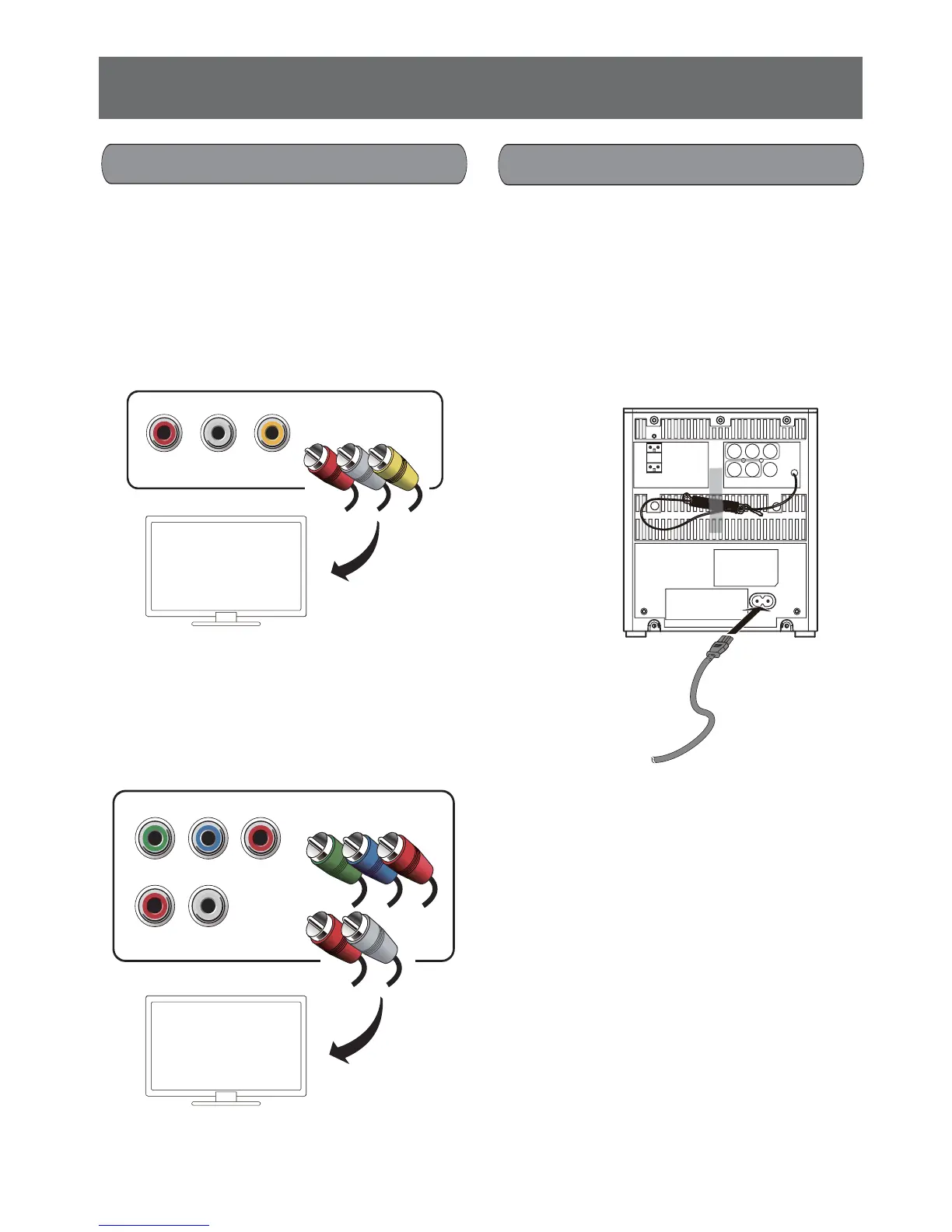
Connecting to a TV
Connect audio and video cable to output terminals
of this unit and related input terminals of TV.
Select the best video connection that your TV
supports.
Option 1: For a standard TV connect through a
composite video cable (included) and
audio cable (not included).
Terminal color: R (Red), L ( White),
VIDEO ( Yellow)
Option 2: For a Progressive Scan TV connect
through component video cables (not
included) and audio cable (not includ-
ed).
Terminal color: Y (Green), Pb/Cb ( Blue),
Pr/Cr ( Red)
VIDEOR L
LR
Pr/CrY
Pb/Cb
- Install this unit near the AC outlet where the AC
mains plug can be easily reached.
- Connect the AC mains lead only after all the
other connections have been made.
- Don’t step on or pinch the AC mains lead,
especially at plug, convenience receptacles,
and the point where they exit from the unit.
- Unplug the unit during lightning storms or when
not be used for a long time.
To household
mains socket
Connecting AC mains lead
AC mains lead
Note:
Use the AC mains lead that matches the socket
for the area you live in.
• In Saudi Arabia, always use the 3-pin AC mains
lead.
• The 2-pin AC mains lead with a label is for
Thailand.










 To Next Page