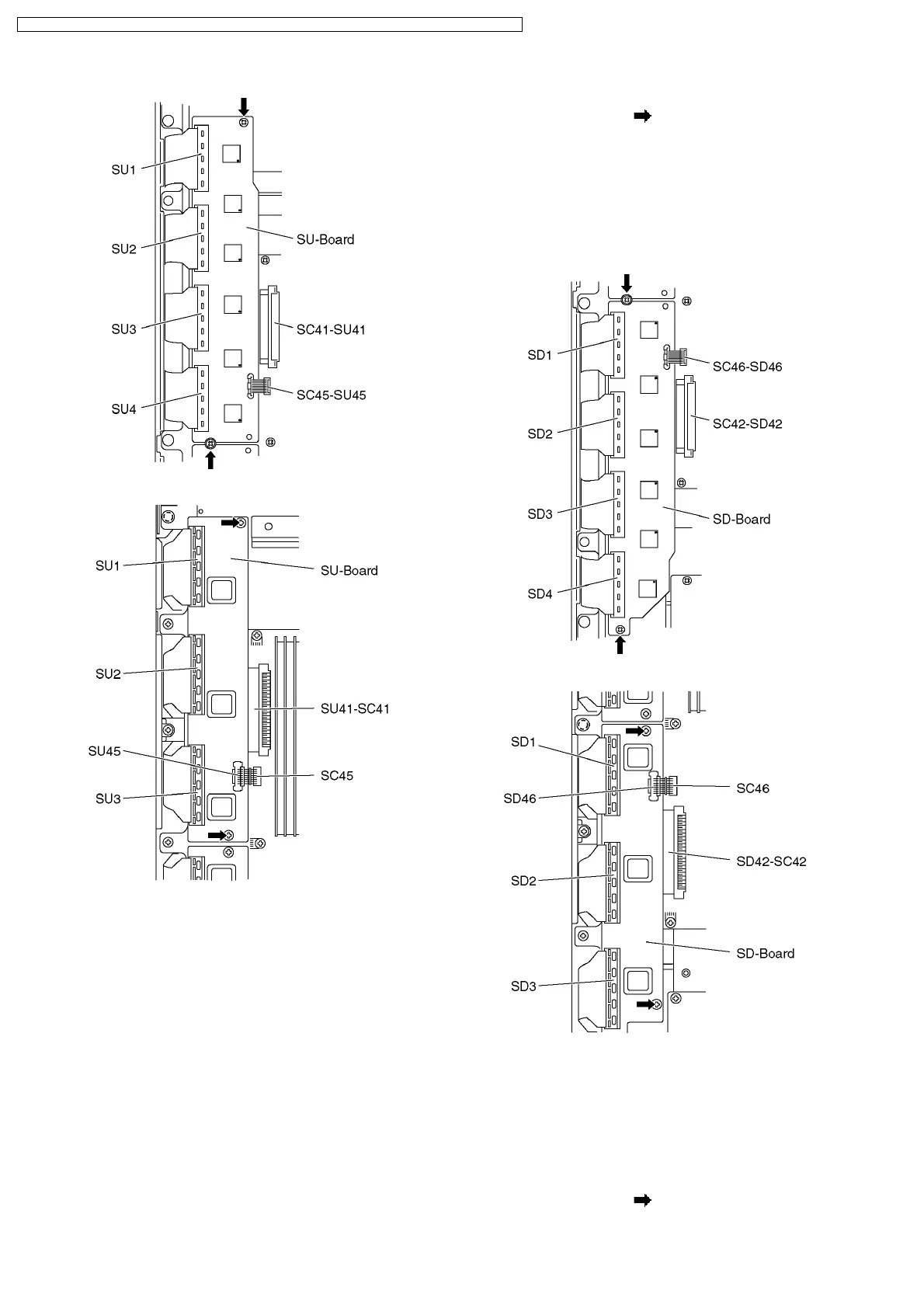
42 inch
37 inch
6.10. Remove the SD-Board
1. Remove the screws (×2 ).
2. Remove the flexible cables (SD1, SD2, SD3 and SD4 (42
inch only)) connected to the SD-Board and remove the
bridge connector (SC46-SD46).
3. Slide the SD-Board to the left to disconnect from a
connector (SC42-SD42) on the SC-Board and remove the
SD-Board.
42 inch
37 inch
6.11. Remove the SC-Board
1. Remove the SU-Board and SD-Board. (See section 6.9.
and 6.10.)
2. Unlock the cable clampers to free the cable.
3. Disconnect the connector (SC2).
4. Disconnect the flexible cable (SC20).
5. Remove the screws (×6
) and remove the SC-Board.
12
TH-37PV70F / TH-37PV70P / TH-37PX70B / TH-37PX70E / TH-42PV70F / TH-42PV70P / TH-42PX70B / TH-42PX70E




 To Next Page