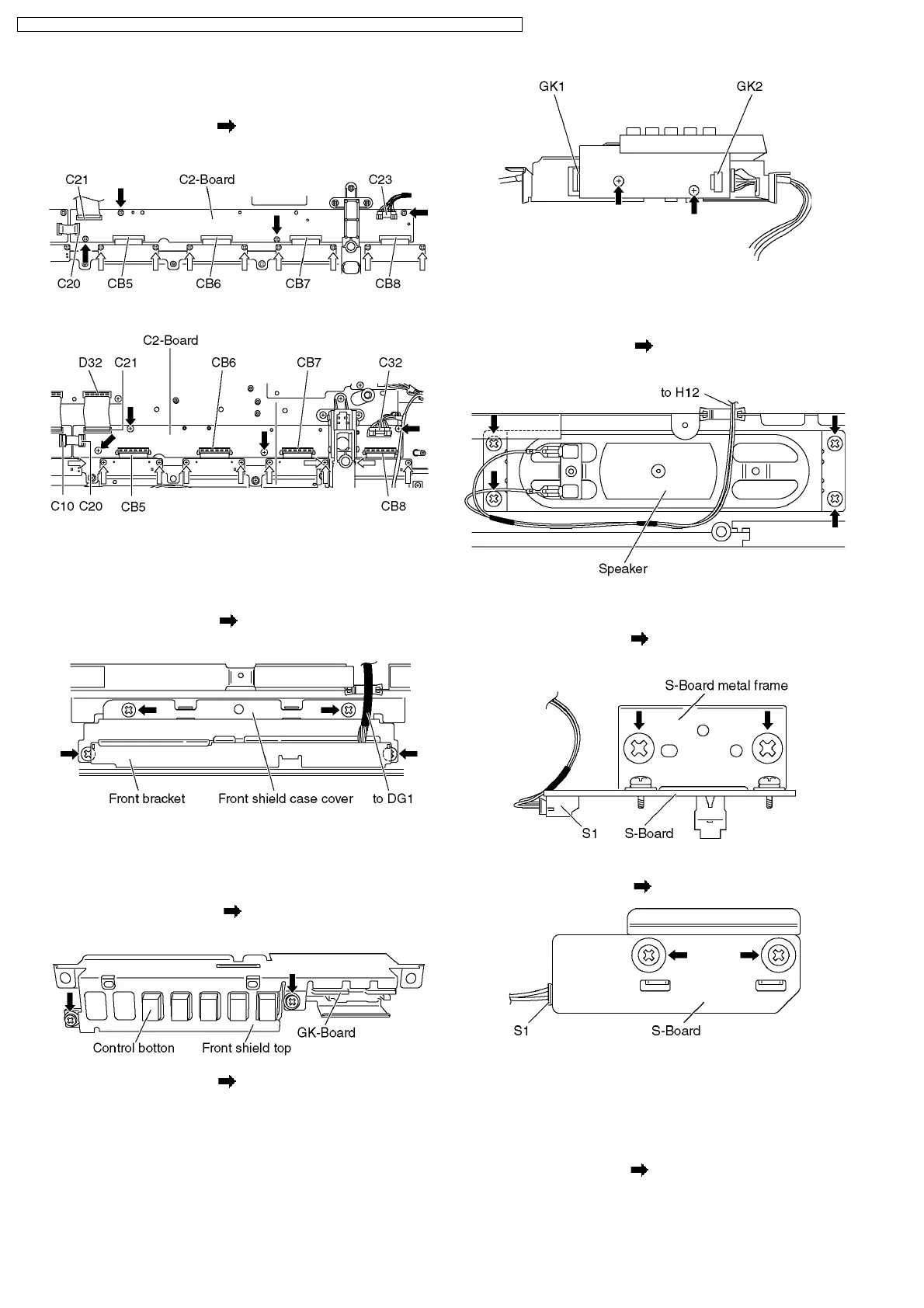
5. Disconnect the flexible cables (C20 and C21).
6. Disconnect the connector (C23).
7. Remove the screws (×4
) and remove the C2-Board.
42 inch
37 inch
6.16. Remove the front bracket and
the front shield case cover
1. Disconnect the connector (DG1). (See section 6.5.)
2. Remove the screws (×4
) and remove the front bracket
and the front shield case cover.
6.17. Remove the GK-Board
1. Remove the front bracket and the front shield case cover.
(See section 6.16.)
2. Remove the screws (×2
) and remove the front shield
top and the control button.
3. Remove the screws (×2 ) and disconnect the connector
(GK1 and GK2).
4. Remove the GK-Board.
6.18. Remove the speaker L, R
1. Disconnect the connector (H12). (See section 6.5.)
2. Remove the screws (×4
each) and remove the speaker
L, R.
6.19. Remove the S-Board
1. Remove the screws (×2 ) and remove the S-Board metal
frame.
2. Disconnect the connector (S1).
3. Remove the screws (×2
) and remove the S-Board.
6.20. Remove the K-Board
1. Remove the S-Board. (See section 6.19.)
2. Unlock the cable clampers to free the cable.
3. Disconnect the connectors (GK2). (See section 6.17.)
4. Remove the screws (×2
) and slide to the right to remove
the K-Board.
14
TH-37PV70F / TH-37PV70P / TH-37PX70B / TH-37PX70E / TH-42PV70F / TH-42PV70P / TH-42PX70B / TH-42PX70E




 To Next Page