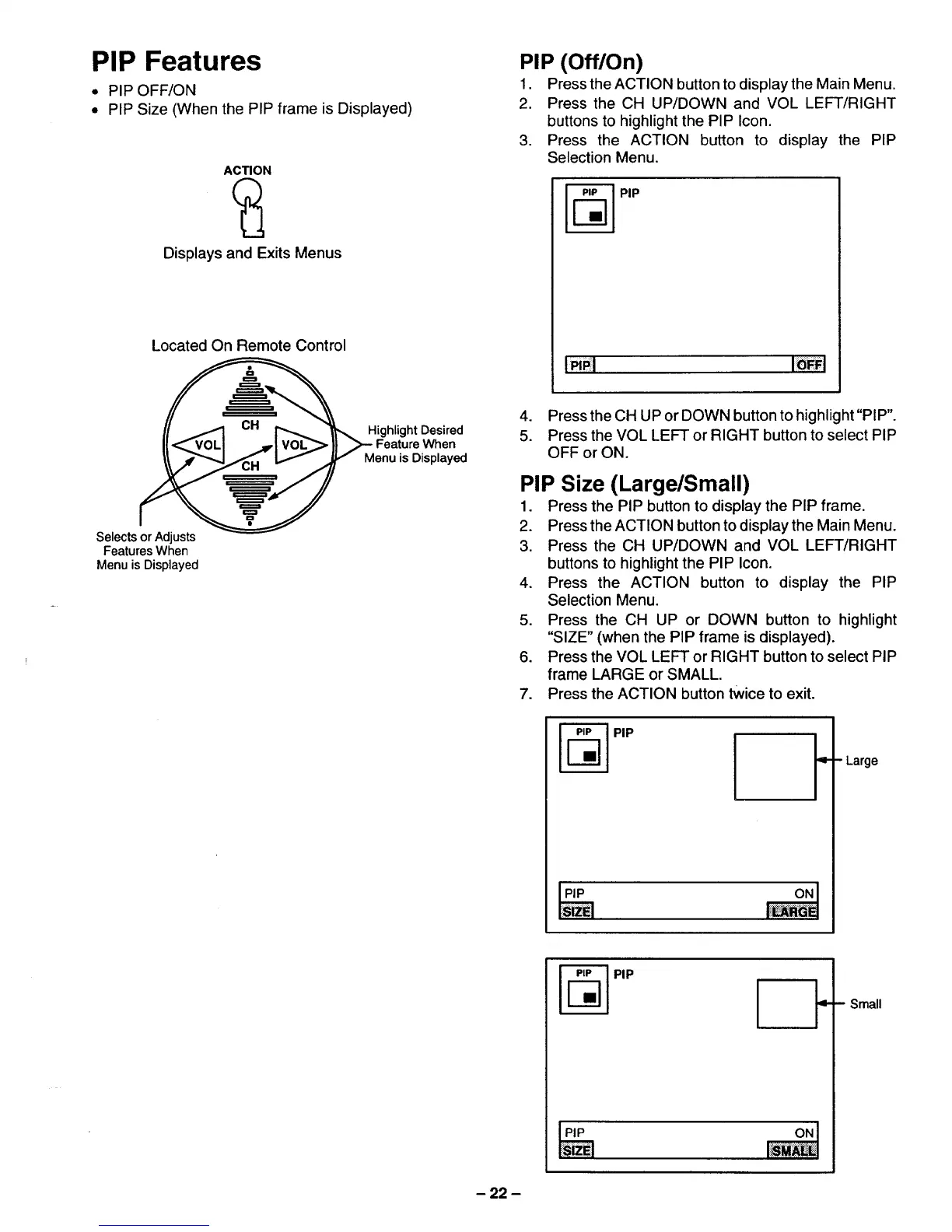
PIP Features
• PIP OFF/ON
• PIP Size (When the PIP frame is Displayed)
ACTION
Displays and Exits Menus
Located On Remote Control
_ Highlight Desired
I_ <VOLI ._'1 VOL_ _ _MeFeuatUr_)isV_,hyned
Selects or Adjusts
Features When
Menu is Displayed
PIP (Off/On)
1, Press the ACTION buttonto display the Main Menu.
2. Press the CH UP/DOWN and VOL LEFT/RIGHT
buttons to highlightthe PIP Icon.
3, Press the ACTION button to display the PIP
Selection Menu.
!_1
4. Press the CH UP or DOWN button to highlight"PIP".
5. Press the VOL LEFT or RIGHT button to select PIP
OFF or ON.
PIP Size (Large/Small)
1. Press the PIP button to display the PIP frame.
2. Press the ACTION button to display the Main Menu.
3. Press the CH UP/DOWN and VOL LEFT/RIGHT
buttons to highlight the PIP Icon.
4. Press the ACTION button to display the PIP
Selection Menu.
5. Press the CH UP or DOWN button to highlight
"SIZE" (when the PIP frame is displayed).
6. Press the VOL LEFT or RIGHT button to select PIP
frame LARGE or SMALL.
7. Press the ACTION button twice to exit.
PIP I_"
- Small
- 22 -




 To Next Page