Lockout Features
• Game Lockout
• Channel Lockout
• All Channels plus Video Inputs Lockout
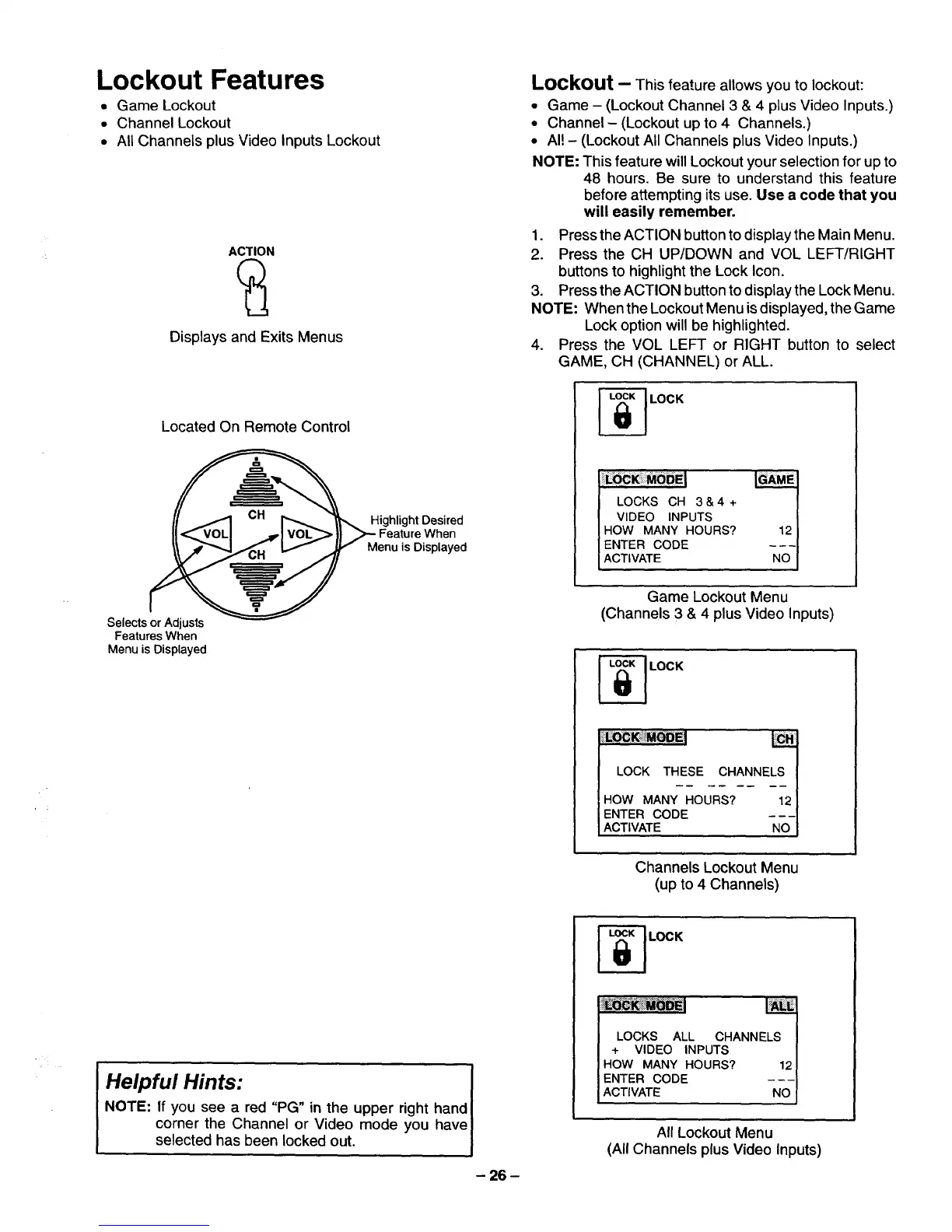
ACTION
Displays and Exits Menus
Located On Remote Control
Highlight Desired
When
Menu is Displayed
Selects or Adjusts
Features When
Menu is Displayed
====
Lockout - This feature allows you to lockout:
• Game - (Lockout Channel 3 & 4 plus Video Inputs.)
• Channel- (Lockout up to 4 Channels.)
• AIr - (Lockout All Channels plus Video Inputs.)
NOTE: This feature will Lockout your selection for up to
48 hours. Be sure to understand this feature
before attempting its use. Use a code that you
will easily remember.
1. Press the ACTION button to displaythe Main Menu.
2. Press the CH UP/DOWN and VOL LEFT/RIGHT
buttons to highlightthe Lock Icon.
3. Press the ACTION button to display the Lock Menu.
NOTE: When the Lockout Menu is displayed, the Game
Lock option will be highlighted.
4. Press the VOL LEFT or RIGHT button to select
GAME, CH (CHANNEL) or ALL.
LOCK
I LOCKS CH 3&4+
I VIDEO INPUTS
IHOW MANY HOURS? 12
I ENTER CODE
I ACTIVATE NO
Game Lockout Menu
(Channels 3 & 4 plus Video Inputs)
K--_LOCK
]iLO_K_i!M_E]
ILoc
I HOW MANY HOURS? 12 I
IENTER CODE .... I
IACTIVATE NOI
Channels Lockout Menu
(up to 4 Channels)
Helpful Hints:
NOTE: If you see a red "PC" in the upper right hand
corner the Channel or Video mode you have
selected has been locked out.
- 26 -
LOCK
I LOCKS ALL CHANNELS_
I + VIDEO INPUTS |
IHOW MANY HOURS? 121
I ENTER CODE ---I
IACTIVATE NO I
AllLockoutMenu
(AllChannels plusVideo Inputs)






 To Next Page