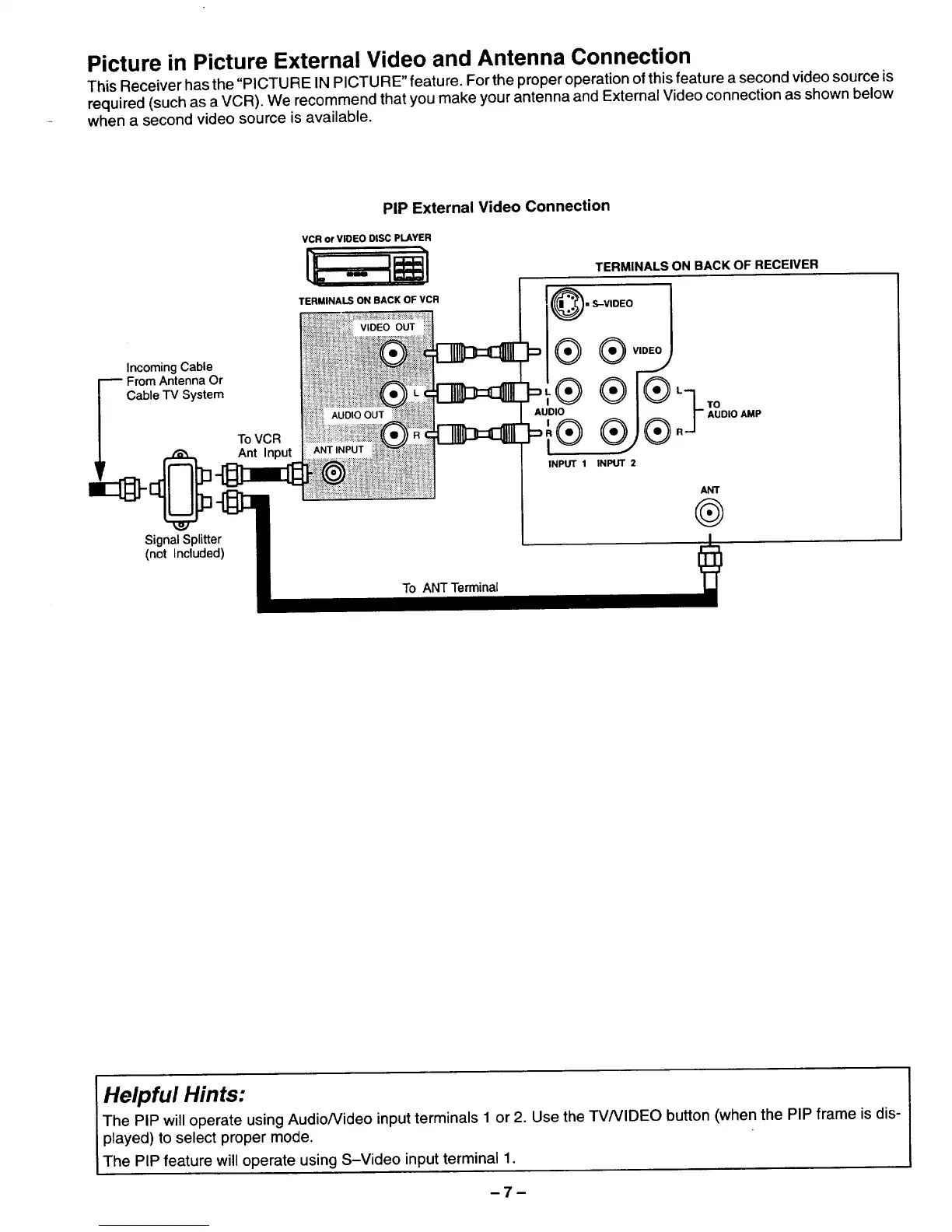
Picture in Picture External Video and Antenna Connection
This Receiver has the "PICTURE IN PICTURE" feature. For the proper operation of this feature a second videosource is
required (such as a VCR). We recommend that you make yourantenna and External Video connection as shown below
when a second video source is available.
Incoming Cable
_ Fr°blrne_esyns_eO_
ToVCR
Ant Input
Signal Splitter
(not Included)
PIP External Video Connection
VCR or VIDEO DISC PLAYER
TERMINALS ON BACK OF VCR
VIDEO OUT
I
®
AUDIO OUT AUOIO
ANT INPUT I
TERMINALS ON BACK OF RECEIVER
• S-VIDEO
AUDIOAMP
R
INPUT 1 INPUT 2
ANT
®
To ANT Terminal
Helpful Hints:
The PIP will operate using Audio/Video input terminals 1 or 2. Use the TVNIDEO button (when the PIP frame is dis-
played) to select proper mode.
The PIP feature will operate using S-Video input terminal 1.
-7-




 To Next Page