Favorite Channel Feature
• Chan (Channel) Scan AII/Fav
• Fay CH Select
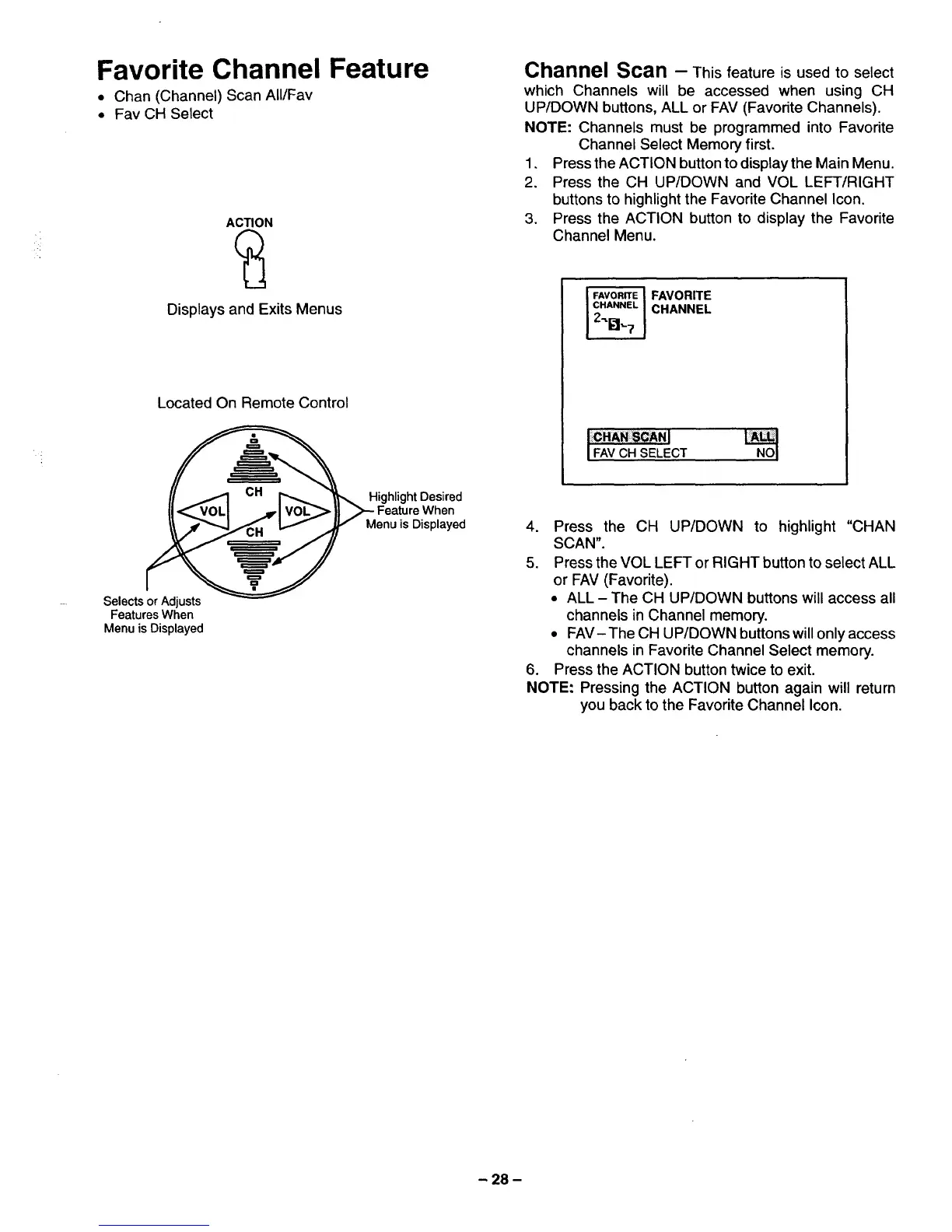
ACTION
Displays and Exits Menus
Located On Remote Control
Channel Scan - This feature is used to select
which Channels will be accessed when using CH
UP/DOWN buttons, ALL or FAV (Favorite Channels).
NOTE: Channels must be programmed into Favorite
Channel Select Memory first.
1, Press the ACTION buttonto displaythe Main Menu.
2. Press the CH UP/DOWN and VOL LEFT/RIGHT
buttons to highlightthe Favorite Channel Icon.
3. Press the ACTION button to display the Favorite
Channel Menu.
_ FAVORITE
CHANNEL
I:-CHANSCANI
IFAyCHSELECT NOI
Selects or Adjusts
Features When
Menu is Displayed
Highlight Desired
Menu is Displayed
4. Press the CH UP/DOWN to highlight "CHAN
SCAN".
5. Press the VOL LEFT or RIGHT button to select ALL
or FAV (Favorite).
• ALL - The CH UP/DOWN buttons will access all
channels in Channel memory.
• FAV-The CH UP/DOWN buttons will only access
channels in Favorite Channel Select memory.
6. Press the ACTION button twice to exit.
NOTE: Pressing the ACTION button again will return
you back to the Favorite Channel Icon.
- 28 -






 To Next Page