13
English
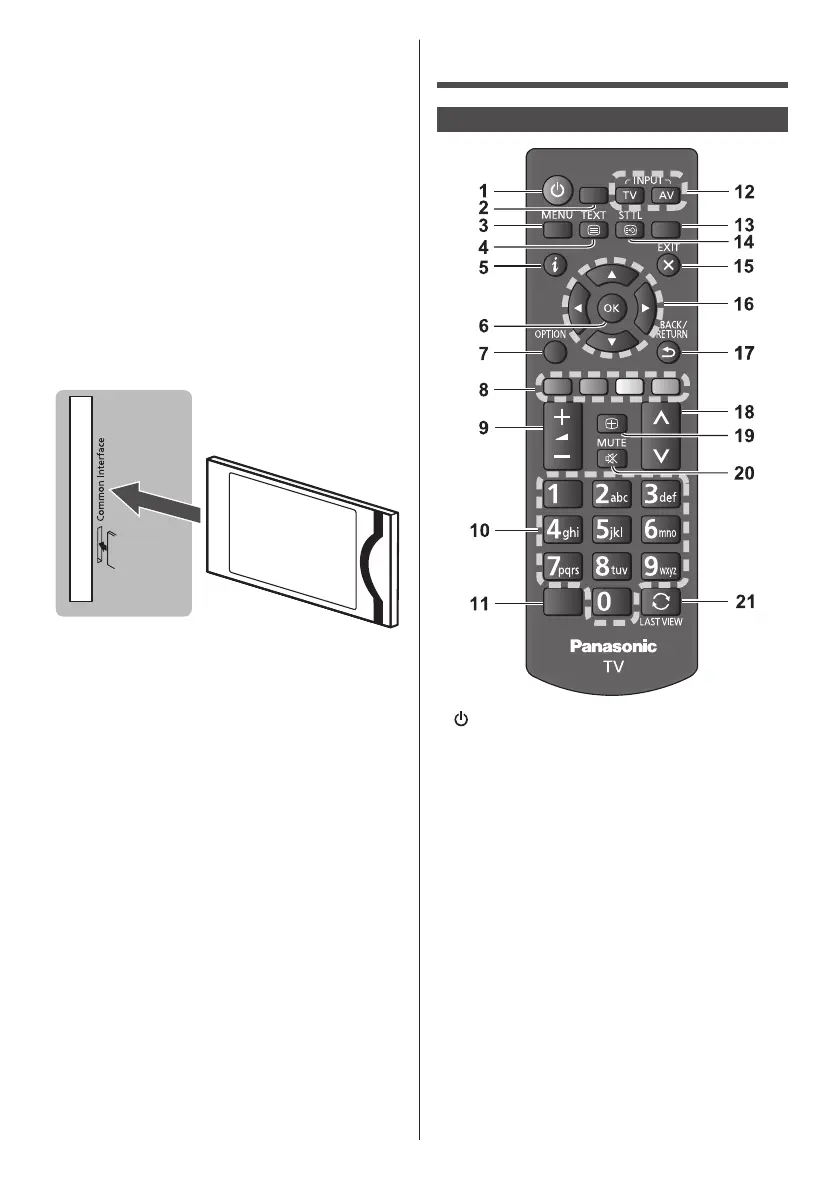
■ Common Interface
●
Unplugthepowercordbeforeinsertingorremoving
theCImodule.
●
IfasmartcardandaCImodulecomeasaset,first
inserttheCImodule,theninsertthesmartcardinto
theCImodule.
●
InsertorremovetheCImodulecompletelyinthe
correctdirectionasshown.
●
Normallyencryptedchannelswillappear.(Viewable
channelsandtheirfeaturesdependontheCI
module.)
●
TheremightbesomeCImodulesinthemarketwith
olderornewerfirmwareversionsthatdonotwork
fullyinteroperablewiththisCI+v1.3TV.Inthiscase,
pleasecontactyourcontentprovider.
●
BesuretoremovetheCImodulecard,etc.before
repairing,transferringordiscarding.
TV
CImodule
Identifying Controls
Remote Control
MEDIA
PLAYER
GUIDE
ASPECT
STILL
1
●
WhenLEDlightson,switchesTVonorstandby.
2 MEDIA PLAYER
●
DisplayfilesfromUSB.
3 MENU
●
PresstoaccessChannels,Sources,Utilities,and
Settings.
4 Teletext button
●
PresstoopenorcloseText/Teletext.
5 Information
●
Displayschannelandprogrammeinformation.
6 OK
●
Confirmsselectionsandchoices.
●
Pressafterselectingchannelpositionstoquickly
changechannel.
7 OPTION
●
PresstoopenorclosetheOptionsmenu.
8 Coloured buttons
(red-green-yellow-blue)
●
Usedfortheselection,navigationandoperationof
variousfunctions.



 To Next Page