10
English
Installing the wall-
hanging bracket
Please contact your local Panasonic dealer to purchase
the recommended wall-hanging bracket.
●
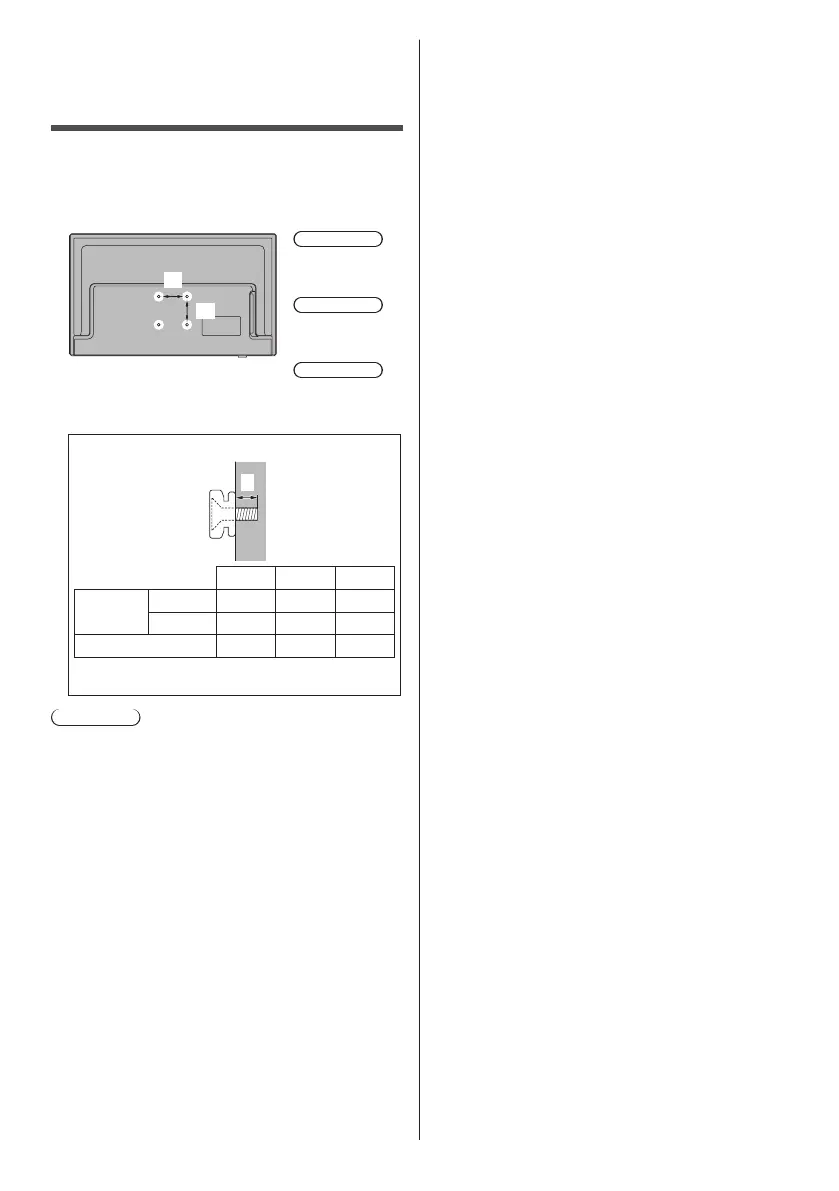
Holes for wall-hanging bracket installation
Rear of the TV
a
b
24-inch model
a: 100 mm
b: 200 mm
32-inch model
a: 100 mm
b: 100 mm
43-inch model
a: 200 mm
b: 200 mm
(View from the side)
L
24-inch 32-inch 43-inch
Depth of
screw (L)
min. (mm)
8 8 14
max. (mm)
10 10 17
Diameter M4 M6 M6
Screw for fixing the TV onto the wall-hanging
bracket (not supplied with the TV)
Warning
●
Using other wall-hanging brackets, or installing a wall-
hanging bracket by yourself have the risk of personal
injury and product damage. In order to maintain the
unit’s performance and safety, be absolutely sure to
ask your dealer or a licensed contractor to secure
the wall-hanging brackets. Any damage caused by
installing without a qualified installer will void your
warranty.
●
Carefully read the instructions accompanying optional
accessories, and be absolutely sure to take steps to
prevent the TV from falling off.
●
Handle the TV carefully during installation since
subjecting it to impact or other forces may cause
product damage.
●
Take care when fixing wall brackets to the wall.
Always ensure that there are no electrical cables or
pipes in the wall before hanging bracket.
●
To prevent fall and injury, remove the TV from its fixed
wall position when it is no longer in use.
●
Please be advised for wall hanging functionality using
VESA certified bracket (Vertical HDMI cannot be
accessed).





 To Next Page