28
English
Using Media Player
MediaPlayerallowsyoutoenjoyphoto,videoormusic
storedontheUSBFlashMemory/USBHDD.
EasyListView:
Stillpictures/movingpicturesstoredwithdigital
camerasaredisplayed.
MixFolderView:
Allfilesgroupedbyfolderaredisplayed.
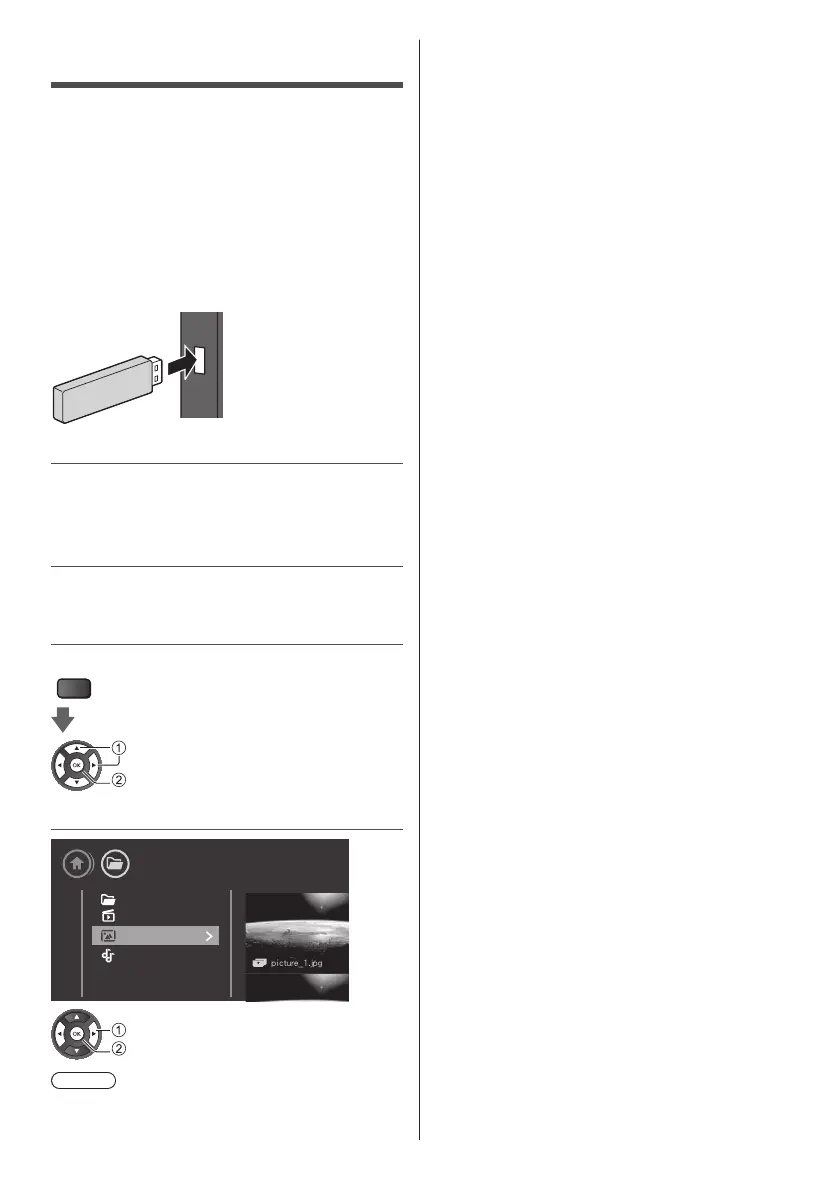
■ To insert or remove the USB Flash Memory
Ensurealignmentisstraightandcompletewhen
insertingorremoving.
●
ConnecttheUSBFlashMemorytotheUSBport.
●
Checktheterminaltypeanddevicesarecorrectfor
connection.
1 Insert the USB Flash Memory to the
TV
●
ToplaybackcontentintheUSBHDDdevice,ensure
theconnectionandsettingsarecompleted.
2 Display multimedia
PLAYER
select
access
3 Select the content
Media
USB device
Folders
Videos
Photos
Music
select
access
Note
●
Selecttheappropriatedeviceandcontentforplaying
backeachfile.
■ Supported USB file System
●
USB(FAT/FAT32/NTFS):onlyconnectUSB
devicesthatconsume500mAofpowerorless.
■ Playback formats
●
ImageCodec:JPEG,GIF,PNG,BMP
●
AudioCodec:MP3,WAV,WMA(v2uptov9.2),
AC3,AAC,HE-AAC,DTS2.0
●
VideoCodec:AVI,MKV,H.264/MPEG-4AVC,
MPEG1,MPEG2,MPEG4,WMV9/VC1
●
Subtitle:SRT,SMI,SSA,SUB,ASS,TXT









 To Next Page