29
English
Setup menu
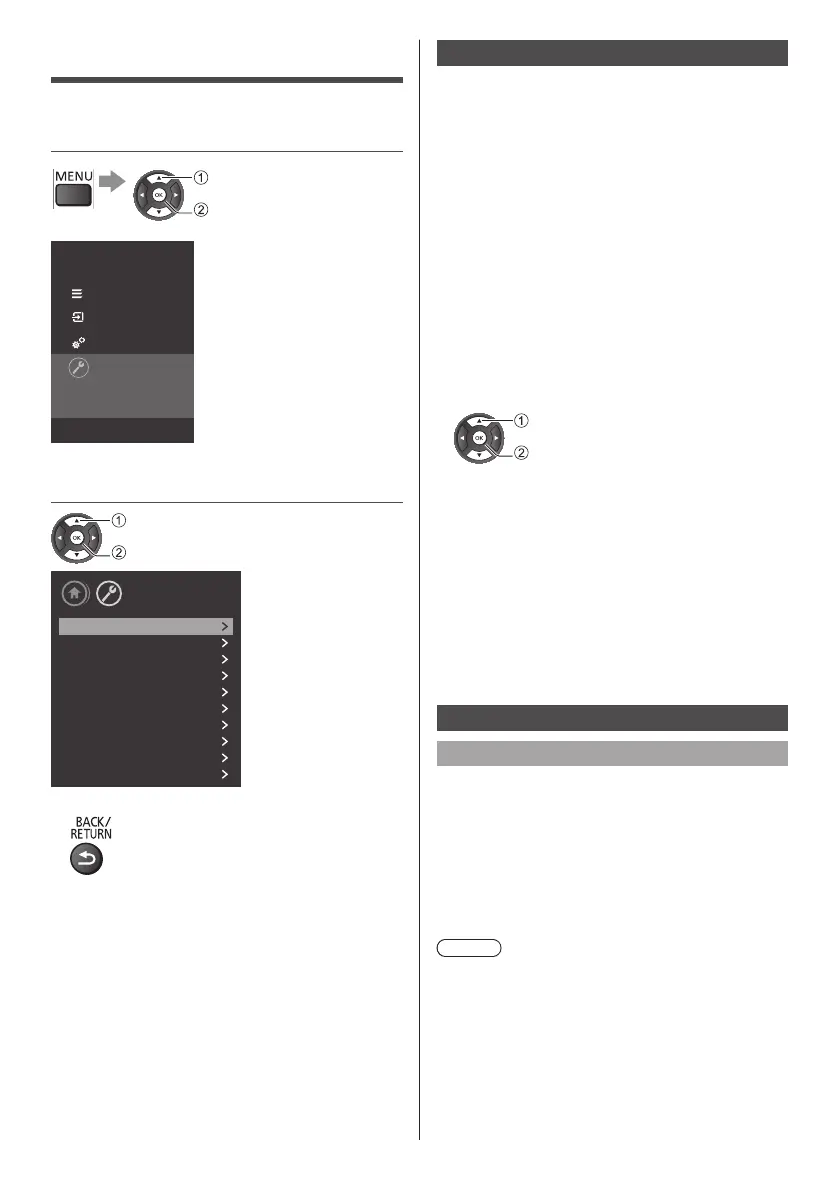
1 Display the menu and select
[Settings]
select
access
Panasonic TV
Channels
Sources
Utilities
Settings
Select to view the list of settings,
offered in this TV.
2 Select the item and press OK to
access
select
access
Setup
Picture
Sound
Eco settings
General settings
Region and Language
Universal access
Child lock
Antenna/Cable installation
Satellite installation
Update software
●
Toreturntothepreviousscreen
Eco settings
■ [Energy saving]
Setenergysavinglevel.
Select[Minimum],[Medium],or[Maximum]tohave
differentdegreesforenergysaving,orselect[Off]to
switchoffenergysavingmode.
■ [Screen off]
Setscreenofftosaveenergyconsumption.
Select[Screenoff],theTVscreenisswitchedoff,to
switchtheTVscreenbackon,pressanykeyonthe
remotecontrol.
●
WhenTVisinscreenoffmode,theLEDlights
greenandblinksevery2seconds.
■ [Switch off timer]
SetTVswitchofftimer.
Presstoadjustthevalue.Thevalue0(Off)
deactivatestheautomaticswitchoff.
select
access
SelectSwitchofftimer,theTVswitchesoff
automaticallytosaveenergy.
●
TVswitchesoffifreceivingaTVsignalbutyou
don’tpressakeyontheremotecontrolduringa4
hourperiodbydefault.
●
TVswitchesoffifnotreceivingaTVsignalnora
remotecontrolcommandfor10minutes.
●
IfyouusetheTVasamonitororuseadigital
receivertowatchTV(aSet-TopBox-STB)and
youdonotusetheremotecontroloftheTV,you
shoulddeactivatethisautomaticswitchoff,toset
thevalueto0.
General settings
Connection Related Settings
■ HDMI-CEC Connection
ConnectHDMICEC-compatibledevicestoyourTV,
youcanoperatethemwiththeTVremotecontrol.HDMI
CECmustbeswitchedonontheTVandtheconnected
device.
●
SwitchonCEC
●
OperateHDMICEC-compatibledeviceswithTV
remotecontrol
Note
●
CECmightnotworkwithdevicesfromother
brands.
●
TheHDMICECfunctionalityhasdifferent
namesondifferentbrands.Notallbrandsare
fullycompatiblewithCEC.ExampleHDMICEC
brandingnamesarepropertyoftheirrespective
owners.








 To Next Page