24
English
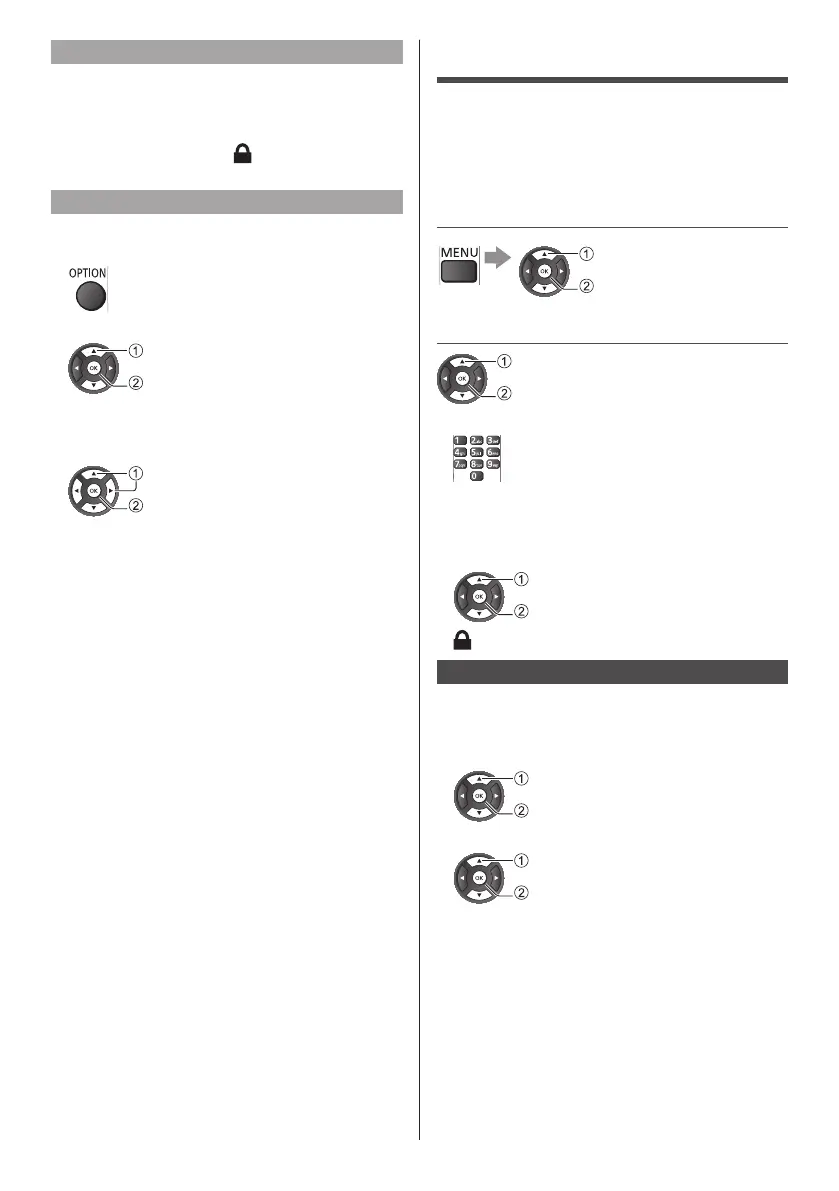
Lock / Unlock channel
Topreventchildrenfromwatchingachannel,youcan
lockachannel.Towatchalockedchannel,youmust
enterthe4digitChildLockPINcodefirst.Youcannot
lockprogrammesfromconnecteddevices.
Thelockedchannelwillhave nexttothechannel
logo.
Search channel
Searchforachanneltofinditinalonglistofchannels.
1Displayoptionmenu
2Select[Searchchannel]
select
access
3Inthetypingfield,pressOKtoopenon-screen
keyboard
4Usenavigationkeystoselectacharacter
select
set
5Select[Done]whencompletetheediting.
Child Lock
Youcanlockspecificchannelstorestrictaccessto
them.
Whenthelockedchannelisselected,amessage
appears.EnterthePINnumbertowatch.
1 Display the menu and select
[Settings]
select
access
2 Select [Child lock]
select
access
1EnterthePINnumber(4digits)
●
EnterthePINnumbertwiceatfirstsetting.
●
MakeanoteofthePINnumberincaseyouforget
it.
2Selectthechanneltobelocked
select
lock/unlock
:Appearswhenthechannel/inputislocked
Parental rating
TowatchtheDVBprogrammethathasrating
informationontheselectedage,enterthePINnumber
(dependingonthebroadcaster).
1Select[ParentalRating]
select
access
2Selectanagefortherestrictionofprogrammes
select
access
●
Theavailabilityofthisfunctiondependsonthe
countryyouselect







 To Next Page