17
English
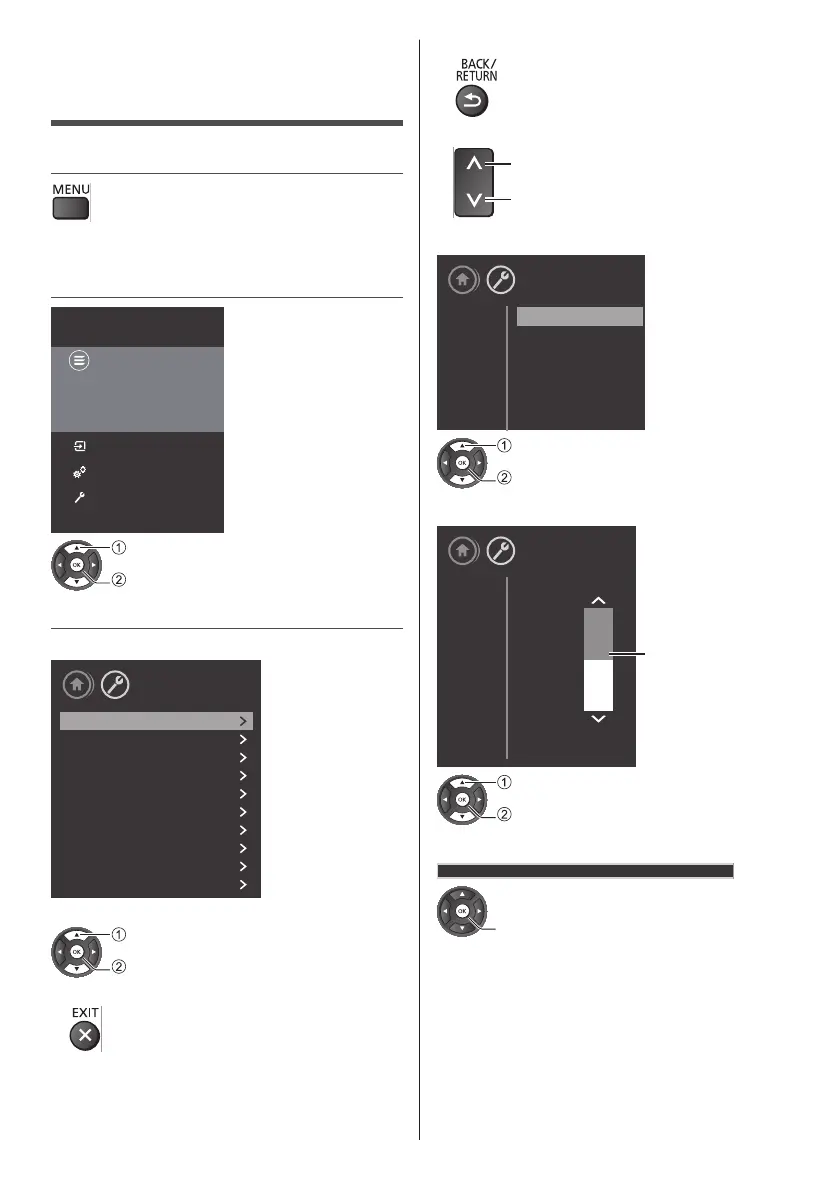
How to Use Menu
Functions
1 Display the menu
●
Displaysthefunctionsthatcanbeset(varies
accordingtotheinputsignal).
2 Select the menu
Panasonic TV
Channels
Sources
Utilities
Settings
Game Of Thones
11:30 - 13:30
Summers span decades. Winters
can last a lifetime. And the struggle
for the Iron Throne has begun...
select
access
3 Select the item
Example:[PictureMenu]
Picture
Sound
Eco settings
General settings
Region and Language
Universal access
Child lock
Antenna/Cable installation
Satellite installation
Update software
Setup
Operationguide
select
access
●
Toexitthemenuscreen
●
Toreturntothepreviousscreen
●
Tochangemenupages
up
down
■ Choose from among alternatives
Setup
Picture
Viewing Mode
Custom
Dynamic
Natural
Normal
Cinema
Game
select
store
■ Adjust using the slide bar
Setup
Picture
Sharpness
Sharpness
10
5 5
0
Moved
change
store
■ Go to the next screen
ChildLock
access





 To Next Page