31
English
Software
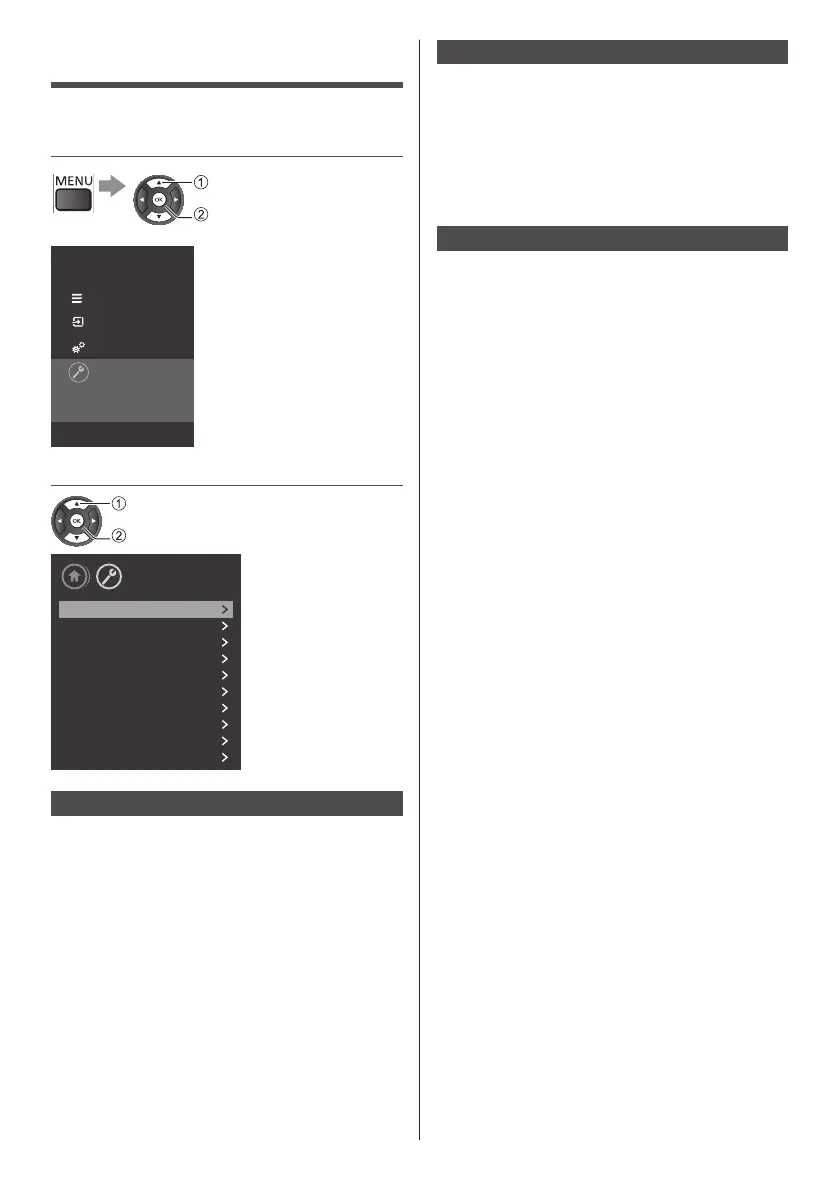
1 Display the menu and select
[Settings]
select
access
Panasonic TV
Channels
Sources
Utilities
Settings
Select to view the list of settings,
offered in this TV.
2 Select [Update software]
select
access
Setup
Picture
Sound
Eco settings
General settings
Region and Language
Universal access
Child lock
Antenna/Cable installation
Satellite installation
Update software
Update Software
■ [Local Updates]
Thisisfordealersandexpertusers.
■ [Look for OAD updates]
ScantosearchanOver-the-airsoftwareupdate.
●
TheavailabilityofOADupdatesisdependson
yourcountry.
Software Version
■ [Current software info]
ViewthecurrentTVsoftwareversionandinformation.
■ [View software update history]
Viewthesoftwareupdatehistory.
●
Theavailabilityofviewingsoftwareupdatehistory
isdependsonyourcountrywithOAD.
Open Source Software
ThisTVcontainsopensourcesoftware.Select[OSS]to
viewtheopensource.









 To Next Page