EasyManua.ls Logo

Panasonic TX-29FJ50A - Remote Control Operations; Remote Picture Menu Operation; Remote Sound Menu Operation

Panasonic TX-29FJ50A
23 pages
Print Icon
To Next Page IconTo Next Page
To Previous Page IconTo Previous Page
Loading...
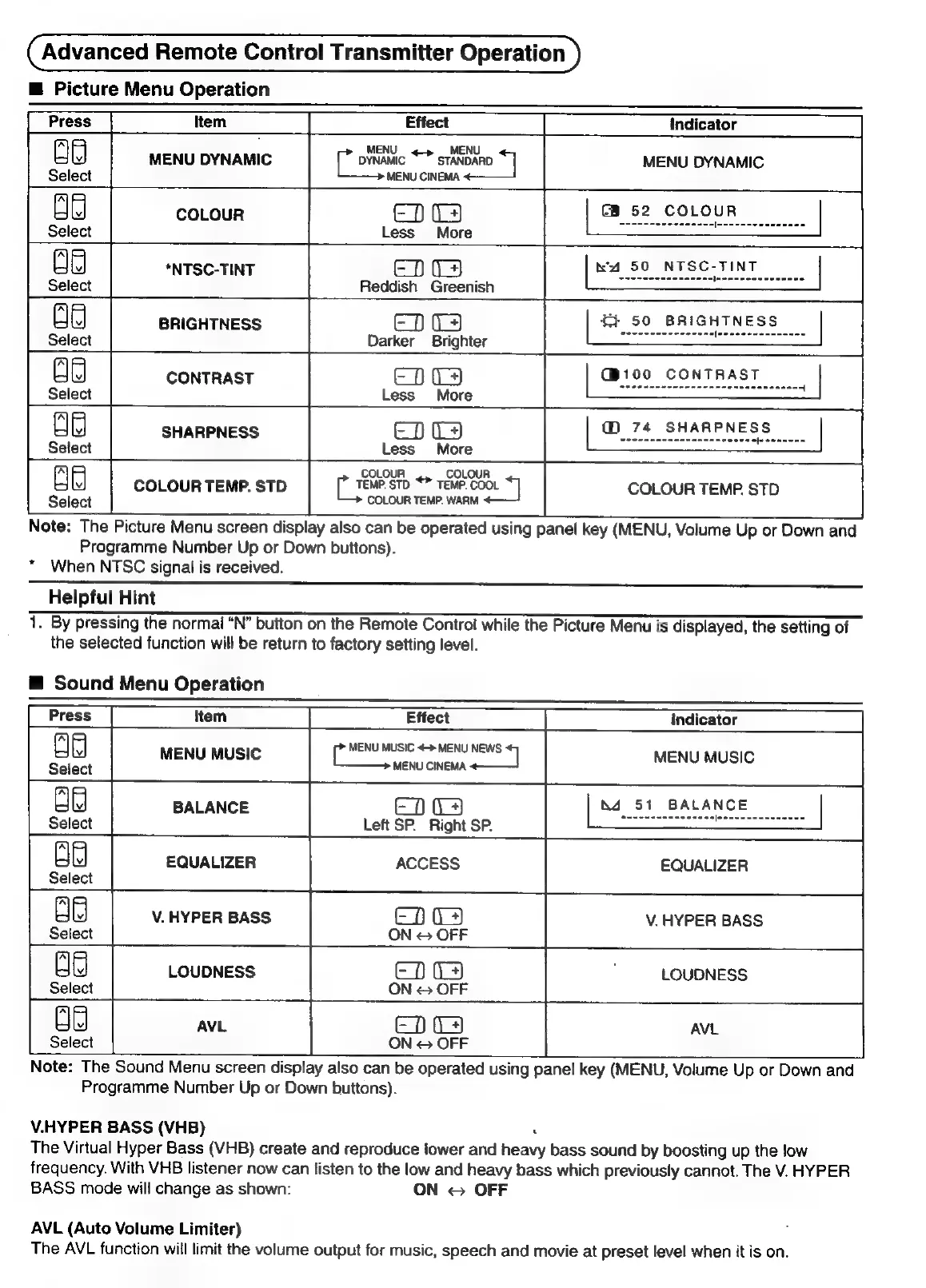
Advanced
Remote
Control
Transmitter
Operation
@
Picture
Menu
Operation
ld
DYNAMIC
*
STANDARD
4]
MENU
DYNAMIC
MENU
CINEMA.
ED
4
CB
52
COLOUR
Less
More
EDS
Reddish
Greenish
ED
04
Darker
Brighter
ED
4
Less
More
EDA
Less
More
COLOUR
COLOUR
[ee
STD
*™
TEMP.
COOL
COLOUR
TEMP.
STD
COLOUR
TEMP.
WARM
Note:
The
Picture
Menu
screen
display
also
can
be
operated
using
panel
key
(MENU,
Volume
Up
or
Down
and
Programme
Number
Up
or
Down
buttons).
“When
NTSC
signal
is
received.
Helpful
Hint
———————————————————————————————————————————
1.
By
pressing
the
normal
“N”
button
on
the
Remote
Control
while
the
Picture
Menu
is
displayed,
the
setting
of
the
selected
function
will
be
return
to
factory
setting
level.
@
Sound
Menu
Operation
item
Effect
Indicator
MENU
MUSIC
+>
MENU
NEWS
et
MENU
MUSIC
‘seni
CaNcaMA
MENU
MUSIC
BALANCE
EDS
51
BALANCE
Select
Left
SP.
Right
SP.
EQUALIZER
ACCESS
EQUALIZER
Select
V.
HYPER
BASS
ED
V.
HYPER
BASS
Select
ON
©
OFF
LOUDNESS
ED
LOUDNESS
Select
ON
©
OFF
AVL
ED
AVL
Select
ON
©
OFF
Note:
The
Sound
Menu
screen
display
also
can
be
operated
using
panel
key
(MENU,
Volume
Up
or
Down
and
Programme
Number
Up
or
Down
buttons).
V.HYPER
BASS
(VHB)
j
The
Virtual
Hyper
Bass
(VHB)
create
and
reproduce
lower
and
heavy
bass
sound
by
boosting
up
the
low
frequency.
With
VHB
listener
now
can
listen
to
the
low
and
heavy
bass
which
previously
cannot.
The
V.
HYPER
BASS
made
will
change
as
shown:
ON
©
OFF
AVL
(Auto
Volume
Limiter)
The
AVL
function
will
limit
the
volume
output
for
music,
speech
and
movie
at
preset
level
when
it
is
on.

Related product manuals