EasyManua.ls Logo

Panasonic TX-29FJ50A - Helpful Hint

Panasonic TX-29FJ50A
23 pages
Print Icon
To Next Page IconTo Next Page
To Previous Page IconTo Previous Page
Loading...
Tuning
Procedure
M@
Preset
Menu
Operation
Geomagnetism
Correction
Since
a
large
picture
tube
has
been
used,
blurring
of
colours
and
strange
discolouration
Patches
may
occur
depending
on
the
direction
the
television
faces.
This
is
caused
by
a
geomagnetic
effect.
For
optimum
viewing,
it
is
necessary
to
adjust
the
TV
placement.
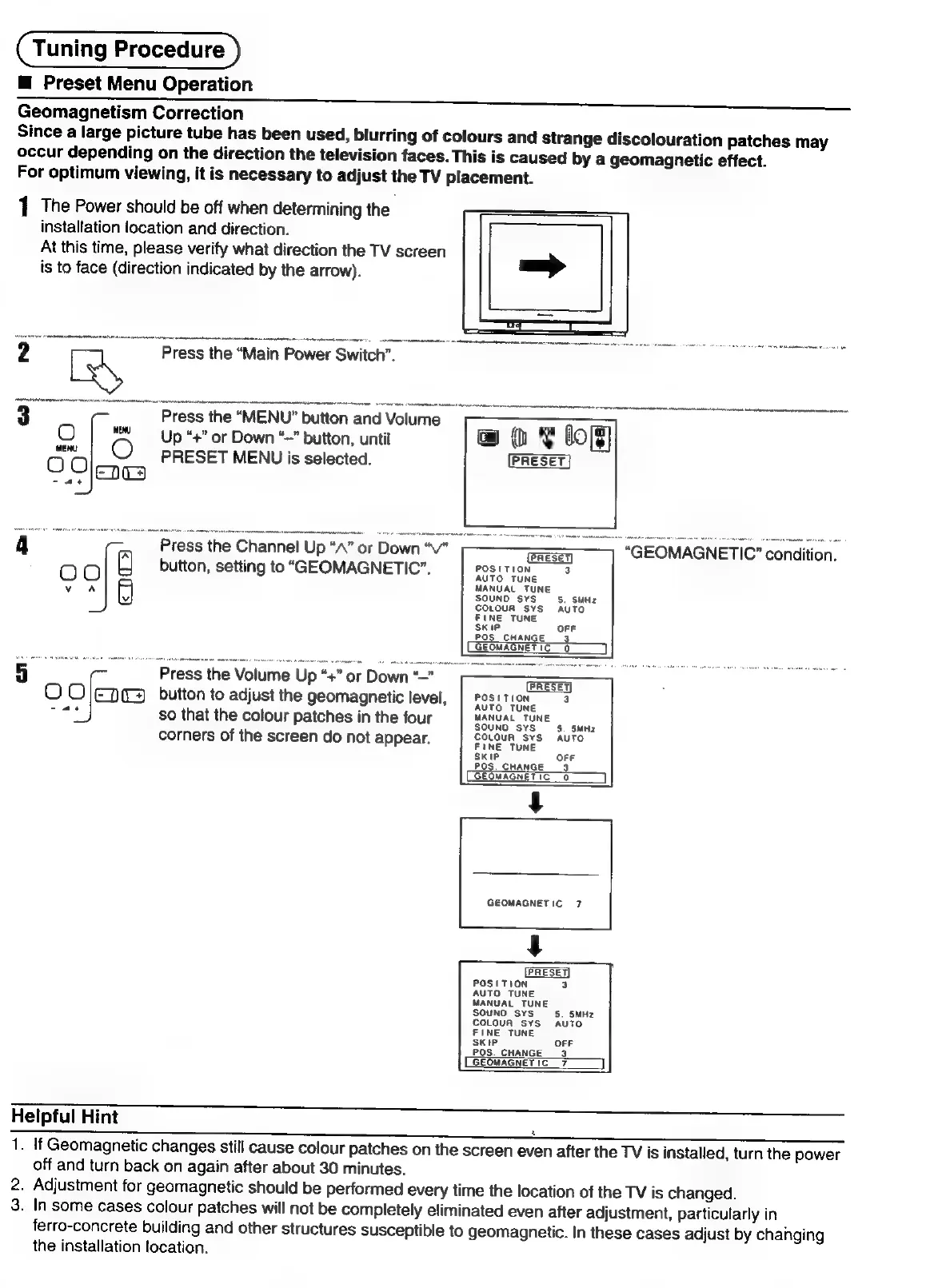
1
The
Power
should
be
off
when
determining
the
installation
location
and
direction.
At
this
time,
please
verify
what
direction
the
TV
screen
is
to
face
(direction
indicated
by
the
arrow).
?
Press
the
“Main
Power
Switch
3
Press
the
“MENU”
button
and
Volume
O
|
Up
“+”
or
Down
“~"
button,
until
fete
O
preset
MENU
is
selected.
EDT
-
ae
@
%
Cop]
4
Press
the
Channel
Up
“A”
or
Down
“V"
OO
button,
setting
to
“GEOMAGNETIC”.
70s
1
Tee
v
A
5
5
Press
the
Volume
Up
“+”
or
Down
“—”
O
OJjEpe
button
to
adjust
the
geomagnetic
level,
ie
so
that
the
colour
patches
in
the
four
corners
of
the
screen
do
not
appear.
OFF
POS.
CHANGE
9
GEOMAGNETIC
0
GEOMAGNETIC
7
PRESET)
POSITION
3
AUTO
TUNE
MANUAL
TUNE
oF
POS
CHANGE
2
GEOMAGNETIC
7
Helpful
Hint
1.
If
Geomagnetic
changes
still
cause
colour
patches
on
the
screen
even
after
the
TV
is
installed,
turn
the
power
off
and
turn
back
on
again
after
about
30
minutes.
2.
Adjustment
for
geomagnetic
should
be
performed
every
time
the
location
of
the
TV
is
changed.
3.
In
some
cases
colour
patches
will
not
be
completely
eliminated
even
after
adjustment,
particularly
in
ferro-concrete
building
and
other
structures
susceptible
to
geomagnetic.
In
these
cases
adjust
by
changing
the
installation
location.

Related product manuals