EasyManua.ls Logo

Panasonic TX-29FJ50A - Page 14

Panasonic TX-29FJ50A
23 pages
Print Icon
To Next Page IconTo Next Page
To Previous Page IconTo Previous Page
Loading...
Tuning
Procedure
M
Pos.
Change
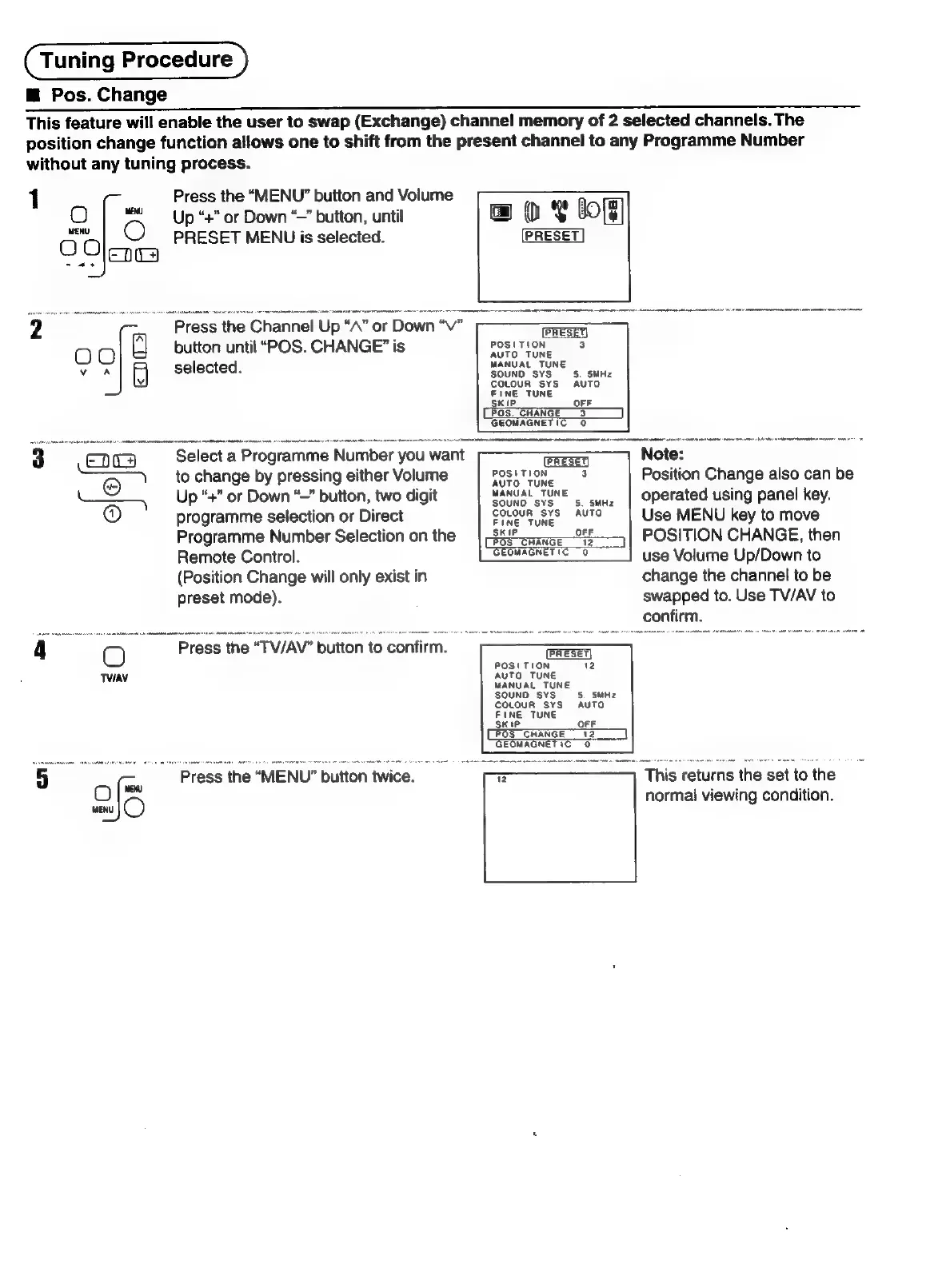
This
feature
will
enable
the
user
to
swap
(Exchange)
channel
memory
of
2
selected
channels.
The
position
change
function
allows
one
to
shift
from
the
present
channel
to
any
Programme
Number
without
any
tuning
process.
1
Press
the
“MENU”
button
and
Volume
O
|
Up
“+”
or
Down
‘—
button,
until
1
&
bof]
O00
Oe
PRESET
MENU
is
selected.
PRESET
=
2
~~
_
Press
the
Channel
Up
“A”
or
Down
“V”
O
O
A
button
until
“POS.
CHANGE”
is
POSITION
3
iu
selected.
MANUAL
TUNE
SKIP
OFF
POS
CHANGE
3
GEOMAGNETIC
0
3
Select.
a
Programme
Number
you
want
RESET
Note:
eo
to
change
by
pressing
either
Volume
BOSHTION:
8
Position
Change
also
can
be
Up
“+”
or
Down
“—”
button,
two
digit
MANUAL
TUNE
©...
|
Operated
using
panel
key.
@
programme
selection
or
Direct
CoLoun
ste.
AUTO
Use
MENU
key
to
move
Programme
Number
Selection
on
the
POSITION
CHANGE,
then
Remote
Control.
BMAGNET
IC."
2
use
Volume
Up/Down
to
(Position
Change
will
only
exist
in
change
the
channel
to
be
preset
mode).
swapped
to.
Use
TV/AV
to
confirm.
4
O
Press
the
“TV/AV"
button
to
confirm.
TVIAV
5
of
"Press
the
“MENU”
button
twice.
This
returns
the
set
to
the
on
normal
viewing
condition.

Related product manuals