EasyManua.ls Logo

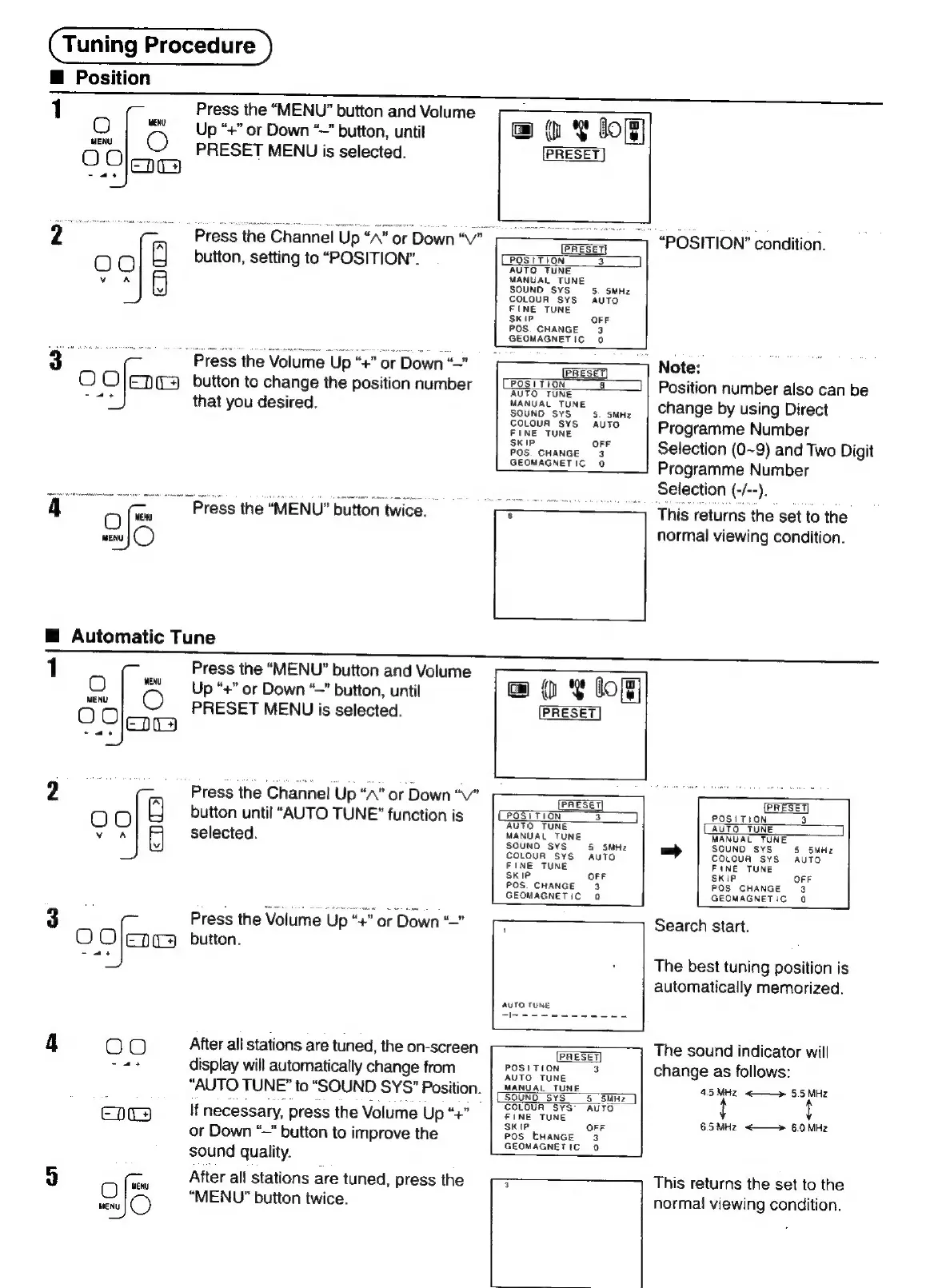
Panasonic TX-29FJ50A - Tuning Procedure; Channel Position Adjustment; Automatic Channel Tuning

Panasonic TX-29FJ50A
23 pages
Print Icon
To Next Page IconTo Next Page
To Previous Page IconTo Previous Page
Loading...
Tuning
Procedure
Position
1
MENU
O
Oar
O
MENU
Press
the
“MENU”
button
and
Volume
Up
“+”
or
Down
“~”
button,
until
PRESET
MENU
is
selected.
“Press
the
Channel
‘Up
“A”
or
Down
“V"
button,
setting
to
“POSITION”.
~
Press
the
Volume
Up
“£"
or
Down
“~
button
to
change
the
position
number
that
you
desired.
Press
the
MENU!
button
twice.
H
Automatic
Tune
Ie
MENU
OC
er
O
MENU
MENU
O
Press
the
“MENU”
button
and
Volume
Up
“+”
or
Down
“—”
button,
until
PRESET
MENU
is
selected.
Press
the
Channel
Up
“A”
or
Down
“v"
button
until
“AUTO
TUNE”
function
is
selected.
Press
the
Volume
Up
“+
“+”
or
Down
“”
button.
After
all
stations
are
tuned,
the
on-screen
display
will
automatically
change
from
“AUTO
TUNE”
to
“SOUND
SYS”
Position.
If
necessary,
press
the
Volume
Up
“+
“4
or
Down
“~"
button
to
improve
the
sound
quality.
After
all
stations
are
tuned,
press
the
“MENU”
button
twice.
@
Y
8m}
PRESET
PRESET)
POSITION
3
AUTO
TUNE
MANUAL
TUNE
5.
SMHz
OFF
POS
CHANGE
3
GEOMAGNETIC
0
PRESET)
POSITION
a
AUTO
TUNE
MANUAL
TUNE
SOUND
SYS
COLOUA
SYS
FINE
TUNE
SKIP
OFF
POS.
CHANGE
3
GEOMAGNETIC
0
S.
SMHz
AUTO
@
¥
log
PRESET
“POSITION”
condition.
|
Note:
Position
number
also
can
be
change
by
using
Direct
Programme
Number
Selection
(0~9)
and
Two
Digit
Programme
Number
Selection
iS
/--).
This
returns
the
set
to
the
normal
viewing
condition.
PRESET)
PRESET)
(POSTTION
3
POSITION
3
AUTO
TUNE
AUTO
TUNE
MANUAL
TUNE
MANUAL
TUNE
SOUND
SYS
5
SMHz
=
SOUND
SYS
5
5MHz
COLOUR
SYS
AUTO
COLOUA
SYS
AUTO
FINE
T
FINE
TUNE
K
Ie
OFF
SKIP
OFF
POS.
CHANGE
3
POS
CHANGE
3
GEOMAGNETIC
0
GEOMAGNETIC
0
AUTO
TUNE
1
PRESET
POSITION
3
AUTO
TUNE
MANUAL
TUNE
SOUND
SYS
COLOUR
SYS
FINE
TUNE
SKIP
OFF
POS
CHANGE
3
GEOMAGNETIC
0
Search
start.
The
best
tuning
position
is
automatically
memorized.
The
sound
indicator
will
change
as
follows:
4.5
MHz
<——»
5.5
MHz
6.5
MHz
<——»
6.0
MHz
This
returns
the
set
to
the
normal
viewing
condition.

Related product manuals