EasyManua.ls Logo

Panasonic TX-29FJ50A - How to Cancel! the Fine Tuning

Panasonic TX-29FJ50A
23 pages
Print Icon
To Next Page IconTo Next Page
To Previous Page IconTo Previous Page
Loading...
Tuning
Procedure
@
How
to
Cancel!
the
Fine
Tuning
pr
ia
ash
RS
ey
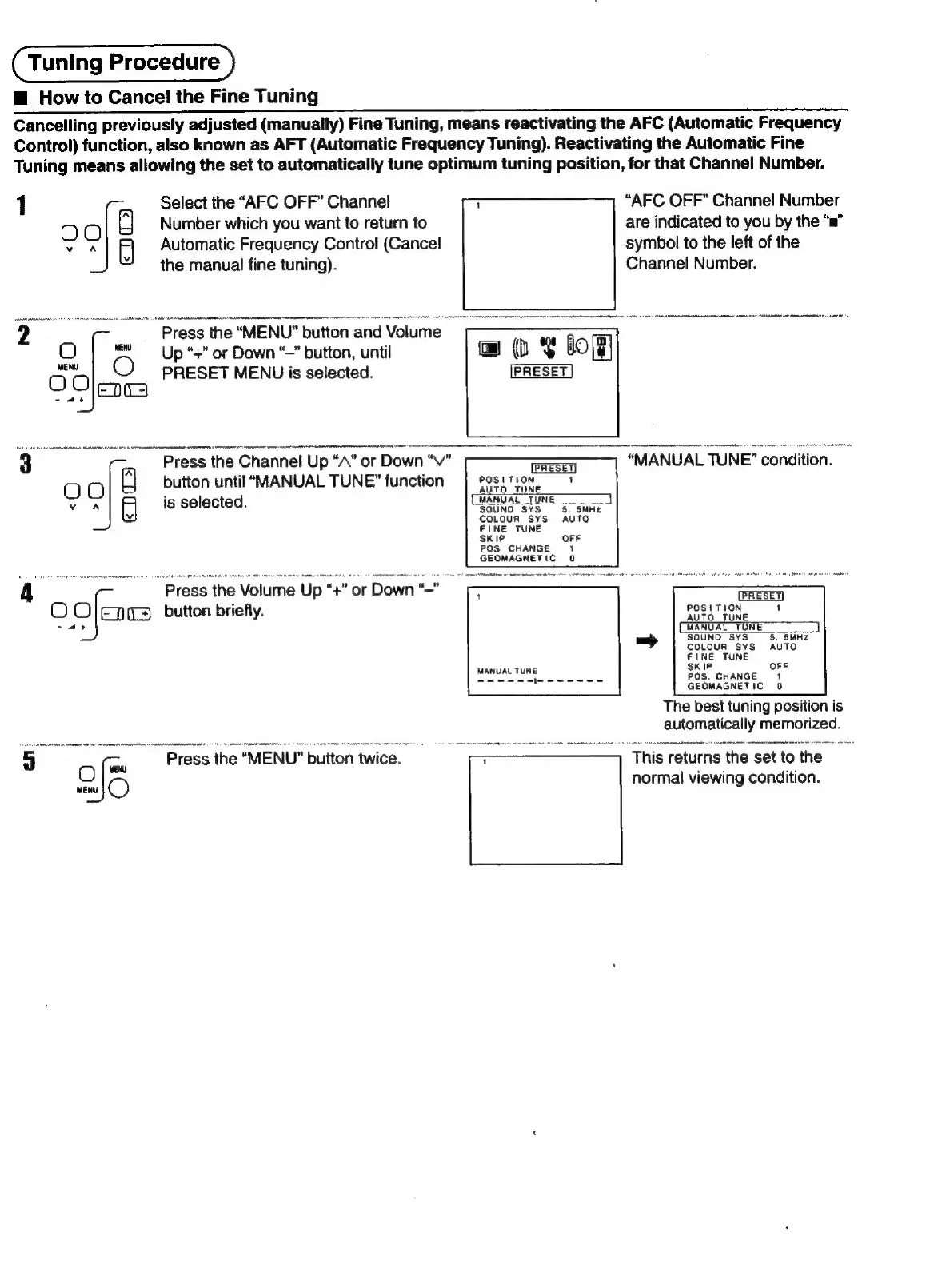
Cancelling
previously
adjusted
(manually)
Fine
Tuning,
means
reactivating
the
AFC
(Automatic
Frequency
Control)
function,
also
known
as
AFT
(Automatic
Frequency
Tuning).
Reactivating
the
Automatic
Fine
Tuning
means
allowing
the
set
to
automatically
tune
optimum
tuning
position,
for
that
Channel
Number.
1
Select
the
“AFC
OFF”
Channel
Number
which
you
want
to
return
to
OO
vA
Automatic
Frequency
Control
(Cancel!
the
manual
fine
tuning).
“AFC
OFF”
Channel
Number
are
indicated
to
you
by
the
“ma”
symbol
to
the
left
of
the
Channel
Number.
@
ot
bof]
PRESET
2
“Press
the
“MENU”
button
and
Volume
O
|
@
Up“+"
or
Down
“”
button,
until
fete
O
PRESET
MENU
is
selected.
~/EDT3
3
Press
the
Channel
Up
“A”
or
Down
“v"
ele)
button
until
“MANUAL
TUNE”
function
voA
5
is
selected.
y
a
“Press
t
the
Volume
Up
“4
“"
or
Down
O
Olena
button
briefly.
-
ae
5
"Press
the
“MENU”
button
twice.
O
wen)
ae
“MANUAL
TUNE”
condition.
PRESET]
POSITION
1
AUTO
TUNE
(MANUAL
TUNE)
SOUND
SYS
5.
SMHz
COLOUR
SYS
AUTO
oFF
POS
CHANGE
1
GEOMAGNETIC
0
POS.
CHANGE
GEOMAGNETIC
0
The
best
tuning
position
is
auromanically
memorized.
This
returns
the
set
to
the
normal
viewing
condition.

Related product manuals