EasyManua.ls Logo

Panasonic TX-29FJ50A - Fine Tuning for Picture and Sound

Panasonic TX-29FJ50A
23 pages
Print Icon
To Next Page IconTo Next Page
To Previous Page IconTo Previous Page
Loading...
Tuning
Procedure
M
Fine
Tune
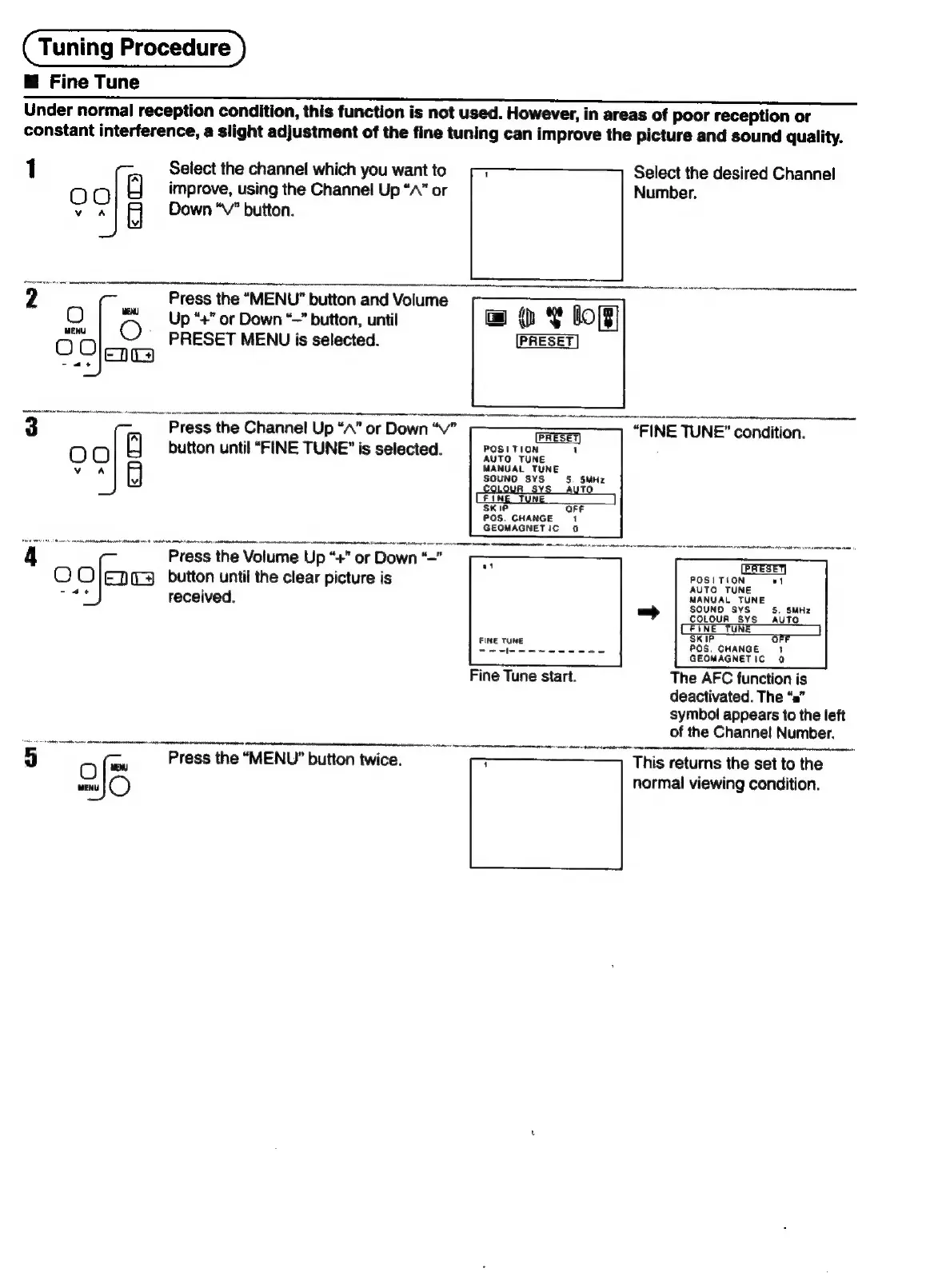
Under
normal
reception
condition,
this
function
is
not
used.
However,
in
areas
of
poor
reception
or
constant
interference,
a
slight
adjustment
of
the
fine
tuning
can
improve
the
picture
and
sound
quality.
1
Select
the
channel
which
you
want
to
Select
the
desired
Channel
00
a
improve,
using
the
Channel
Up
“A”
or
Number.
vA
Down
“V"
button.
2
Press
the
“MENU”
button
and
Volume
-————_—_,_—
O
|}
Up“+’
or
Down
“~”
button,
until
fete
©
PRESET
MENU
is
selected.
~
7
|e
3
:
ce
"Press
the
Channel
Up
“A”
or
Down
“v”
GaESET
“FINE
TUNE”
condition.
OOo
button
until
“FINE
TUNE”
is
selected.
POSITION
==
4
¥
A
AUTO
TUNE
MANUAL
TUNE
SOUNO
SYS
OLOUR
Sv
‘SKIP
POS.
CHANGE
1
GEOMAGNETIC
0
Press
the
Volume
Up
“+”
or
Down
“—"
O
O]enes
button
until
the
clear
picture
is
received.
P
5.
SMI
COLOUR
SYS
AUTO
POS.
CHANGE
a
GEOMAGNETIC
0
Fine
Tune
start.
The
AFC
function
is
deactivated.
The
“a”
symbol
appears
to
the
left
of
the
Channel
Number.
5
a
Press
the
“MENU”
button
twice.
This
returns
the
set
to
the
Qe
normal
viewing
condition.

Related product manuals