EasyManua.ls Logo

Panasonic TX-29FJ50A - General Operation; Power and Volume Control; Channel Selection Methods; Input and System Switching

Panasonic TX-29FJ50A
23 pages
Print Icon
To Next Page IconTo Next Page
To Previous Page IconTo Previous Page
Loading...
General
Operation
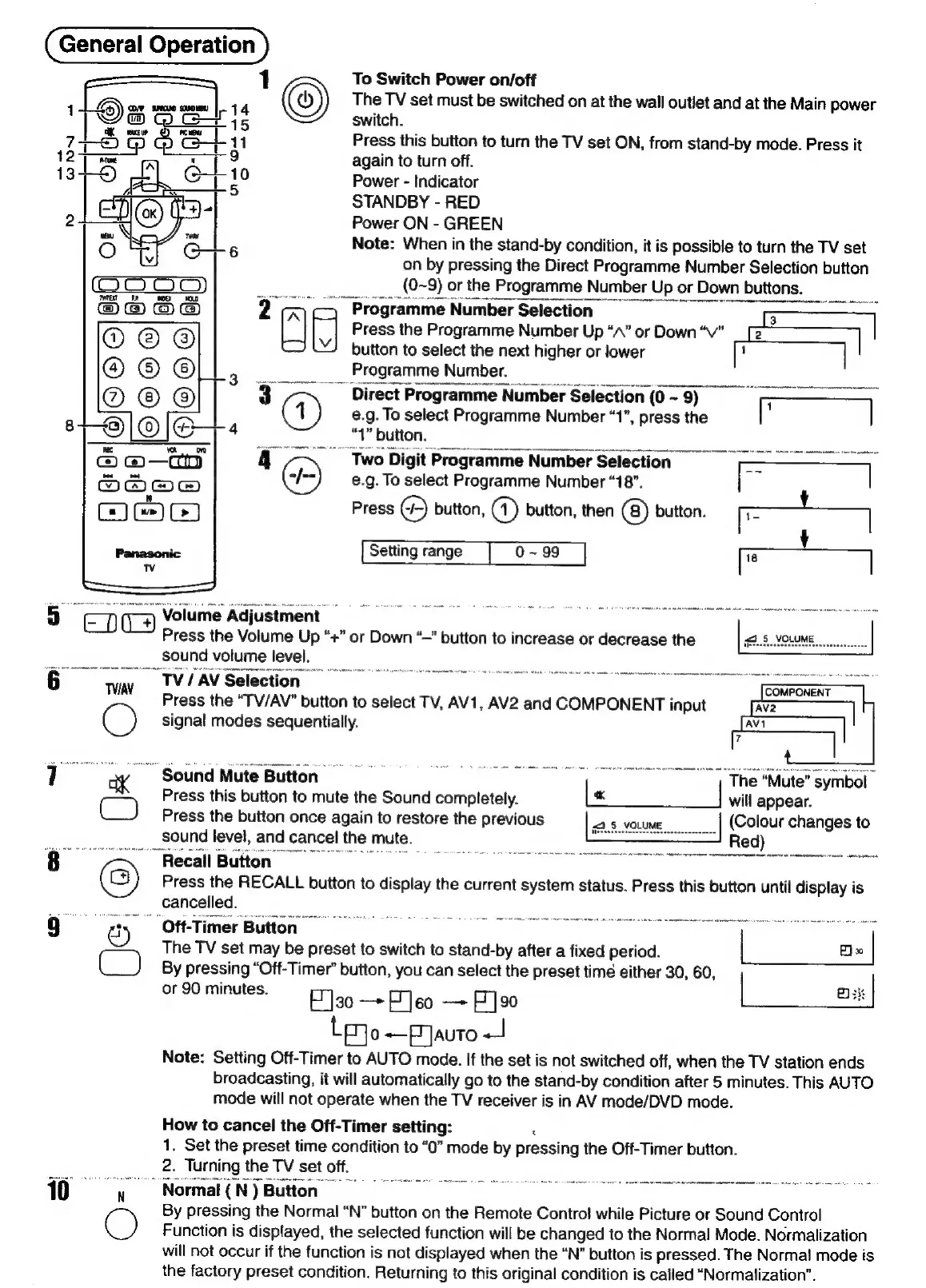
To
Switch
Power
on/off
The
TV
set
must
be
switched
on
at
the
wall
outlet
and
at
the
Main
power
switch.
Press
this
button
to
turn
the
TV
set
ON,
from
stand-by
mode.
Press
it
again
to
turn
off.
Power
-
Indicator
STANDBY
-
RED
Power
ON
-
GREEN
Note:
When
in
the
stand-by
condition,
it
is
possible
to
turn
the
TV
set
on
by
pressing
the
Direct
Programme
Number
Selection
button
(0~
‘9)
or
the
Programme
Number
Up
or
Down
buttons.
“Programme
Number
Selection
5
-
“EB
Fj
Press
the
Programme
Number
Up
“A”
or
Down
“Vv”
_
[
button
to
select
the
next
higher
or
lower
1
Programme
Number.
~
Direct
Programme
Number
Selection
(0
~
9)
1
e.g.
To
select
Programme
Number
“1”,
press
the
“1”
button.
Twol
Digit
Programme
Number
Selection
e.g.
To
select
Programme
Number
“18”.
Press
Ce)
button,
@)
button,
then
@)
button.
Setting
range
|
0~99
5
eno
7
Ti:
Volume
Adjustment
Press
the
Volume
Up
“+”
or
Down
“—”
button
to
increase
or
decrease
the
sound
volume
level.
6
<4
"TV
AV
Selection
Ort
te:
Press
the
“TV/AV”
button
to
select
TV,
AV1,
AV2
and
COMPONENT
input
C)
signal
modes
sequentially.
Sound
Mute
Button
Press
this
button
to
mute
the
Sound
completely.
Press
the
button
once
again
to
restore
the
previous
sound
level,
and
cancel
the
mute.
The
“Mute”
symbol
will
appear.
(Colour
changes
to
Red)
an
“Recall
Button
©
Press
the
RECALL
button
to
display
the
current
system
status.
Press
this
button
until
display
is
The
TV
set
may
be
preset
to
switch
to
stand-by
after
a
fixed
period.
By
pressing
“Off-Timer”
button,
you
can
select
the
preset
time
either
30,
60
|
[3k
or
90
minutes.
F]30
=
Feo
aa
F]90
Bk
|
Lp
0
+P
JAuTo
J
Note:
Setting
Off-Timer
to
AUTO
mode.
If
the
set
is
not
switched
off,
when
the
TV
station
ends
broadcasting,
it
will
automatically
go
to
the
stand-by
condition
after
5
minutes.
This
AUTO
mode
will
not
operate
when
the
TV
receiver
is
in
AV
mode/DVD
mode.
How
to
cancel
the
Off-Timer
setting:
1.
Set
the
preset
time
condition
to
“0”
mode
by
pressing
the
Off-Timer
button.
2.
Turning
the
TV
set
off,
:
Sat
Rie
teh
2
10
y
Normal
(N)
Button’
By
pressing
the
Normal
“N”
button
on
the
Remote
Contro!
while
Picture
or
Sound
Control
C)
Function
is
displayed,
the
selected
function
will
be
changed
to
the
Normal
Mode.
Normalization
will
not
occur
if
the
function
is
not
displayed
when
the
“N”
button
is
pressed.
The
Norma!
mode
is
the
factory
preset
condition.
Returning
to
this
original
condition
is
called
“Normalization”.
,

Related product manuals