EasyManua.ls Logo

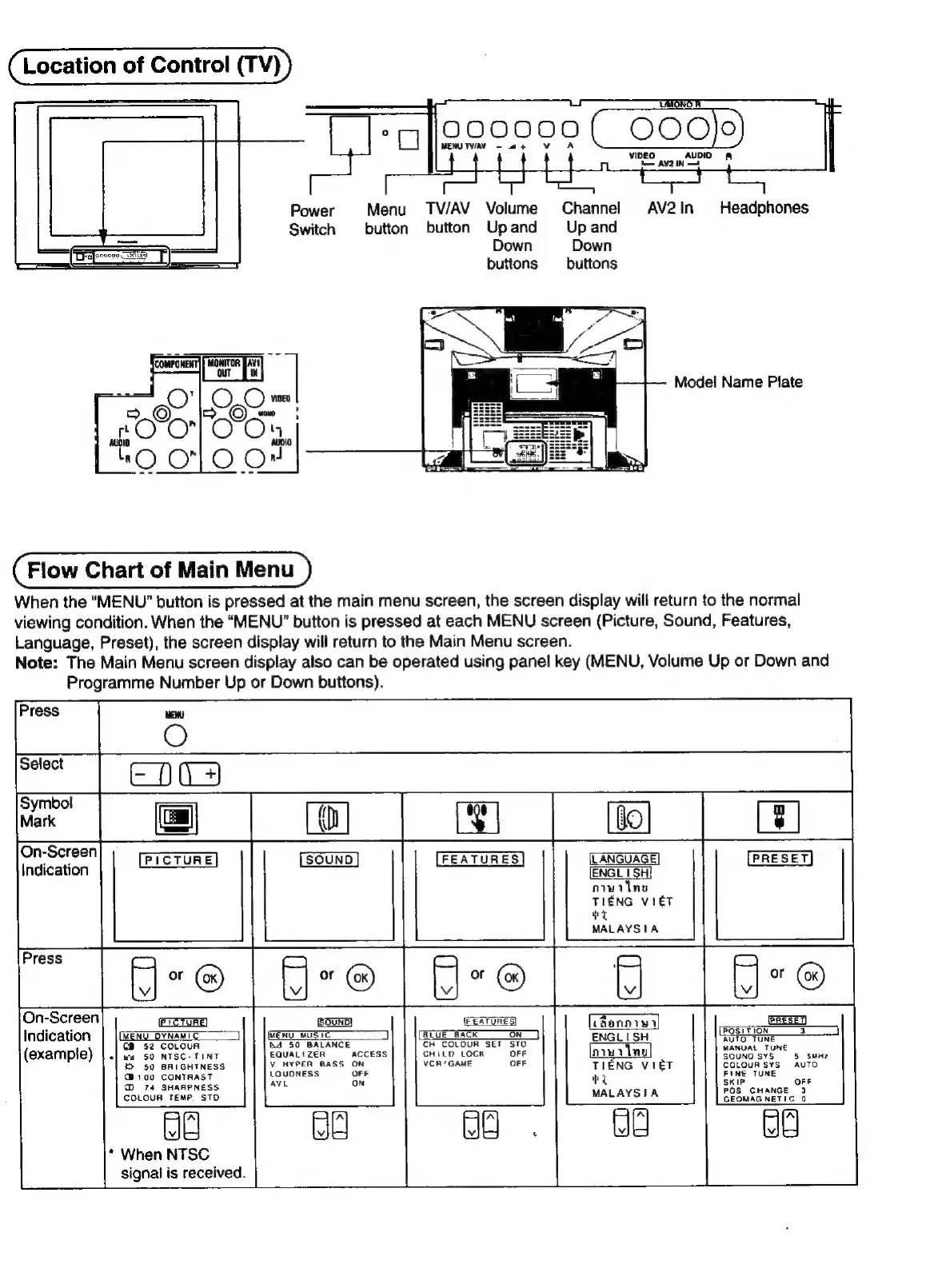
Panasonic TX-29FJ50A - Control Panel and Menu Navigation; TV Control Panel Overview; Main Menu Navigation Flowchart

Panasonic TX-29FJ50A
23 pages
Print Icon
To Next Page IconTo Next Page
To Previous Page IconTo Previous Page
Loading...
Location
of
Control
(TV)
Power
Menu
TV/AV
Volume
Channel
AV2In
Headphones
Switch
button
button
Upand
Upand
Down
Down
buttons
—_
buttons
Model
Name
Plate
Flow
Chart
of
Main
Menu
When
the
“MENU”
button
is
pressed
at
the
main
menu
screen,
the
screen
display
will
return
to
the
normal
viewing
condition.
When
the
“MENU”
button
is
pressed
at
each
MENU
screen
(Picture,
Sound,
Features,
Language,
Preset),
the
screen
display
will
return
to
the
Main
Menu
screen.
Note:
The
Main
Menu
screen
display
also
can
be
operated
using
panel
key
(MENU,
Volume
Up
or
Down
and
Programme
Number
Up
or
Down
buttons).
On-Screen
Indication
FEATURES
LANGUAGE)
[ENGL
1
SH}
niwilne
TIENG
VIET
Hy
MALAYSIA
fe
:
Vv.
Vv
On-Screen
idanniwa
Indication
(END
_DYNAMIC
]
G@ENU_wusic
3
(aruE“sacK
ON}
ENGLISH
GB
52
COLOUR
4
50
BALANCE
CH
COLOUR
SET
STO
(example)
|.]
ws
so
ntsc.
tint
EQUALIZER
ACCESS
CHILD
LOCK
OFF
mw
ing
t+
50
BRIGHTNESS
v.
HYPER
BASS
ON
VCR‘GAME
OFF
TIENG
VteT
@
100
CONTRAST
LOUDNESS
DEE
by
@
74
SHARPNESS
AVE
ON
COLOUR
TEMP,
STO
MALAYSIA
Ly
Ly
*
When
NTSC
signal
is
received.

Related product manuals