EasyManua.ls Logo

Panasonic TX-29FJ50A - Page 3

Panasonic TX-29FJ50A
23 pages
Print Icon
To Next Page IconTo Next Page
To Previous Page IconTo Previous Page
Loading...
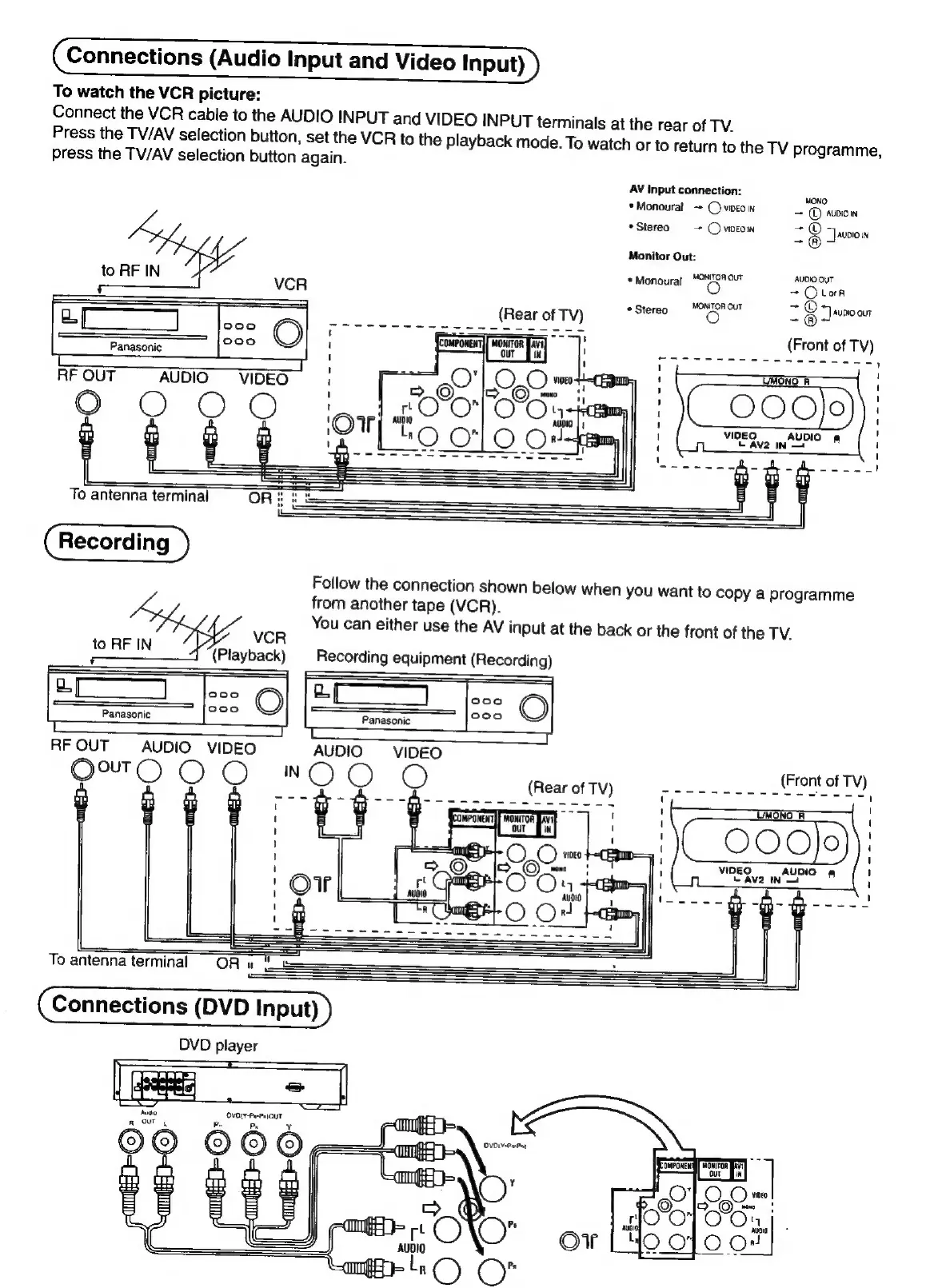
Connections
(Audio
Input
and
Video
Input)
To
watch
the
VCR
picture:
Connect
the
VCR
cable
to
the
AUDIO
INPUT
and
VIDEO
INPUT
terminals
at
the
rear
of
TV.
Press
the
TV/AV
selection
button,
set
the
VCR
to
the
playback
mode.
To
watch
or
to
return
to
the
TV
programme,
press
the
TV/AV
selection
button
again.
AV
input
connection:
MONO:
*Monoural
-+
©)
vireo
in
+
©
avwion
*Stereo
=~
Ovworow
-@
“Jauoiow
Monitor
Out:
MONITOR
OUT
AUDK)
OUT
to
RF
IN
vcR
*
Monoural
O
=
Oboe
3
MONITOR
OUT
+O
noe
Stereo
oO
-@®
7
=|
aap
(Front
of
TV)
PS
Sse
mecroreccSoue
;
TMONO
A
Follow
the
connection
shown
below
when
you
want
to
copy
a
programme
from
another
tape
(VCR).
You
can
either
use
the
AV
input
at
the
back
or
the
front
of
the
TV.
VCR
to
RF
IN
(Playback)
Recording
equipment
(Recording)
RFOUT
AUDIO
VIDEO
Se
Oe.
To
antenna
terminal
~=OR
n=
&
Connections
(DVD
Input)
DVD
player
=

Related product manuals