EasyManua.ls Logo

Panasonic TX-29FJ50A - Teletext Operation Guide; Teletext Modes and Navigation; TV;Teletext Mode Switching

Panasonic TX-29FJ50A
23 pages
Print Icon
To Next Page IconTo Next Page
To Previous Page IconTo Previous Page
Loading...
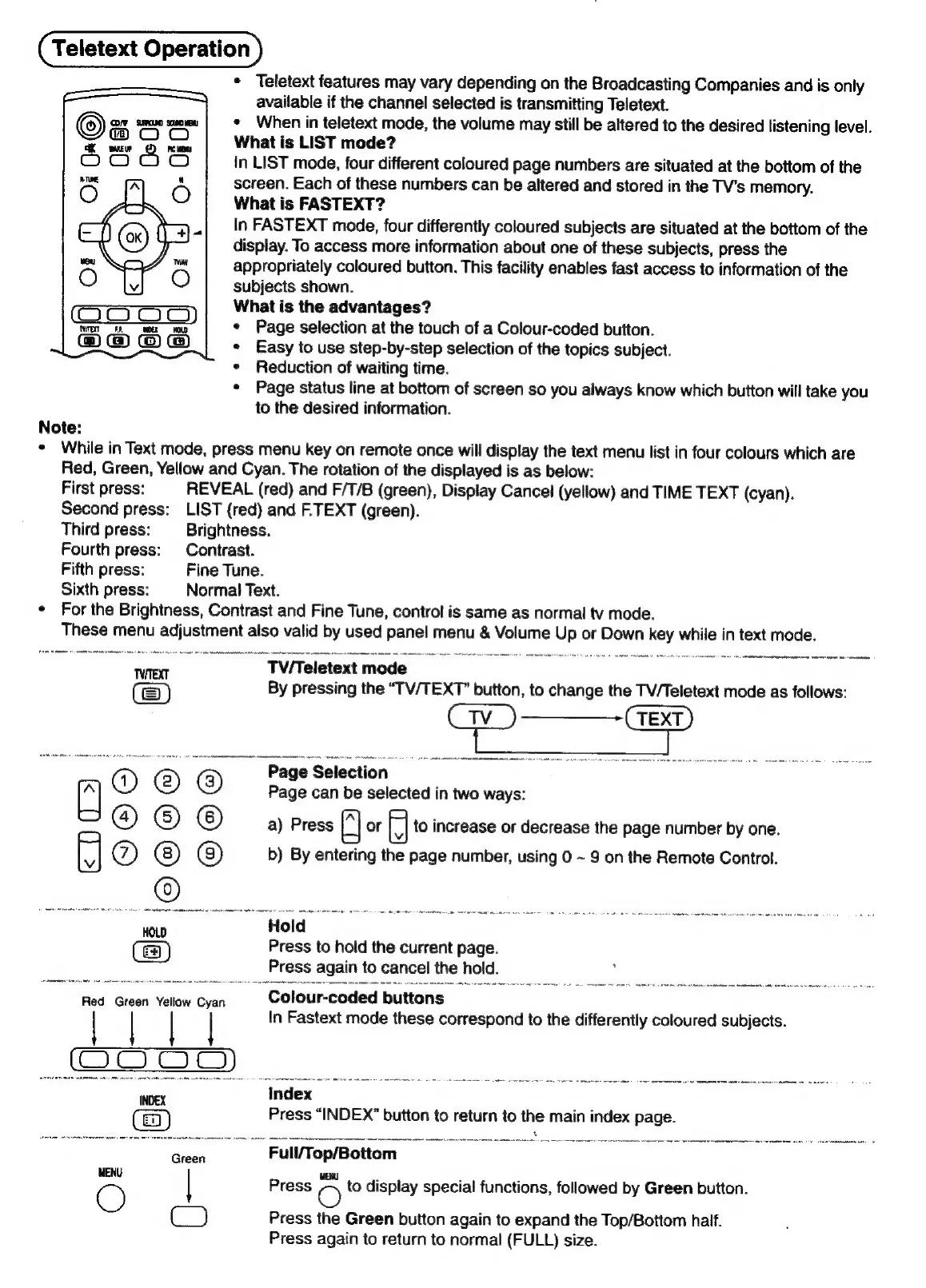
Teletext
Operation
*
Teletext
features
may
vary
depending
on
the
Broadcasting
Companies
and
is
only
available
if
the
channel
selected
is
transmitting
Teletext.
¢
When
in
teletext
mode,
the
volume
may
still
be
altered
to
the
desired
listening
level.
What
is
LIST
mode?
in
LIST
mode,
four
different
coloured
page
numbers
are
situated
at
the
bottom
of
the
screen.
Each
of
these
numbers
can
be
altered
and
stored
in
the
TV’s
memory.
What
is
FASTEXT?
In
FASTEXT
mode,
four
differently
coloured
subjects
are
situated
at
the
bottom
of
the
display.
To
access
more
information
about
one
of
these
subjects,
press
the
appropriately
coloured
button.
This
facility
enables
fast
access
to
information
of
the
subjects
shown.
What
is
the
advantages?
¢
Page
selection
at
the
touch
of
a
Colour-coded
button.
¢
Easy
to
use
step-by-step
selection
of
the
topics
subject.
¢
Reduction
of
waiting
time.
*
Page
status
line
at
bottom
of
screen
so
you
always
know
which
button
will
take
you
to
the
desired
information.
Note:
*
While
in
Text
mode,
press
menu
key
on
remote
once
will
display
the
text
menu
list
in
four
colours
which
are
Red,
Green,
Yellow
and
Cyan.
The
rotation
of
the
displayed
is
as
below:
First
press:
REVEAL
(red)
and
F/T/B
(green),
Display
Cancel
(yellow)
and
TIME
TEXT
(cyan).
Second
press:
LIST
(red)
and
F.TEXT
(green).
Third
press:
Brightness.
Fourth
press:
Contrast.
Fifth
press:
Fine
Tune.
Sixth
press:
Normal
Text.
¢
For
the
Brightness,
Contrast
and
Fine
Tune,
control
is
same
as
normal
tv
mode.
These
menu
adjustment
also
valid
by
used
panel
menu
&
Volume
Up
or
Down
key
while
in
text
mode.
Twrext
TV/Teletext
mode
By
pressing
the
“TV/TEXT”
button,
to
change
the
TV/Teletext
mode
as
follows:
}
t
|
i
}
i
i
Page
Selection
Page
can
be
selected
in
two
ways:
O
© @
@)
©
©
a)
Press
|_|
or
|
|
to
increase
or
decrease
the
page
number
by
one.
®
©
©
(8)
b)
By
entering
the
page
number,
using
0
~
9
on
the
Remote
Control.
e
:
one
ms
aca
Press
to
hold
the
current
page.
Press
again
to
cancel
the
hold.
Red
Green
Yellow
Cyan
Colour-coded
buttons
|
|
In
Fastext
mode
these
correspond
to
the
differently
coloured
subjects.
COO
OD
INDEX
Index
Press
“INDEX”
button
to
return
to
the
main
index
page.
"Geen
~—=Sé«éWWTop/Bottom
==
WENU
O
|
Press
-~
to
display
special
functions,
followed
by
Green
button.
C)
Press
the
Green
button
again
to
expand
the
Top/Bottom
half.
Press
again
to
return
to
normal
(FULL)
size.

Related product manuals