EasyManua.ls Logo

Panasonic TX-29FJ50A - Page 21

Panasonic TX-29FJ50A
23 pages
Print Icon
To Next Page IconTo Next Page
To Previous Page IconTo Previous Page
Loading...
Teletext
Operation
Red
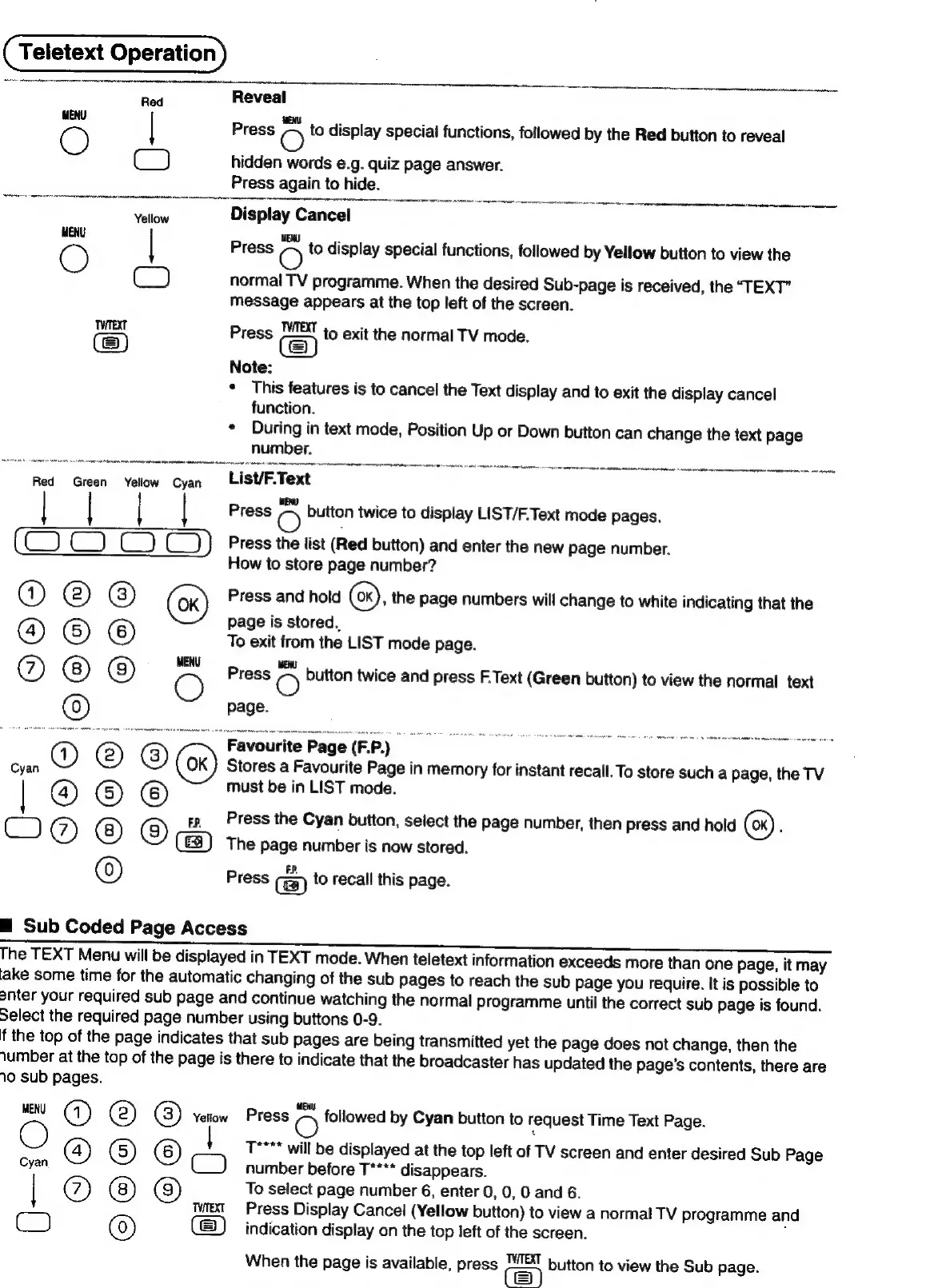
Reveal
Press
O
to
display
special
functions,
followed
by
the
Red
button
to
reveal
Cc)
hidden
words
e.g.
quiz
page
answer.
Press
again
to
hide.
Yellow
Display
Cancel
Press
O
to
display
special
functions,
followed
by
Yellow
button
to
view
the
C)
normal
TV
programme.
When
the
desired
Sub-page
is
received,
the
“TEXT”
message
appears
at
the
top
left
of
the
screen.
Twrext
TWTeXT
i
Press
to
exit
the
normal
TV
mode.
Note:
*
This
features
is
to
cancel
the
Text
display
and
to
exit
the
display
cancel
function.
*
During
in
text
mode,
Position
Up
or
Down
button
can
change
the
text
page
number.
Red
Green
Yeliow
Cyan
List/F.Text
|
Press
O
button
twice
to
display
LIST/F.Text
mode
pages.
(__))}
Press
the
list
(Red
button)
and
enter
the
new
page
number.
How
to
store
page
number?
Press
and
hold
(6x),
the
page
numbers
will
change
to
white
indicating
that
the
page
is
stored,
C)
@
©
To
exit
from
the
LIST
mode
page.
@
O
Press
O
button
twice
and
press
F.Text
(Green
button)
to
view
the
normal
text
Q2eoO
QU
DOO
|
i
i
i
:
i
~,
Favourite
Page
(FP)
Stores
a
Favourite
Page
in
memory
for
instant
recall.
To
store
such
a
page,
the
TV
must
be
in
LIST
mode.
2
<
s
3
rp
Press
the
Cyan
button,
select
the
page
number,
then
Press
and
hold
é
The
page
number
is
now
stored.
Press
to
recall
this
page.
See
QeO
m™
Sub
Coded
Page
Access
The
TEXT
Menu
will
be
displayed
in
TEXT
mode.
When
teletext
information
exceeds
more
than
one
page,
it
may
lake
some
time
for
the
automatic
changing
of
the
sub
Pages
to
reach
the
sub
page
you
require.
It
is
possible
to
onter
your
required
sub
page
and
continue
watching
the
normal
programme
until
the
correct
sub
page
is
found.
Select
the
required
page
number
using
buttons
0-9.
f
the
top
of
the
page
indicates
that
sub
pages
are
being
transmitted
yet
the
page
does
not
change,
then
the
iumber
at
the
top
of
the
page
is
there
to
indicate
that
the
broadcaster
has
updated
the
page’s
contents,
there
are
10
sub
pages.
MENU
@)
@) @)
Yellow
Press
-N
followed
by
Cyan
button
to
request
Time
Text
Page.
O
T****
will
be
displayed
at
the
top
left
of
TV
screen
and
enter
desired
Sub
Page
Cyan
@
©
©
(“)
number
before
T****
disappears.
|
@
@)
To
select
page
number
6,
enter
0,
0,
0
and
6.
next
Press
Display
Cancel
(Yellow
button)
to
view
a
normal
TV
programme
and
Co)
(0)
indication
display
on
the
top
left
of
the
screen.
,
When
the
page
is
available,
press
"7&1
button
to
view
the
Sub
page.
pag
Pp
pag

Related product manuals