EasyManua.ls Logo

Panasonic TX-29FJ50A - Advanced General Operations; Picture Menu Operation; Sound Menu Operation

Panasonic TX-29FJ50A
23 pages
Print Icon
To Next Page IconTo Next Page
To Previous Page IconTo Previous Page
Loading...
General
Operation
11
PIC
MENU
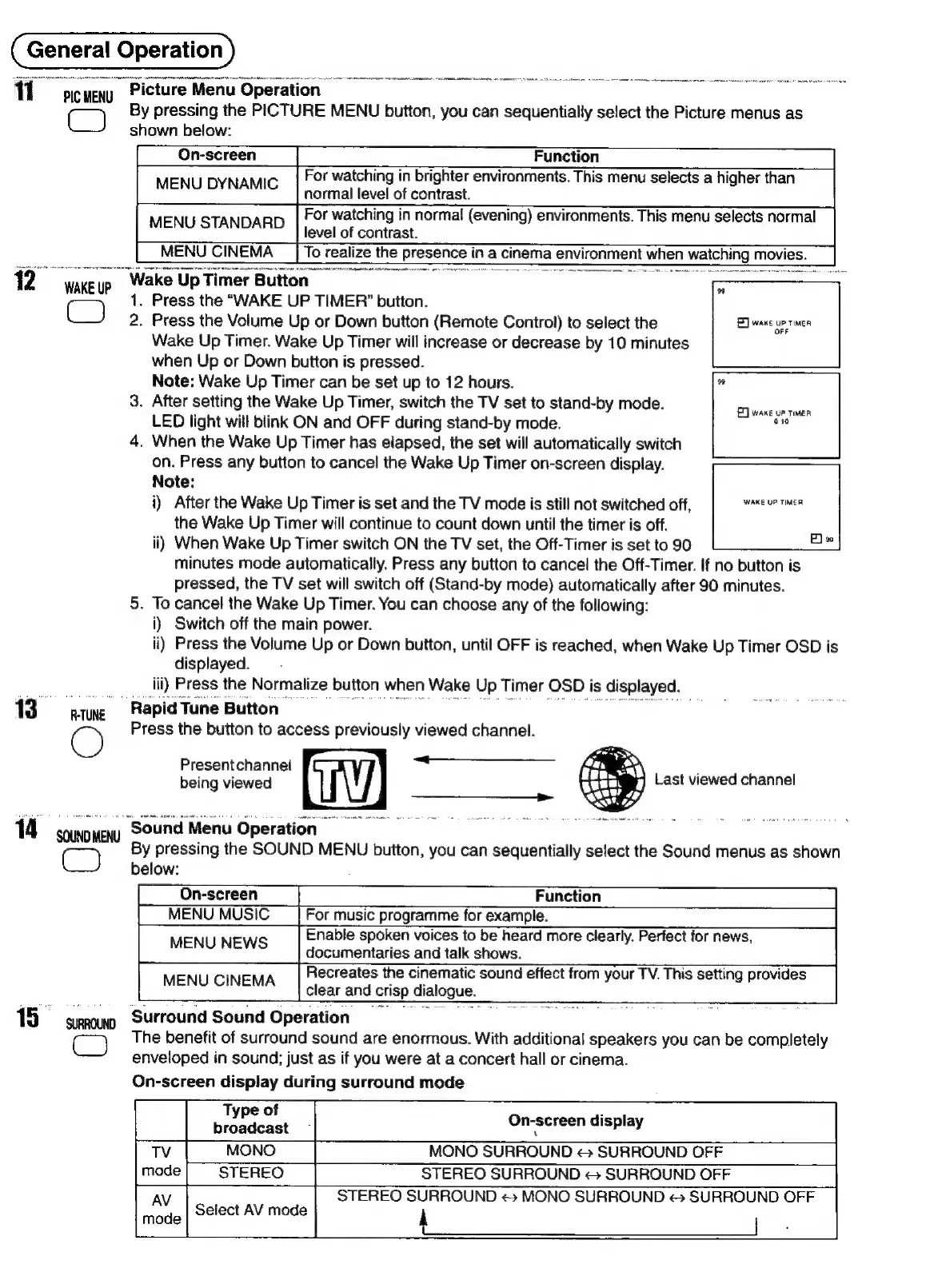
Picture
Menu
Operation
|
i
By
pressing
the
PICTURE
MENU
button,
you
can
sequentially
select
the
Picture
menus
as
shown
below:
On-screen
Function
For
watching
in
brighter
environments.
This
menu
selects
a
higher
than
MENU
DYNAMIC
normal
level
of
contrast.
MENU
STANDARD
For
watching
in
normal
(evening)
environments.
This
menu
selects
normal
level
of
contrast.
MENU
CINEMA
Jo
realize
the
Presence
it
in
a
cinema
a
environment
when
watching
movies.
2
wacle
up
pele
‘Up
Timer
Button
‘es
.
Press
the
“WAKE
UP
TIMER”
button.
:
Press
the
Volume
Up
or
Down
button
(Remote
Control)
to
select
the
EX
wane
up
ramen
Wake
Up
Timer.
Wake
Up
Timer
will
increase
or
decrease
by
10
minutes
when
Up
or
Down
button
is
pressed.
Note:
Wake
Up
Timer
can
be
set
up
to
12
hours.
3.
After
setting
the
Wake
Up
Timer,
switch
the
TV
set
to
stand-by
mode.
LED
light
will
blink
ON
and
OFF
during
stand-by
mode.
4.
When
the
Wake
Up
Timer
has
elapsed,
the
set
will
automatically
switch
on.
Press
any
button
to
cancel
the
Wake
Up
Timer
on-screen
display.
Note:
i)
After
the
Wake
Up
Timer
is
set
and
the
TV
mode
is
stitl
not
switched
off,
PRE
OSOEN
the
Wake
Up
Timer
will
continue
to
count
down
until
the
timer
is
off.
ii)
When
Wake
Up
Timer
switch
ON
the
TV
set,
the
Off-Timer
is
set
to
90
minutes
mode
automatically.
Press
any
button
to
cancel
the
Off-Timer.
If
no
button
is
pressed,
the
TV
set
will
switch
off
(Stand-by
mode)
automatically
after
90
minutes.
5.
To
cancel
the
Wake
Up
Timer.
You
can
choose
any
of
the
following:
i)
Switch
off
the
main
power.
ii)
Press
the
Volume
Up
or
Down
button,
until
OFF
is
reached,
when
Wake
Up
Timer
OSD
is
displayed.
iii)
Press
the
Normalize
button
when
Wake
Up
Timer
OSD
is
displayed.
13°
are
Rapid
Tune
Button
©
Press
the
button
to
access
previously
viewed
channel.
—_
Present
channel
;
being
viewed
Last
viewed
channel
—_
ED
wane
up
tea
ot
14
sonoyew
Sound
Menu
Operation
CG)
By
pressing
the
SOUND
MENU
button,
you
can
sequentially
select
the
Sound
menus
as
shown
below:
On-screen
Function
MENU
MUSIC
For
music
programme
for
example.
Enable
spoken
voices
to
be
heard
more
clearly.
Perfect
for
news,
MENU
NEWS
documentaries
and
talk
shows.
Recreates
the
cinematic
sound
effect
from your
TV.
This
setting
provides
MENU
CINEMA
clear
and
crisp
Sialogue.
15
suru)
Surround
Sound
Operation
C)
The
benefit
of
surround
sound
are
enormous.
With
additional
speakers
you
can
be
completely
enveloped
in
sound;
just
as
if
you
were
at
a
concert
hall
or
cinema.
On-screen
display
during
surround
mode
Type
of
broadcast
MONO
MONO
SURROUND
«
SURROUND
OFF
STEREO STEREO
SURROUND
«+
SURROUND
OFF
STEREO
SURROUND
<>
MONO
SURROUND
«>
SURROUND
OFF
Select
AV
mode
i
|
On-screen
display

Related product manuals