EasyManua.ls Logo

Panasonic TX-29FJ50A - Colour System Selection; Sound System Selection

Panasonic TX-29FJ50A
23 pages
Print Icon
To Next Page IconTo Next Page
To Previous Page IconTo Previous Page
Loading...
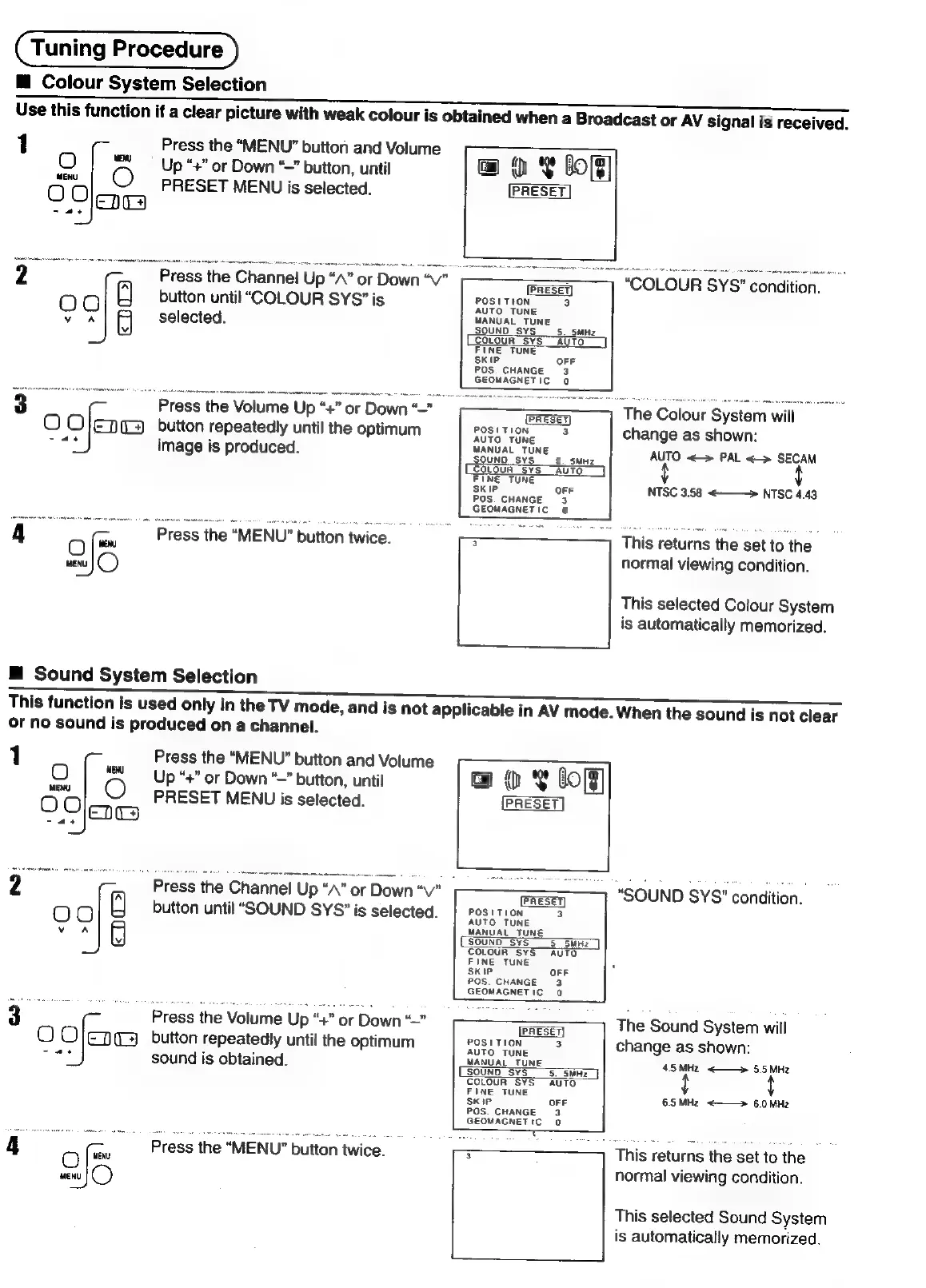
Tuning
Procedure
M@
Colour
System
Selection
Use
this
function
if
a
clear
picture
with
weak
colour
is
obtained
when
a
Broadcast
or
AV
signal
is
received.
Press
the
“MENU”
button
and
Volume
L
@
ot
bo
OQ
|
©
Up”
or
Down
“~”
button,
until
ww
|
©
PRESET
MENU
is
selected.
Ola
ae
Press
the
Channel
Up
“A”
or
Down
“V"_
_—_~
===
—]
“COLOUR
SYS"
condition.
00
button
until
“COLOUR
SYS”
is
posiTioN
3
voa
selected.
MANUAL
TUNE
OFF
POS.
CHANGE
3
GEOMAGNETIC
a
Press
the
Volume
Up
“+”
or
Down
“—”
PRESET
The
Colour
System
will
O
Olena
button
repeatedly
until
the
optimum
osttioN
3
change
as
shown:
ree
image
is
produced.
SOUND
SYS"
5.
suc
AUTO
<>
PAL
<>
SECAM
FINE
TUNE
SKIP
OFF
NTSC
3,58
<———»
NTSC
4.43
POS.
CHANGE
3
GEOMAGNETIC
0
A
mu
«Press
the
MENU"
button
twice.
=
-s--—~—~
Thig
voturis
the
ast
to
the
gs
normal
viewing
condition.
This
selected
Colour
System
is
automatically
memorized.
@
Sound
System
Selection
This
function
is
used
only
in
the
TV
mode,
and
is
not
applicable
in
AV
mode.
When
the
sound
is
not
clear
or
no
sound
is
produced
on
a
channel.
1
Press
the
“MENU”
button
and
Volume
O
|
%
Up
“+”
or
Down
~"
button,
until
OO
O
PRESET
MENU
is
selected.
Eng
cae
@
OY
lo]
[PRESET]
Press
the
Channel
Up
“AN”
or
Down
“vn
button
until
“SOUND
SYS?’
is
selected.
ERESEY
SOUND
SYS’
condition.
POSITION
3
AUTO
TUNE
MANUAL
TUNE
SOUND
SYS
5
5SMHz
COLOUR
SYS
AUTO
FINE
TUNE
OF!
POS.
CHANGE
3
GEOMAGNETIC
0
The
Sound
System
will
PRESET]
J
gosttion.
3
change
as
shown:
sound
is
obtained.
MANUAL
TUN
E
45
MHz
<——>»
NH:
SOUND
SYS
5
SwHz
By
SA
MH
COLOUR
SYS
AUTO
{
{
FINE
TUNE
SKIP
3
=
Press
the
Volume
Up
“4
or
Down
O
Ofenes
button
repeatedly
until
the
optimum
OFF
6.5
MHz
<-——>
6.0
MHz
POS.
CHANGE
3
GEOMAGNETIC
0
4
Mr
a
;
Press
the
“MENU”
button
twice.
=
-
This
returns
the
set
to
the
Qe
normal
viewing
condition.
This
selected
Sound
System
is
automatically
memorized.

Related product manuals