EasyManua.ls Logo

Panasonic TX-29FJ50A - Page 18

Panasonic TX-29FJ50A
23 pages
Print Icon
To Next Page IconTo Next Page
To Previous Page IconTo Previous Page
Loading...
Advanced
Remote
Control
Transmitter
Operation
@
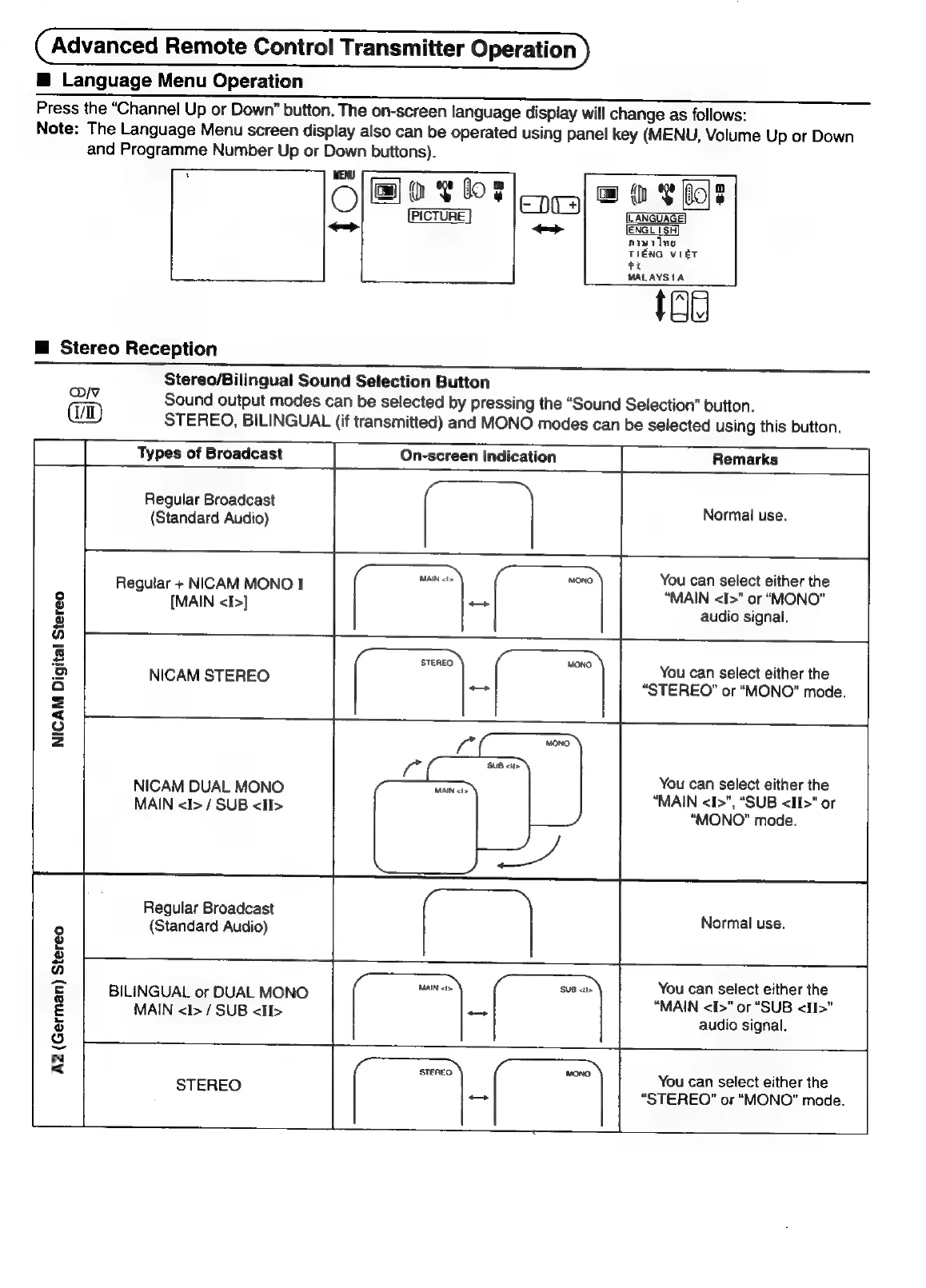
Language
Menu
Operation
Press
the
“Channel
Up
or
Down”
button.
The
on-screen
language
display
will
change
as
follows:
Note:
The
Language
Menu
screen
display
also
can
be
operated
using
panel
key
(MENU,
Volume
Up
or
Down
and
Programme
Number
Up
or
Down
buttons).
ov
fos
am
Veboe
enea|
®
|
LANGUAGE!
[ENGL
|SH
aiwring
TIENG
VIET
ee
MALAYSIA
ial
M
Stereo
Reception
Stereo/Bilingual
Sound
Selection
Button
WV
Sound
output
modes
can
be
selected
by
pressing
the
“Sound
Selection”
button.
STEREO,
BILINGUAL
(if
transmitted)
and
MONO
modes
can
be
selected
using
this
button.
Types
of
Broadcast
On-screen
Indication
Remarks
Regular
Broadcast
(Standard
Audio)
Normal
use.
You
can
select
either
the
“MAIN
<I>"
or
“MONO”
audio
signal.
Regular
+
NICAM
MONO
I
[MAIN
<I>]
You
can
select
either
the
“STEREO”
or
“MONO”
mode.
NICAM
STEREO
NICAM
Digital
Stereo
You
can
select
either
the
“MAIN
<I>”,
“SUB
<II>"
or
“MONO”
mode.
NICAM
DUAL
MONO
MAIN
<I>
/
SUB
<I>
Regular
Broadcast
(Standard
Audio)
Normal
use.
You
can
select
either
the
“MAIN
<I>”
or
“SUB
<II>”
audio
signal.
BILINGUAL
or
DUAL
MONO
MAIN
<I>
/
SUB
<I>
A2
(German)
Stereo
You
can
select
either
the
STEREO
“STEREO”
or
“MONO”
mode.

Related product manuals