SERVICE
14
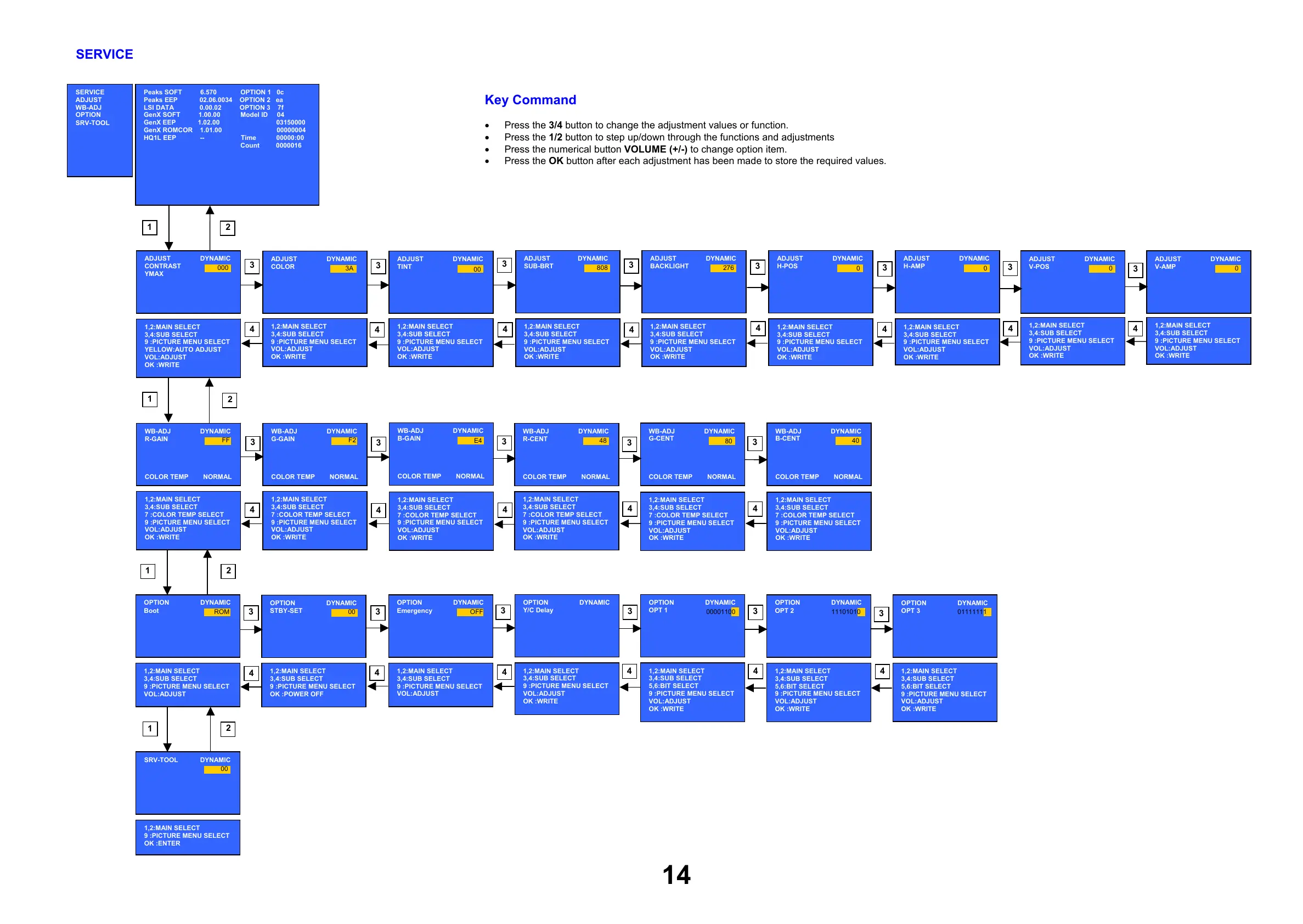
SERVICE
ADJUST
WB-ADJ
OPTION
SRV-TOOL
Peaks SOFT 6.570 OPTION 1 0c
Peaks EEP 02.06.0034 OPTION 2 ea
LSI DATA 0.00.02 OPTION 3 7f
GenX SOFT 1.00.00 Model ID 04
GenX EEP 1.02.00 03150000
GenX ROMCOR 1.01.00 00000004
HQ1L EEP -- Time 00000:00
Count 0000016
ADJUST DYNAMIC
CONTRAST
1,2:MAIN SELECT
3,4:SUB SELECT
9 :PICTURE MENU SELECT
VOL:ADJUST
OK :WRITE
OPTION DYNAMIC
OPT 1
1,2:MAIN SELECT
3,4:SUB SELECT
5,6:BIT SELECT
9 :PICTURE MENU SELECT
VOL:ADJUST
OK :WRITE
00001100
OPTION DYNAMIC
OPT 2
1,2:MAIN SELECT
3,4:SUB SELECT
5,6:BIT SELECT
9 :PICTURE MENU SELECT
VOL:ADJUST
OK :WRITE
11101010
OPTION DYNAMIC
OPT 3
1,2:MAIN SELECT
3,4:SUB SELECT
5,6:BIT SELECT
9 :PICTURE MENU SELECT
VOL:ADJUST
OK :WRITE
01111111
SRV-TOOL DYNAMIC
1,2:MAIN SELECT
9 :PICTURE MENU SELECT
OK :ENTER
00
1
2
3
4
1
1
1
2
2
2
3
3
3
3
3
3
3
3
3
3
3
3
3
3
3
3
3
3
4
4
4
4
4
4
4
44
4
4
4
4
4
4
4
4
4
80
Key Command
• Press the 3/4 button to change the adjustment values or function.
• Press the 1/2 button to step up/down through the functions and adjustments
• Press the numerical button VOLUME (+/-) to change option item.
• Press the OK button after each adjustment has been made to store the required values.










 To Next Page