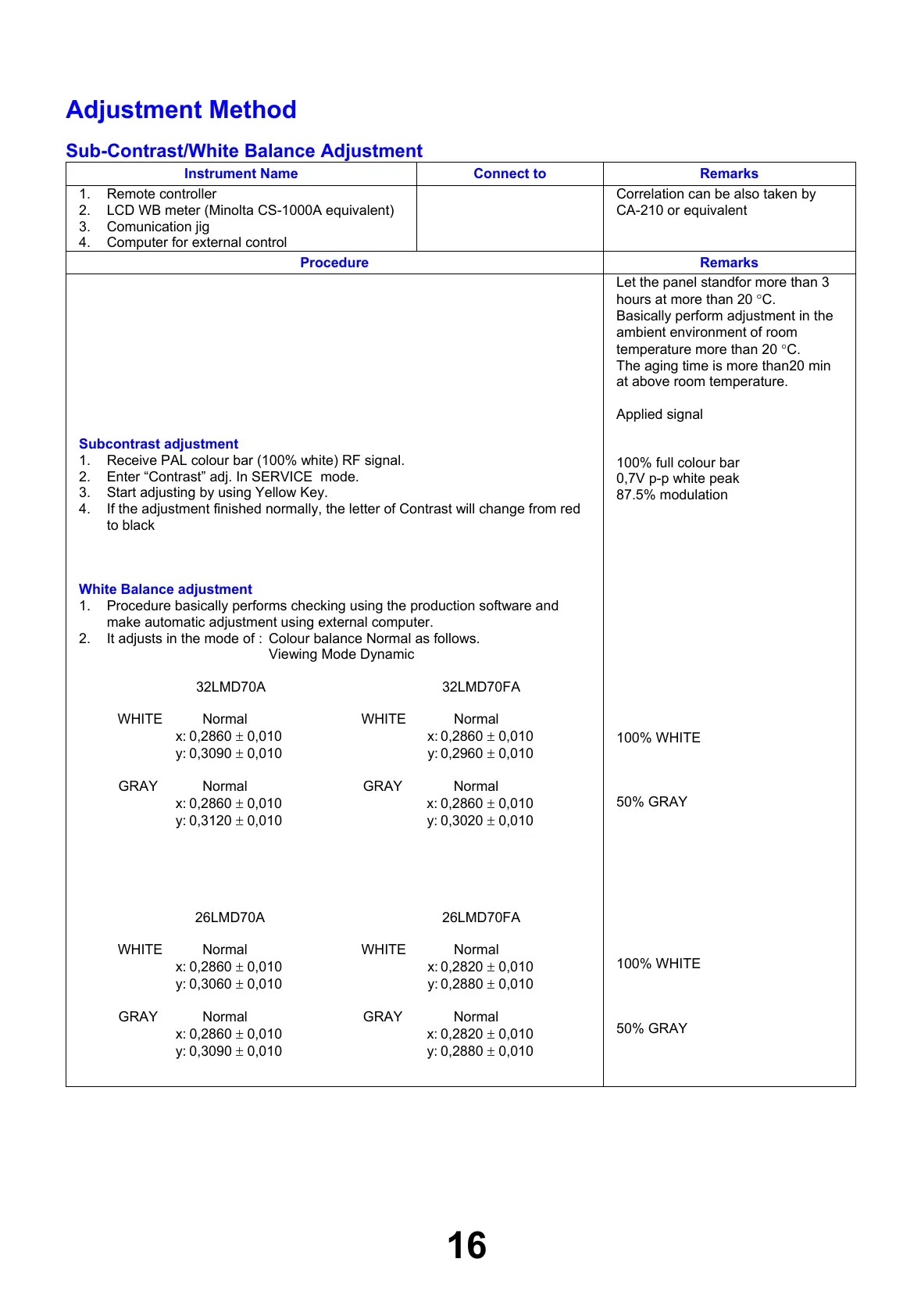
Adjustment Method
Sub-Contrast/White Balance Adjustment
Instrument Name Connect to Remarks
1. Remote controller
2. LCD WB meter (Minolta CS-1000A equivalent)
3. Comunication jig
4. Computer for external control
Correlation can be also taken by
CA-210 or equivalent
Procedure Remarks
Subcontrast adjustment
1. Receive PAL colour bar (100% white) RF signal.
2. Enter “Contrast” adj. In SERVICE mode.
3. Start adjusting by using Yellow Key.
4. If the adjustment finished normally, the letter of Contrast will change from red
to black
White Balance adjustment
1. Procedure basically performs checking using the production software and
make automatic adjustment using external computer.
2. It adjusts in the mode of : Colour balance Normal as follows.
Viewing Mode Dynamic
32LMD70A 32LMD70FA
WHITE Normal WHITE Normal
x: 0,2860 ± 0,010 x: 0,2860 ± 0,010
y: 0,3090 ± 0,010 y: 0,2960 ± 0,010
GRAY Normal GRAY Normal
x: 0,2860 ± 0,010 x: 0,2860 ± 0,010
y: 0,3120 ± 0,010 y: 0,3020 ± 0,010
26LMD70A 26LMD70FA
WHITE Normal WHITE Normal
x: 0,2860 ± 0,010 x: 0,2820 ± 0,010
y: 0,3060 ± 0,010 y: 0,2880 ± 0,010
GRAY Normal GRAY Normal
x: 0,2860 ± 0,010 x: 0,2820 ± 0,010
y: 0,3090 ± 0,010 y: 0,2880 ± 0,010
Let the panel standfor more than 3
hours at more than 20 °C.
Basically perform adjustment in the
ambient environment of room
temperature more than 20 °C.
The aging time is more than20 min
at above room temperature.
Applied signal
100% full colour bar
0,7V p-p white peak
87.5% modulation
100% WHITE
50% GRAY
100% WHITE
50% GRAY
16





 To Next Page